


1.新建Win32程序2.添加cefsimple中的文件3.取消预编译头文件4.添加包含文件和库文件
4.1.头文件夹4.2.库文件夹 5.添加代码
5.1.修改浏览器窗口位置5.2.目标位置加入代码
6.加入manifest文件7.作者答疑
Win32程序是所有在windows系统上采用C++进行程序开发的系统子程序,是非常原生态的一种开发方式,大型软件一般会采用这种可以高度定制的方式来开发。在开发Win32程序时,面临需要嵌入浏览器的问题,可以采用嵌入libcef的方法来嵌入浏览器。本文测试环境采用VS2017+chromium-79.0.3945.88_windows64测试。
在VS2017中新建Win32窗口项目,如下图所示:
找到项目中对应文件,拷贝至Win32所在项目,如下图所示:
将对应文件添加至解决方案,如下图所示:
将包含文件和库路径添加至当前项目属性,头文件是项目文件夹下的include文件夹。
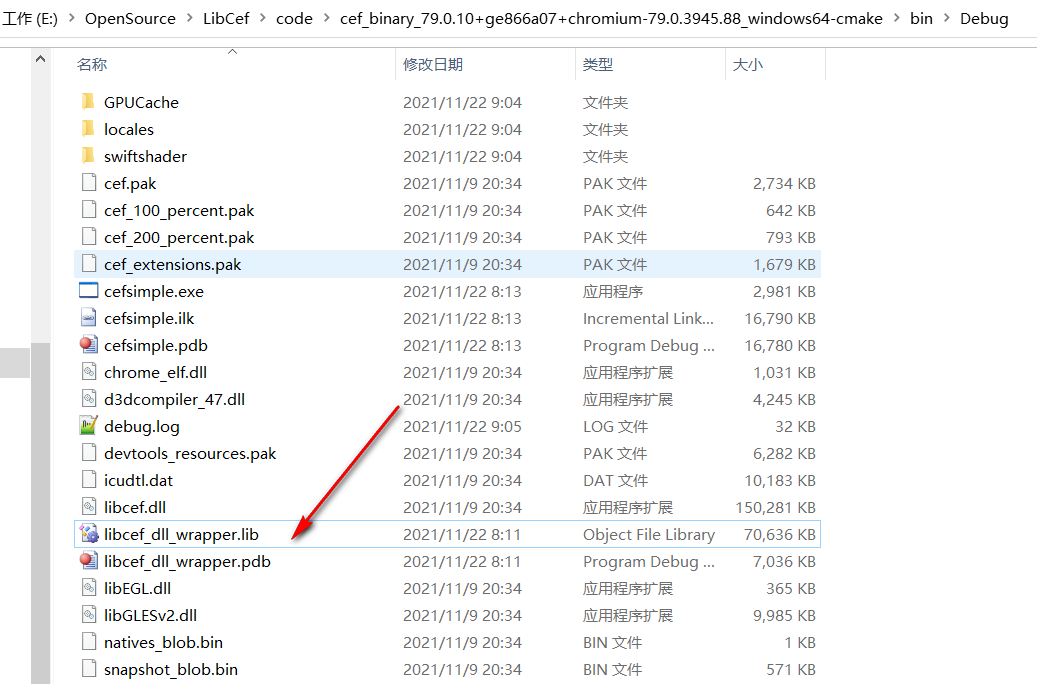
4.1.头文件夹 4.2.库文件夹 本文将编译好的libcef_dll_wrapper.lib和debug对应其他资源文件整理在一个目录,如下所示:
 {
CEF_REQUIRE_UI_THREAD();
CefRefPtr command_line =
CefCommandLine::GetGlobalCommandLine();
#if defined(OS_WIN) || defined(OS_LINUX)
// Create the browser using the Views framework if "--use-views" is specified
// via the command-line. Otherwise, create the browser using the native
// platform framework. The Views framework is currently only supported on
// Windows and Linux.
const bool use_views = command_line->HasSwitch("use-views");
#else
const bool use_views = false;
#endif
// SimpleHandler implements browser-level callbacks.
CefRefPtr handler(new SimpleHandler(use_views));
// Specify CEF browser settings here.
CefBrowserSettings browser_settings;
std::string url;
// Check if a "--url=" value was provided via the command-line. If so, use
// that instead of the default URL.
url = command_line->GetSwitchValue("url");
if (url.empty())
url = "http://www.baidu.com";
if (use_views) {
// Create the BrowserView.
CefRefPtr browser_view = CefBrowserView::CreateBrowserView(
handler, url, browser_settings, NULL, NULL, NULL);
// Create the Window. It will show itself after creation.
CefWindow::CreateTopLevelWindow(new SimpleWindowDelegate(browser_view));
} else {
// Information used when creating the native window.
CefWindowInfo window_info;
#if defined(OS_WIN)
// On Windows we need to specify certain flags that will be passed to
// CreateWindowEx().
window_info.SetAsPopup(NULL, "test simple cef");
#endif
// Create the first browser window.
CefBrowserHost::CreateBrowser(window_info, handler, url, browser_settings,
NULL, NULL);
}
}
5.2.目标位置加入代码
在Win32中InitInstance函数内加入代码:
CefRefPtrg_handler; BOOL InitInstance(HINSTANCE hInstance, int nCmdShow) { //初始化 //启用高分辨率,启动进程 CefEnableHighDPISupport(); void *sandbox_info = NULL; CefMainArgs main_args(hInstance); int exit_code = CefExecuteProcess(main_args, NULL, sandbox_info); if (exit_code >= 0) { return exit_code; } //关闭沙箱,浏览器初始化 CefSettings settings; settings.no_sandbox = true; settings.multi_threaded_message_loop = true; CefRefPtr app(new SimpleApp); CefInitialize(main_args, settings, app.get(), sandbox_info); hInst = hInstance; // 将实例句柄存储在全局变量中 HWND hWnd = CreateWindowW(szWindowClass, szTitle, WS_OVERLAPPEDWINDOW, CW_USEDEFAULT, 0, CW_USEDEFAULT, 0, nullptr, nullptr, hInstance, nullptr); if (!hWnd) { return FALSE; } ShowWindow(hWnd, nCmdShow); UpdateWindow(hWnd); CefRefPtr _handler(new SimpleHandler(false)); g_handler = _handler; CefWindowInfo window_info; RECT rect; GetWindowRect(hWnd, &rect); int w = rect.right - rect.left; int h = rect.bottom - rect.top; w = std::abs(w); h = std::abs(h); rect.left = 0; rect.right = w; rect.top = 0; rect.bottom = h; window_info.SetAsChild(hWnd, rect); //window_info.SetAsPopup(NULL, "hello"); CefBrowserSettings browser_settings; CefBrowserHost::CreateBrowser(window_info, g_handler.get(), "http://www.baidu.com", browser_settings, NULL, NULL); return TRUE; }
在Win32中退出函数内加入代码:
CefShutdown();6.加入manifest文件
以上做完之后,在测试的时候发现浏览器显示空白,需要加入manifest文件,内容如下:
在项目属性,清单工具,输入输出中,指定刚刚新建的cef.manifest文件。重新生成,即可显示目标网页。
如有疑问,请留言。



