


页脚置底(Sticky footer)就是让网页的footer部分始终在浏览器窗口的底部。
当网页内容足够长以至超出浏览器可视高度时,页脚会随着内容被推到网页底部;但如果网页内容不够长,置底的页脚就会保持在浏览器窗口底部。
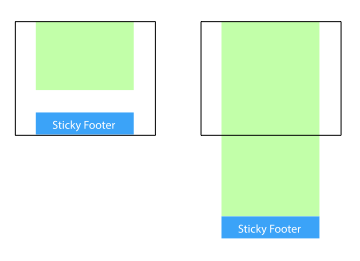
方法一:将内容部分的margin-bottom设为负数
footer
html, body {
  margin: 0;
  padding: 0;
  height: 100%;
}
.wrapper {
  min-height: 100%;
  margin-bottom: -50px;
}
.footer, .push {
  height: 50px;
}
1、这个方法需要容器里有额外的占位元素(div.push)。
2、div.wrapper的margin-bottom需要和div.footer的-height值一样,注意是负height。
方法二:将页脚的margin-top设为负数
给内容外增加父元素,并让内容部分的padding-bottom与页脚的height相等。
footer
html, body {
  margin: 0;
  padding: 0;
  height: 100%;
}
.content {
  min-height: 100%;
}
.content-inside {
  padding: 20px;
  padding-bottom: 50px;
}
.footer {
  height: 50px;
  margin-top: -50px;
}
方法三:使用calc()设置内容高度
footer
.content {
  min-height: calc(100vh - 70px);
}
.footer {
  height: 50px;
}
这里假设div.content和div.footer之间有20px的间距,所以70px=50px+20px
方法四:使用flexbox弹性盒布局
以上三种方法的footer高度都是固定的,如果footer的内容太多则可能会破坏布局。
footer
html {
  height: 100%;
}
body {
  min-height: 100%;
  display: flex;
  flex-direction: column;
}
.content {
  flex: 1;
}
方法五:使用Grid网格布局
footer
html {
  height: 100%;
}
body {
  min-height: 100%;
  display: grid;
  grid-template-rows: 1fr auto;
}
.footer {
  grid-row-start: 2;
  grid-row-end: 3;
}
以上就是本文的全部内容,希望对大家的学习有所帮助,也希望大家多多支持考高分网。



