


主要用到知识点:
•css3 3d转换 •原生js鼠标拖动事件
•display:grid 布局
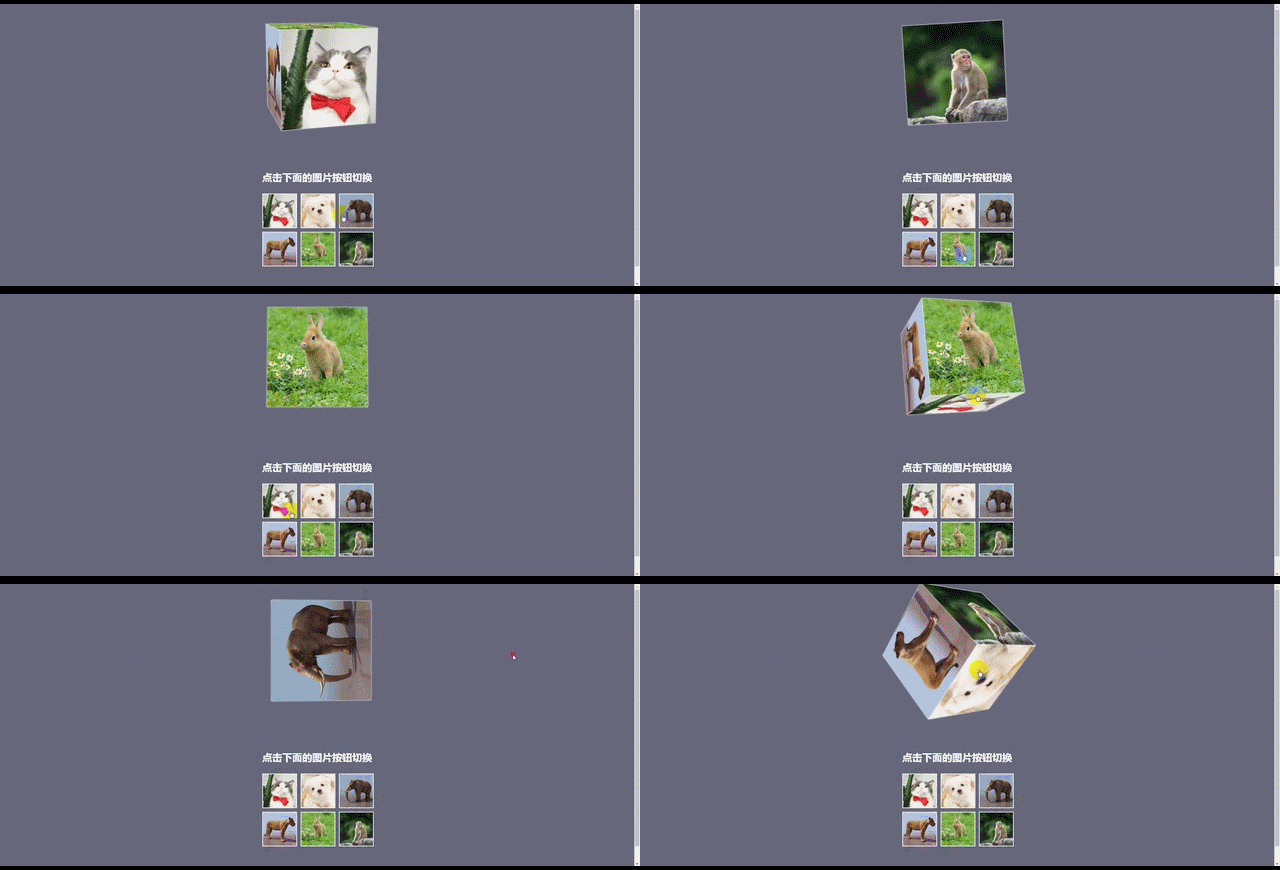
实现的功能
•3d魔方 可点击,可拖动
•直接看效果
html:


点击下面的图片按钮切换
css:
   * {
 margin: 0;
 padding: 0;
    }
    html,
    body {
 width: 100%;
 height: 100%;
 background: #66677c;
 text-align: center;
    }
    .container {
 width: 300px;
 height: 300px;
 margin: 50px auto 150px;
 perspective: 1200px;
    }
    .container .box {
 width: 300px;
 height: 300px;
 position: relative;
 transform-style: preserve-3d;
 transition: transform 0.5s;
    }
    .container .box .pic {
 position: absolute;
 left: 0;
 top: 0;
 width: 300px;
 height: 300px;
 box-shadow: 0px 0px 5px #fff;
    }
    .container .box .pic img {
 width: 100%;
 height: 100%;
 cursor: pointer;
    }
    .container .box .pic:nth-child(1) {
 transform: translateZ(150px);
    }
    .container .box .pic:nth-child(2) {
 transform: rotateY(-180deg) translateZ(150px);
    }
    .container .box .pic:nth-child(3) {
 transform: rotateY(90deg) translateZ(150px);
    }
    .container .box .pic:nth-child(4) {
 transform: rotateY(-90deg) translateZ(150px);
    }
    .container .box .pic:nth-child(5) {
 transform: rotateX(90deg) translateZ(150px);
    }
    .container .box .pic:nth-child(6) {
 transform: rotateX(-90deg) translateZ(150px);
    }
    h1 {
 color: #fff;
 font-size: 30px;
 margin-bottom: 30px;
    }
    .btn {
 display: grid;
 justify-content: center;
 grid-template-columns: 100px 100px 100px;
 grid-template-rows: 100px 100px;
 grid-gap: 15px;
    }
    .btn input {
 width: 100px;
 height: 100px;
 outline: none;
 border: 2px solid #fff;
    }
    .btn input:focus {
 border: 2px solid #e70;
    }
    .defaul {
 transform: translateZ(-150px) rotateX(-10deg) rotateY(15deg);
    }
    .image1 {
 transform: translateZ(-150px) rotateX(0deg) rotateY(0deg);
    }
    .image2 {
 transform: translateZ(-150px) rotateY(-180deg);
    }
    .image3 {
 transform: translateZ(-150px) rotateY(-90deg);
    }
    .image4 {
 transform: translateZ(-150px) rotateY(90deg);
    }
    .image5 {
 transform: translateZ(-150px) rotateX(-90deg);
    }
    .image6 {
 transform: translateZ(-150px) rotateX(90deg);
    }
js:
 (function(){
 var btn = document.getElementsByClassName('btn')[0];
 var box = document.getElementsByClassName('box')[0];
 btn.addEventListener('click',function(e){
     var className = e.target.className;
     if(className !== 'btn'){
  box.style = '';
  box.classList.replace(box.classList[1],'image'+className);
     }
 })
 //鼠标拖动效果
 var xN = 10, yN = 15;
 document.addEventListener('mousedown',function(e){
     e.preventDefault();
     e.stopPropagation();
     var x = e.clientX;
     var y = e.clientY;
     document.addEventListener('mousemove',move);
     document.addEventListener('mouseup', up);
     function move(e){
  e.preventDefault();
  e.stopPropagation();
  var x1 = e.clientX;
  var y1 = e.clientY;
  xN += (x1 - x)*0.04;
  yN += (y1 - y)*0.04;
  box.style.transform = 'translateZ(-150px) rotateY(' + xN + 'deg) rotateX(' + -yN + 'deg)';
     }
     function up(){
  document.removeEventListener('mousemove', move);
     }
 })
    })()
总结
以上所述是小编给大家介绍的基于css3实现可拖动的魔方3d效果 ,希望对大家有所帮助,如果大家有任何疑问请给我留言,小编会及时回复大家的。在此也非常感谢大家对考高分网网站的支持!如果你觉得本文对你有帮助,欢迎转载,烦请注明出处,谢谢!



