


官网:https://github.com/alibaba/Sentinel
官网中文:https://github.com/alibaba/Sentinel/wiki/%E4%BB%8B%E7%BB%8D
下载地址:https://github.com/alibaba/Sentinel/releases
安装Sentinel控制台
前提:java8环境OK,8080端口不能被占用
命令:java -jar sentinel-dashboard-1.7.0.jar
访问sentinel管理界 http://localhost:8080,登录账号密码均为sentinel
二、初始化演示工程(1)新建工程进行配置
pom依赖
            com.alibaba.cloud
            spring-cloud-starter-alibaba-nacos-discovery


            com.alibaba.csp
            sentinel-datasource-nacos


            com.alibaba.cloud
            spring-cloud-starter-alibaba-sentinel


            org.springframework.cloud
            spring-cloud-starter-openfeign


            org.springframework.boot
            spring-boot-starter-web


            org.springframework.boot
            spring-boot-starter-actuator


            org.springframework.boot
            spring-boot-devtools
            runtime
            true


            cn.hutool
            hutool-all
            4.6.3


            org.projectlombok
            lombok
            true


            org.springframework.boot
            spring-boot-starter-test
            test
yml配置
server:
  port: 8401

spring:
  application:
    name: cloudalibaba-sentinel-service
  cloud:
    nacos:
      discovery:
        server-addr: localhost:8848
    sentinel:
      transport:
        dashboard: localhost:8080
        port: 8719  #默认8719,假如被占用了会自动从8719开始依次+1扫描。直至找到未被占用的端口

management:
  endpoints:
    web:
      exposure:
        include: '*'
主启动
@EnableDiscoveryClient
@SpringBootApplication
public class MainApp8401
{
    public static void main(String[] args) {
        SpringApplication.run(MainApp8401.class, args);
    }
}
业务类FlowLimitController
@RestController
public class FlowLimitController
{
    @GetMapping("/testA")
    public String testA() {
        return "------testA";
    }

    @GetMapping("/testB")
    public String testB() {

        return "------testB";
    }

}
(2)启动8401微服务后查看sentienl控制台
Sentinel采用的懒加载说明,执行一次访问即可
http://localhost:8401/testA
http://localhost:8401/testB
效果
(1)直接(默认)
系统默认:直接->快速失败
配置及说明
测试
快速点击访问http://localhost:8401/testA
(2)关联
当与A关联的资源B达到阈值后,就限流自己
配置A
postman模拟并发密集访问testB
大批量线程高并发访问B,导致A失效了
(3)链路
快速请求A,请求阻塞,一秒一次,请求成功
(4)预热
默认coldFactor为3,即请求QPS从threshold/3开始,经预热时长逐渐升至设定的QPS阈值。
官网说明:https://github.com/alibaba/Sentinel/wiki/%E9%99%90%E6%B5%81—%E5%86%B7%E5%90%AF%E5%8A%A8
源码:com.alibaba.csp.sentinel.slots.block.flow.controller.WarmUpController
配置:
(5)排队等待
官网:
源码:com.alibaba.csp.sentinel.slots.block.flow.controller.RateLimiterController
四、降级规则
(1)RT配置
代码
  @GetMapping("/testD")
   public String testD()
   {
    try { TimeUnit.SECONDS.sleep(1); } catch (InterruptedException e) { e.printStackTrace(); }
    log.info("testD 测试RT");

  return "------testD";
   }
配置
jmeter压测,结论
(2)异常比例
代码
@GetMapping("/testD")
    public String testD()
    {

        log.info("testD 测试RT");
        int age = 10/0;
        return "------testD";
    }
配置
jmeter
结论
(3)异常数
代码
@GetMapping("/testE")
public String testE()
{
    log.info("testE 测试异常数");
    int age = 10/0;
    return "------testE 测试异常数";
}
配置
官网:https://github.com/alibaba/Sentinel/wiki/热点参数限流
核心注解:@SentinelResource
代码:com.alibaba.csp.sentinel.slots.block.BlockException
@GetMapping("/testHotKey")
@SentinelResource(value = "testHotKey",blockHandler = "deal_testHotKey")
public String testHotKey(@RequestParam(value = "p1",required = false) String p1,
                         @RequestParam(value = "p2",required = false) String p2) {
    //int age = 10/0;
    return "------testHotKey";
}

//兜底方法
public String deal_testHotKey (String p1, String p2, BlockException exception){
    return "------deal_testHotKey,o(╥﹏╥)o";
}
方法testHostKey里面第一个参数只要QPS超过每秒1次,马上降级处理
具体配置:
系统规则:
(1)按资源名称限流+后续处理
@RestController
public class RateLimitController
{
@GetMapping("/byResource")
@SentinelResource(value = "byResource",blockHandler = "handleException")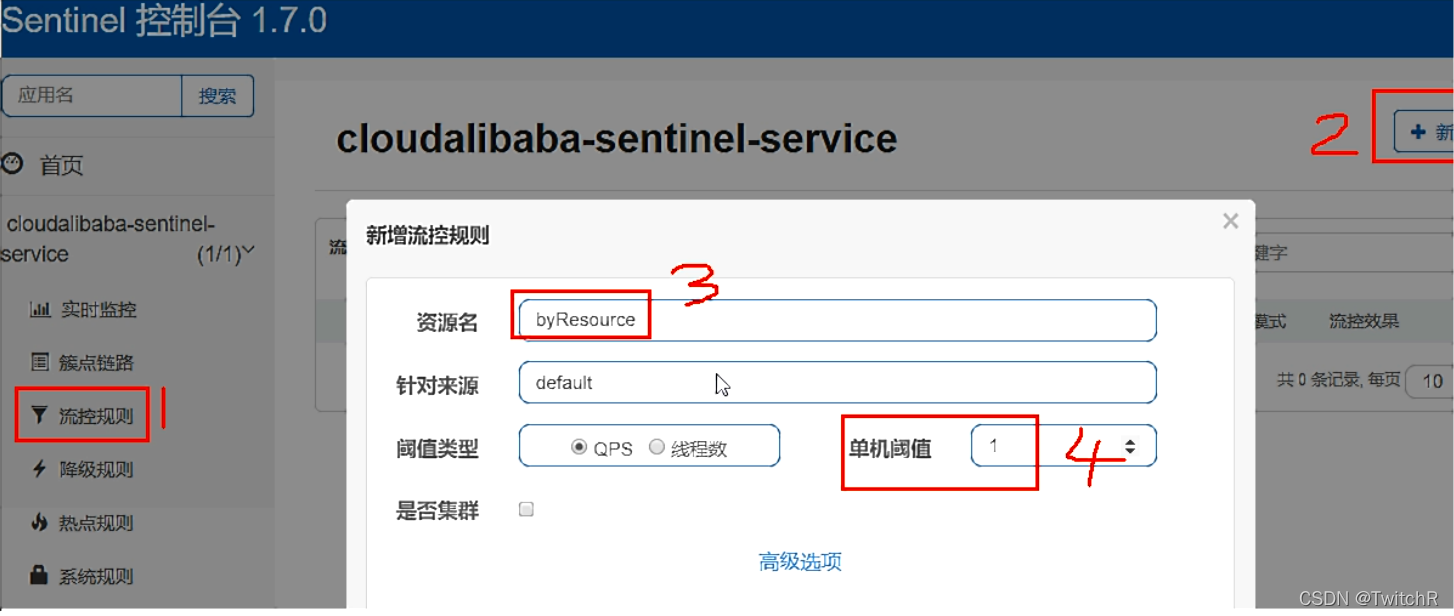
public CommonResult byResource()
{
return new CommonResult(200,"按资源名称限流测试OK",new Payment(2020L,"serial001"));
}
public CommonResult handleException(BlockException exception)
{
return new CommonResult(444,exception.getClass().getCanonicalName()+"t 服务不可用");
}
(2)按照Url地址限流+后续处理
@GetMapping("/rateLimit/byUrl")
@SentinelResource(value = "byUrl")
public CommonResult byUrl()
{
    return new CommonResult(200,"按url限流测试OK",new Payment(2020L,"serial002"));
}
(3)客户自定义限流处理逻辑
创建customerBlockHandler类用于自定义限流处理逻辑
public class CustomerBlockHandler {

    public static CommonResult handleException(BlockException exception) {
        return new CommonResult(2020, "自定义限流处理信息....CustomerBlockHandler");

    }
}
业务RateLimitController
@GetMapping("/rateLimit/customerBlockHandler")
@SentinelResource(value = "customerBlockHandler",
        blockHandlerClass = CustomerBlockHandler.class,
        blockHandler = "handlerException2")
public CommonResult customerBlockHandler()
{
    return new CommonResult(200,"按客戶自定义",new Payment(2020L,"serial003"));
}
(4)原理说明
Sentinel主要有三个核心API:
SphU定义资源
Tracer定义统计
ContextUtil定义了上下文
sentinel整合ribbon+openFeign+fallback
(1)Ribbon系列
@RestController
@Slf4j
public class CircleBreakerController {

    public static final String SERVICE_URL = "http://nacos-payment-provider";

    @Resource
    private RestTemplate restTemplate;


    @RequestMapping("/consumer/fallback/{id}")
    //@SentinelResource(value = "fallback") //没有配置
    //@SentinelResource(value = "fallback",fallback = "handlerFallback") //fallback只负责业务异常
    //@SentinelResource(value = "fallback",blockHandler = "blockHandler") //blockHandler只负责sentinel控制台配置违规
    @SentinelResource(value = "fallback",fallback = "handlerFallback",blockHandler = "blockHandler",
            exceptionsToIgnore = {IllegalArgumentException.class})
    public CommonResult fallback(@PathVariable Long id) {
        CommonResult result = restTemplate.getForObject(SERVICE_URL + "/paymentSQL/"+id, CommonResult.class,id);

        if (id == 4) {
            throw new IllegalArgumentException ("IllegalArgumentException,非法参数异常....");
        }else if (result.getData() == null) {
            throw new NullPointerException ("NullPointerException,该ID没有对应记录,空指针异常");
        }

        return result;
    }

    //fallback
    public CommonResult handlerFallback(@PathVariable  Long id,Throwable e) {
        Payment payment = new Payment(id,"null");
        return new CommonResult<>(444,"兜底异常handlerFallback,exception内容  "+e.getMessage(),payment);
    }

    //blockHandler
    public CommonResult blockHandler(@PathVariable  Long id,BlockException blockException) {
        Payment payment = new Payment(id,"null");
        return new CommonResult<>(445,"blockHandler-sentinel限流,无此流水: blockException  "+blockException.getMessage(),payment);
    }


}
fallback管运行异常,blockHandler管配置违规
fallback和blockHandler都配置,正常报错进入fallback,异常次数过多满足block配置则进入block
(2)Feign系列
yml配置
server:
  port: 84


spring:
  application:
    name: nacos-order-consumer
  cloud:
    nacos:
      discovery:
        server-addr: 192.168.40.128:8848
    sentinel:
      transport:
        dashboard: localhost:8080
        port: 8719

service-url:
  nacos-user-service: http://nacos-payment-provider


#对Feign的支持
feign:
  sentinel:
    enabled: true
业务类
带@FeignClient注解的业务接口
@FeignClient(value = "nacos-payment-provider",fallback = PaymentFallbackService.class)
public interface PaymentService
{
    @GetMapping(value = "/paymentSQL/{id}")
    public CommonResult paymentSQL(@PathVariable("id") Long id);
}
PaymentFallbackService实现类
@Component
public class PaymentFallbackService implements PaymentService
{
    @Override
    public CommonResult paymentSQL(Long id)
    {
        return new CommonResult<>(44444,"服务降级返回,---PaymentFallbackService",new Payment(id,"errorSerial"));
    }
}
Controller
// OpenFeign
@Resource
private PaymentService paymentService;

@GetMapping(value = "/consumer/paymentSQL/{id}")
public CommonResult paymentSQL(@PathVariable("id") Long id) {
    return paymentService.paymentSQL(id);
}
主启动,添加@EnableFeignClients启动Feign的功能
@EnableDiscoveryClient
@SpringBootApplication
@EnableFeignClients
public class OrderNacosMain84
{
    public static void main(String[] args) {
        SpringApplication.run(OrderNacosMain84.class, args);
    }
}
(3)熔断框架比较
POM依赖
    com.alibaba.csp
    sentinel-datasource-nacos
YML配置
server:
  port: 8401

spring:
  application:
    name: cloudalibaba-sentinel-service
  cloud:
    nacos:
      discovery:
        server-addr: localhost:8848 #Nacos服务注册中心地址
    sentinel:
      transport:
        dashboard: localhost:8080 #配置Sentinel dashboard地址
        port: 8719
      datasource:  #配置nocos数据源,将sentinel配置持久化到nacos中
        ds1:
          nacos:
            server-addr: localhost:8848
            dataId: cloudalibaba-sentinel-service
            groupId: DEFAULT_GROUP
            data-type: json
            rule-type: flow

management:
  endpoints:
    web:
      exposure:
        include: '*'

feign:
  sentinel:
    enabled: true # 激活Sentinel对Feign的支持
添加Nacos业务规则配置



