



PSI(Program Structure Interface) 文件是表示一个文件的内容作为在一个特定的编程语言元素的层次结构的结构的根。
PsiFile 类是所有PSI文件共同的基类, 在特定语言中的文件通常使用它的子类表示。比如,PsiJavaFile 类表示一个java文件, XmlFile 类表示xml文件。
和 VirtualFile 以及 document的应用作用域不同(即使打开多个projects,仍然只有一个对应的实例),PSI的作用域是项目级(多个projects中同时打开同一个文件,会有多个实例)。
如何获取PSI文件?- 从action获取: e.getData(LangDataKeys.PSI_FILE).
- 从虚拟文件获取: PsiManager.getInstance(project).findFile()
- 从文档获取: PsidocumentManager.getInstance(project).getPsiFile()
- 从文件内的一个元素获取: psiElement.getContainingFile()
- 在project中的任意位置通过指定的名字寻找文件,使用 FilenameIndex.getFilesByName(project, name, scope)
- e.getData(PlatformDataKeys.VIRTUAL_FILE),如果是多选,使用e.getData(PlatformDataKeys.VIRTUAL_FILE_ARRAY)
- LocalFileSystem.getInstance().findFileByIoFile()
- psiFile.getVirtualFile(),如果PSI FILE仅存在内存中,则返回空
- FiledocumentManager.getInstance().getFile()
PsiTreeChangeListener
BulkFileListener 批量文件监听
1.添加
beforeChildrenChange
beforeChildAddition
beforeChildAddition
beforeChildAddition
childAdded
childAdded
childAdded
childrenChanged
2.删除
beforeChildrenChange
beforeChildRemoval
beforeChildRemoval
beforeChildRemoval
childRemoved
childRemoved
childRemoved
childrenChanged
3.修改名称
propertyChanged
childrenChanged
System.out.println("------"+e.getPropertyName());
// getPropertyName == fileName
System.out.println("e.getOldValue()"+e.getOldValue());
System.out.println("e.getNewValue()"+e.getNewValue());
原文连接 https://juejin.cn/post/6882591400916058125
监听文件打开FileEditorManagerListener
右键
ation分组
获取选中文本
public class PopupAction extends AnAction {

    @Override
    public void actionPerformed(AnActionEvent e) {
        //获取当前编辑器对象
        Editor editor = e.getRequiredData(CommonDataKeys.EDITOR);
        //获取选择的数据模型
        SelectionModel selectionModel = editor.getSelectionModel();
        //获取当前选择的文本
        String selectedText = selectionModel.getSelectedText();
        System.out.println(selectedText);
    }
}
用户选择文档生成目录
  createBtn.addActionListener(new ActionListener() {
      @Override
      public void actionPerformed(ActionEvent e) {
          VirtualFile virtualFile = FileChooser.chooseFile(FileChooserDescriptorFactory.createSingleFolderDescriptor(), project, project.getbaseDir());
          if(virtualFile!=null){
              String path = virtualFile.getPath();
              System.out.println(path);
          }
      }
  });
通知管理
NotificationGroup notificationGroup = new NotificationGroup("testid", NotificationDisplayType.BALLOON, false);


Notification notification = notificationGroup.createNotification("测试通知", MessageType.INFO);
Notifications.Bus.notify(notification);
行标记
生成文档public class HaloLineMarker implements LineMarkerProvider { @Nullable @Override public LineMarkerInfo getLineMarkerInfo(@NotNull PsiElement psiElement) { LineMarkerInfo lineMarkerInfo= null; try { lineMarkerInfo = null; String anno="org.springframework.boot.autoconfigure.SpringBootApplication"; if(!judgeHaveAnnotation(psiElement,anno)){ return lineMarkerInfo; } PsiClassImpl field = ((PsiClassImpl) psiElement); PsiAnnotation psiAnnotation = field.getAnnotation(anno); lineMarkerInfo = new LineMarkerInfo<>(psiAnnotation, psiAnnotation.getTextRange(), IconLoader.findIcon("/icons/right/HaloBasic.png"), new FunctionTooltip("快速导航"), new AppMgmtNavigationHandler(), GutterIconRenderer.Alignment.LEFT); } catch (Exception e) { e.printStackTrace(); } return lineMarkerInfo; } @Override public void collectSlowLineMarkers(@NotNull List list, @NotNull Collection collection) { } private boolean judgeHaveAnnotation(@NotNull PsiElement psiElement, String anno) { if (psiElement instanceof PsiClass) { PsiClassImpl field = ((PsiClassImpl) psiElement); PsiAnnotation psiAnnotation = field.getAnnotation(anno); if (null != psiAnnotation) { return true; } return false; } return false; } }
public interface Processor{
    public void process(SourceNoteData sourceNoteData) throws Exception;
}


编写Freemarker的抽象类
public abstract class AbstractFreeMarkerProcessor implements Processor{

      protected abstract Template getTemplate() throws IOException, Exception;

      protected abstract Object getModel(SourceNoteData sourceNoteData);

      protected abstract Writer getWriter(SourceNoteData sourceNoteData) throws FileNotFoundException, Exception;


      @Override
      public final void process(SourceNoteData sourceNoteData) throws Exception{
          Template template = getTemplate();
          Object model = getModel(sourceNoteData);
          Writer writer = getWriter(sourceNoteData);
          template.process(model, writer);
      }
  }


编写MDFreeMarkProcessor继承AbstractFreeMarkerProcessor。实现抽象方法
public class MDFreeMarkProcessor extends AbstractFreeMarkerProcessor{
      @Override
      protected Template getTemplate() throws Exception{
          //加载模板字符串
          String templateString = UrlUtil.loadText(MDFreeMarkProcessor.class.getResource("/template/md.ftl"));
          //创建模板配置
          Configuration configuration = new Configuration(Configuration.VERSION_2_3_28);
          //创建字符串模板的导入器
          StringTemplateLoader stringTemplateLoader=new StringTemplateLoader();
          //导入字符串模板
          stringTemplateLoader.putTemplate("MDTemplate",templateString);
          configuration.setTemplateLoader(stringTemplateLoader);
          //获取模板
          return configuration.getTemplate("MDTemplate");
      }

      @Override
      protected Object getModel(SourceNoteData sourceNoteData){
          HashMap model = new HashMap();
          model.put("topic",sourceNoteData.getNoteTopic());
          model.put("noteList",sourceNoteData.getNoteDataList());
          return model;
      }

      @Override
      protected Writer getWriter(SourceNoteData sourceNoteData) throws Exception{
          String filePath = sourceNoteData.getFilePath();
          File file = new File(filePath);
          return new BufferedWriter(new OutputStreamWriter(new FileOutputStream(file),"utf-8"));
      }

  }


添加处理操作
createBtn.addActionListener(new ActionListener() {
      @Override
      public void actionPerformed(ActionEvent e){
          VirtualFile virtualFile = FileChooser.chooseFile(FileChooserDescriptorFactory.createSingleFolderDescriptor(), project, project.getbaseDir());
          if (virtualFile != null) {
              String path = virtualFile.getPath();
              String topic = topicEtf.getText();
              String filePath = path + "/" + topic + ".md";
              Processor processor = new MDFreeMarkProcessor();
              try {
                  processor.process(new DefaultSourceNoteData(topic, filePath, DataCenter.NOTE_LIST));
              } catch (Exception ex) {
                  ex.printStackTrace();
              }
          }
      }
  });
非模态框式通知
NotificationGroup notificationGroup = new NotificationGroup("notificationGroup", NotificationDisplayType.BALLOON, true);
Notification notification = notificationGroup.createNotification("notification",NotificationType.ERROR);
Notifications.Bus.notify(notification);
高版本不兼容NotificationGroup 直接采用 new Notification
Notification notification = new Notification("PNGroup", "Private Notes Message", content, type);
其中,NotificationDisplayType可以是以下几种:
- NONE:无弹框,不展示
- BALLOON:自动消失
- STICKY_BALLOON:用户点击关闭按钮消失
- TOOL_WINDOW:实例效果同STICKY_BALLOON
CopyPasteManager.getInstance().setContents(new StringSelection(xml));
CopyPasteManager.getInstance().setContents(new SimpleTransferable(table.toString(), DataFlavor.allHtmlFlavor));
界面 下拉框
private JComboBox实战kind; kind.addItem(seleType); kind.addItemListener(new ItemListener() { @Override public void itemStateChanged(ItemEvent e) { SelectedTypeModel selectedTypeModel = (SelectedTypeModel) e.getItem(); switch (selectedTypeModel.getValue()) { case HaloConstant.COMBOX_CONTROLLER: NewRightContext.setClassType(HaloConstant.COMBOX_CONTROLLER); break; default: NewRightContext.setClassType(null); }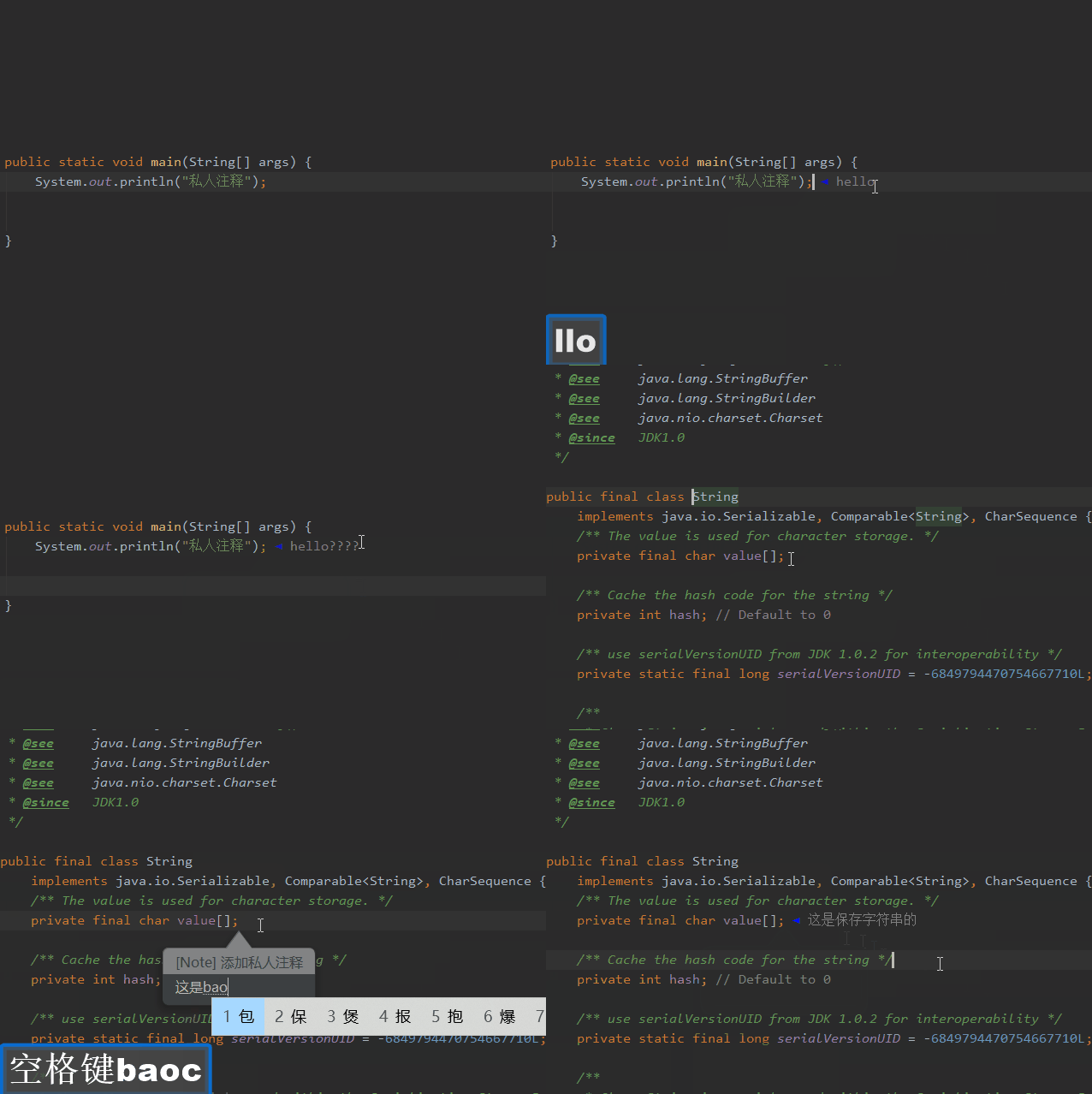 } });
开发了一个idea 小插件,可以在任意地方加注释。
场景:
- 项目中添加注释,不被git提交,在平常工作中往往需要添加一些自己看的懂的注释,不过这些注释有的时候可能不能通过审查
- 阅读源码的时,源码文件为只读文件
已开源: https://gitee.com/Lovxy/private-notes
点一下star ✨,是对作者最大的支持



