


- 前言
- 一、UReport2是什么?
- 二、使用步骤
- 1.导入POM
- 2.添加context.properties
- 3.编写config配置类
- 4.访问{ip}{端口}/ureport/designer
- 5.配置数据源
- 6.数据集配置
- 7.数据映射
- 8.过滤条件
- 9.行列操作
- 10.行类型
- 1.标题行
- 2.重复表头
- 3.重复表尾
- 4.总结行
- 总结
前言
最近在公司里面要做对报表的修改,原项目用的是第三方报表软件,需要安装第三方软件,有水印,因此选择了基于Apache-2.0协议开源的中式报表引擎UReport2
一、UReport2是什么?
UReport2是一款高性能的架构在Spring之上纯Java报表引擎,通过迭代单元格可以实现任意复杂的中国式报表。
在UReport2中,提供了全新的基于网页的报表设计器,可以在Chrome、Firefox、Edge等各种主流浏览器运行(IE浏览器除外),打开浏览器即可完成各种复杂报表的设计制作。
当然该项目是基于springboot的,需要创建springboot工程
1.导入POM2.添加context.propertiesorg.springframework.boot spring-boot-starter-web mysql mysql-connector-java runtime org.springframework.boot spring-boot-starter-jdbc com.bstek.ureport ureport2-console 2.2.9 com.alibaba druid-spring-boot-starter 1.2.8
在resources目录下创建context.properties文件
内容为:
# 用于定义UReport2中提供的默认基于文件系统的报表存储目录
ureport.fileStoreDir=F:/ureportfiles
3.编写config配置类
@Configuration
//导入ureport-console-context.xml文件
@importResource("classpath:ureport-console-context.xml")
@Slf4j
public class ReportConfig implements BuildinDatasource {
//添加 report 的servlet
    @Bean
    public ServletRegistrationBean ureport2Servlet() {
        return new ServletRegistrationBean<>(new UReportServlet(), "/ureport
    @Override
    public String name() {
        return "ReportSource";
    }


    @Override
    public Connection getConnection() {
        try {
            return businessDataSource().getConnection();
        } catch (SQLException e) {
            log.error("Ureport 数据源 获取连接失败!");
            e.printStackTrace();
        }
        return null;
    }
}
省略的配置文件(因为用配置类配置类了,这里可以不用创建) 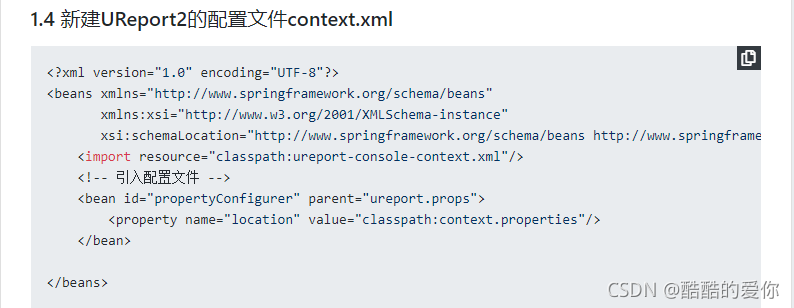 4.访问{ip}{端口}/ureport/designer
访问成功!
映射前
映射后
过滤后
行列操作和excel差不多
选择单元格,右键
不算行内容,此时显示的话行内容是2,标题行只显示1次
重复表尾,和表头差不多,只不过一个是头,一个是尾
UReport2使用起来还是比较方便的,和现有的项目集成起来也比较简单
相关代码查看我的gitee库
相关代码gitee



