


集群创建完后, 默认没有文件系统,要是实现文件的存储操作,我们还需创建一个Cephfs可以支持对外访问的文件系统。
-
创建两个存储池, 执行两条命令:
ceph osd pool create cephfs_data 128
ceph osd pool create cephfs_metadata 64
少于5个OSD可把pg_num设置为128
OSD数量在5到10,可以设置pg_num为512
OSD数量在10到50,可以设置pg_num为4096
OSD数量大于50,需要计算pg_num的值
通过下面命令可以列出当前创建的存储池:
ceph osd lspools -
创建fs, 名称为fs_test:
ceph fs new fs_test cephfs_metadata cephfs_data -
状态查看, 以下信息代表正常:
[root@CENTOS7-1 mgr-dashboard]# ceph fs ls
name: fs_test, metadata pool: cephfs_metadata, data pools: [cephfs_data ]
[root@CENTOS7-1 mgr-dashboard]# ceph mds stat fs_test-1/1/1 up {0=centos7-1=up:active}附: 如果创建错误, 需要删除, 执行:
ceph fs rm fs_test --yes-i-really-mean-it
ceph osd pool delete cephfs_data cephfs_data  --yes-i-really-really-mean-it
确保在ceph.conf中开启以下配置:
[mon] mon allow pool delete = true -
采用fuse挂载
先确定ceph-fuse命令能执行, 如果没有, 则安装:
yum -y install ceph-fuse -
创建挂载目录
mkdir -p /usr/local/cephfs_directory -
挂载cephfs
[root@node3 ~]# ceph-fuse -k /etc/ceph/ceph.client.admin.keyring -m 10.10.20.11:6789 /usr/local/cephfs_directory ceph-fuse[6687]: starting ceph client 2019-07-14 21:39:09.644181 7fa5be56e040 -1 init, newargv = 0x7fa5c940b500 newargc=9 ceph-fuse[6687]: starting fuse -
查看磁盘挂载信息
[root@CENTOS7-1 mgr-dashboard]# df -h
Filesystem Size  Used Avail Use% Mounted on
/dev/mapper/centos-root   38G  3.0G   35G   8% /
devtmpfs   1.9G     0  1.9G   0% /dev
tmpfs      1.9G     0  1.9G   0% /dev/shm
tmpfs      1.9G   20M  1.9G   2% /run
tmpfs      1.9G     0  1.9G   0% /sys/fs/cgroup
/dev/sda1  197M  167M   31M  85% /boot
tmpfs      378M     0  378M   0% /run/user/0
tmpfs      1.9G   24K  1.9G   1% /var/lib/ceph/osd/ceph-0
ceph-fuse   27G     0   27G   0% /usr/local/cephfs_directory
tmpfs      378M     0  378M   0% /run/user/1000
/usr/local/cephfs_directory目录已成功挂载。
-
安装好JDK、GIT和MAVEN。
-
下载rados java客户端源码
git clone https://github.com/ceph/rados-java.git
下载目录位置:
[root@CENTOS7-1 rados-java]# pwd /usr/local/sources/rados-java -
执行MAVEN安装, 忽略测试用例:
[root@CENTOS7-1 rados-java]# mvn install -Dmaven.test.skip=true生成jar包, rados-0.6.0-SNAPSHOT.jar
[root@CENTOS7-1 target]# ll total 104 drwxr-xr-x 3 root root 17 Jul 14 19:31 classes drwxr-xr-x 2 root root 27 Jul 14 19:31 dependencies drwxr-xr-x 3 root root 25 Jul 14 19:31 generated-sources drwxr-xr-x 2 root root 28 Jul 14 19:31 maven-archiver drwxr-xr-x 3 root root 35 Jul 14 19:31 maven-status -rw-r--r-- 1 root root 105570 Jul 14 19:31 rados-0.6.0-SNAPSHOT.jar -
创建软链接, 加入CLASSPATH
ln -s /usr/local/sources/rados-java/target/rados-0.6.0-SNAPSHOT.jar /usr/local/jdk1.8.0_181/jre/lib/ext/rados-0.6.0-SNAPSHOT.jar安装jna
yum -y install jna创建软链接
ln -s /usr/share/java/jna.jar /usr/local/jdk1.8.0_181/jre/lib/ext/jna.jar查看
[root@CENTOS7-1 target]# ll /usr/local/jdk1.8.0_181/jre/lib/ext/jna.jar
lrwxrwxrwx 1 root root 23 Jul 14 10:23 /usr/local/jdk1.8.0_181/jre/lib/ext/jna.jar -> /usr/share/java/jna.jar
[root@CENTOS7-1 target]# ll /usr/local/jdk1.8.0_181/jre/lib/ext/rados-0.6.0-SNAPSHOT.jar lrwxrwxrwx 1 root root 40 Jul 14 10:25 /usr/local/jdk1.8.0_181/jre/lib/ext/rados-0.6.0-SNAPSHOT.jar -> /usr/share/java/rados-0.6.0-SNAPSHOT.jar -
创建JAVA测试类
CephClient类,注意, 最新版0.6的异常处理包位置已发生变化。
import com.ceph.rados.Rados; import com.ceph.rados.exceptions.*; import java.io.File; public class CephClient { public static void main (String args[]){ try { Rados cluster = new Rados("admin"); System.out.println("Created cluster handle."); File f = new File("/etc/ceph/ceph.conf"); cluster.confReadFile(f); System.out.println("Read the configuration file."); cluster.connect(); System.out.println("Connected to the cluster."); } catch (RadosException e) { System.out.println(e.getMessage() + ": " + e.getReturnValue()); } } } -
运行验证
需要在linux环境下运行,且要在client节点。
编译并运行:
[root@CENTOS7-1 sources]# javac CephClient.java
[root@CENTOS7-1 sources]# java CephClient
Created cluster handle.
Read the configuration file.
Connected to the cluster.
成功与ceph建立连接。
-
工程设计
演示经常使用的文件上传与下载功能, 看java是如何在项目中使用。
-
工程结构
创建一个Spring Boot工程,创建一个是启动类和一个ceph操作封装类。
-
工程实现
CephDemoApplication启动类:
@SpringBootApplication
public class CephDemoApplication {

    public static void main(String[] args) {

 System.out.println("start....");
 String username = "admin";
 String monIp = "10.10.20.11:6789;10.10.20.12:6789;10.10.20.13:6789";
 String userKey = "AQBZBypdMchvBRAAbWVnIGyYNvxWQZ2UkuiYew==";
 String mountPath = "/";
 CephOperator cephOperate = null;
 try {
     String opt = (args == null || args.length < 1)? "" : args[0];
     cephOperate = new CephOperator(username, monIp, userKey, mountPath);
     if("upload".equals(opt)) {
  cephOperate.uploadFileByPath("/temp_upload_fs", args[1]);
     }else if("download".equals(opt)) {
  cephOperate.downloadFileByPath("/temp_download_fs", args[1]);
     }else {
  System.out.println("Unrecognized Command! Usage  opt[upload|download] filename[path]!");
     }
 }catch(Exception e) {
     e.printStackTrace();
 }finally {
     if(null != cephOperate) {
  cephOperate.umount();
     }
 }
 System.out.println("end....");

    }

}
monIp为ceph client节点连接地址与端口, 支持多个;
userKey为密钥, 对应ceph.client.admin.keyring中的key值。
启动接收两个参数, 一个是标识上传或下载, 另一个是标识文件名称。
CephOperator操作类的实现:
public class CephOperator {

    private CephMount mount;
    private String username;
    private String monIp;
    private String userKey;

    public CephOperator(String username, String monIp, String userKey, String mountPath) {
 this.username = username;
 this.monIp = monIp;
 this.userKey = userKey;
 this.mount = new CephMount(username);
 this.mount.conf_set("mon_host", monIp);
 mount.conf_set("key", userKey);
 mount.mount(mountPath);
    }

    //查看目录列表
    public void listDir(String path) throws IOException {
 String[] dirs = mount.listdir(path);
 System.out.println("contents of the dir: " + Arrays.asList(dirs));
    }

    //新建目录
    public void mkDir(String path) throws IOException {
 mount.mkdirs(path, 0755);//0表示十进制
    }

    //删除目录
    public void delDir(String path) throws IOException {
 mount.rmdir(path);
    }

    //重命名目录or文件
    public void renameDir(String oldName, String newName) throws IOException {
 mount.rename(oldName, newName);
    }

    //删除文件
    public void delFile(String path) throws IOException {
 mount.unlink(path);
    }


    public Boolean uploadFileByPath(String filePath, String fileName) {

 // 如果mount操作单元为空则直接返回
 if (this.mount == null) {
     return null;
 }
 // 文件描述信息定义
 char pathChar = File.separatorChar;
 String fileFullName = "";
 Long fileLength = 0l;
 Long uploadedLength = 0l;
 File file = null;

 // 定义文件流
 FileInputStream fis = null;

 // 获取本地文件信息
 fileFullName = filePath + pathChar + fileName;
 file = new File(fileFullName);
 if (!file.exists()) {
     return false;
 }
 fileLength = file.length();

 // 获取本地文件流
 try {
     fis = new FileInputStream(file);
 } catch (FileNotFoundException e) {
     e.printStackTrace();
 }

 // 判断文件是否已经存在
 String[] dirList = null;
 Boolean fileExist = false;
 try {
     dirList = this.mount.listdir("/");
     for (String fileInfo : dirList) {
  if (fileInfo.equals(fileName)) {
      fileExist = true;
  }
     }
 } catch (FileNotFoundException e) {
     e.printStackTrace();
 }

 if (!fileExist) {
     try {
  // 创建文件并设置为写入模式
  this.mount.open(fileName, CephMount.O_CREAT, 0);
  int fd = this.mount.open(fileName, CephMount.O_RDWR, 0);

  // 开始文件传输
  int length = 0;
  byte[] bytes = new byte[1024];
  while ((length = fis.read(bytes, 0, bytes.length)) != -1) {
      // 上传写入数据
      this.mount.write(fd, bytes, length, uploadedLength);

      // 更新上传进度
      uploadedLength += length;

      // 输出上传百分比
      float rate = (float) uploadedLength * 100 / (float) fileLength;
      String ratevalue = (int) rate + "%";
      System.out.println(ratevalue);

      // 上传完成后退出
      if (uploadedLength == fileLength) {
   break;
      }
  }
  System.out.println("文件传输成功!");

  // 设置文件权限
  this.mount.fchmod(fd, 0666);

  // 关闭操作
  this.mount.close(fd);
  if (fis != null) {
      fis.close();
  }
  return true;
     } catch (Exception e) {
  e.printStackTrace();
     }
 } else if (fileExist) {
     try {
  // 获取文件大小
  CephStat stat = new CephStat();
  this.mount.stat(fileName, stat);
  long lastLen= stat.size;
  int fd = this.mount.open(fileName, CephMount.O_RDWR, 0);

  // 开始文件传输
  int length = 0;
  byte[] bytes = new byte[1024];
  long uploadActLen= 0;
  while ((length = fis.read(bytes, 0, bytes.length)) != -1) {
      // 更新写入
      this.mount.write(fd, bytes, length, lastLen);

      // 更新文件大小
      uploadActLen += length;
      // 更新文件上传百分比
      float rate = (float) uploadActLen * 100 / (float) fileLength;
      String ratevalue = (int) rate + "%";
      System.out.println(ratevalue);

      // complete flag
      if (uploadActLen == fileLength) {
   break;
      }
  }
  // 多次上传会进行追加
  System.out.println("追加文件传输成功!");

  // 设置文件权限
  this.mount.fchmod(fd, 0666);

  // 关闭操作
  this.mount.close(fd);
  if (fis != null) {
      fis.close();
  }
  return true;
     } catch (Exception e) {
  e.printStackTrace();
     }
 } else {
     try {
  if (fis != null) {
      fis.close();
  }
     } catch (Exception e) {
  e.printStackTrace();
     }
     return false;
 }

 return false;
    }

    // 设置当前的工作上传目录
    public void setWorkDir(String path) throws IOException {
 mount.chdir(path);
    }

    //外部获取mount
    public CephMount getMount() {
 return this.mount;
    }

    // 取消文件挂载
    public void umount() {
 mount.unmount();
    }


    public Boolean downloadFileByPath(String filePath, String fileName) {

 // 如果mount操作单元为空则直接返回
 if (this.mount == null) {
     return null;
 }

 // 文件描述信息定义
 char pathChar = File.separatorChar;
 String fileFullName = "";
 Long fileLength = 0l;
 Long downloadedLength = 0l;
 File file = null;

 // 定义文件流
 FileOutputStream fos = null;
 RandomAccessFile raf = null;

 // 创建新的文件
 fileFullName = filePath + pathChar + fileName;
 file = new File(fileFullName);

 // 获取 cephfs 的文件大小
 try {
     CephStat stat = new CephStat();
     this.mount.stat(fileName, stat);
     fileLength = stat.size;
 } catch (Exception e) {
     e.printStackTrace();
 }

 if (fileLength != 0) {
     if (!file.exists()) {
  // 下载文件
  int length = 10240;
  byte[] bytes = new byte[length];
  try {
      int fd = this.mount.open(fileName, CephMount.O_RDONLY, 0);
      fos = new FileOutputStream(file);
      float rate = 0;
      String ratevalue = "";
      while ((fileLength - downloadedLength) >= length && (this.mount.read(fd, bytes, (long) length, downloadedLength)) != -1) {
   fos.write(bytes, 0, length);
   fos.flush();
   downloadedLength += (long) length;

   // 输出进度百分比
   rate = (float) downloadedLength * 100 / (float) fileLength;
   ratevalue = (int) rate + "%";
   System.out.println(ratevalue);

   if (downloadedLength == fileLength) {
break;
   }
      }
      if (downloadedLength != fileLength) {
   this.mount.read(fd, bytes, fileLength - downloadedLength, downloadedLength);
   fos.write(bytes, 0, (int) (fileLength - downloadedLength));
   fos.flush();
   downloadedLength = fileLength;

   // 输出进度百分比
   rate = (float) downloadedLength * 100 / (float) fileLength;
   ratevalue = (int) rate + "%";
   System.out.println(ratevalue);
      }

      System.out.println("Download Success!");
      fos.close();
      this.mount.close(fd);
      return true;
  } catch (Exception e) {
      e.printStackTrace();
  }
     } else if (file.exists()) {
  // 下载文件
  int length = 10240;
  byte[] bytes = new byte[length];
  Long filePoint = file.length();
  try {
      int fd = this.mount.open(fileName, CephMount.O_RDONLY, 0);
      raf = new RandomAccessFile(file, "rw");
      raf.seek(filePoint);
      downloadedLength = filePoint;
      float rate = 0;
      String ratevalue = "";
      while ((fileLength - downloadedLength) >= length && (this.mount.read(fd, bytes, (long) length, downloadedLength)) != -1) {
   raf.write(bytes, 0, length);
   downloadedLength += (long) length;

   // 输出进度百分比
   rate = (float) downloadedLength * 100 / (float) fileLength;
   ratevalue = (int) rate + "%";
   System.out.println(ratevalue);

   if (downloadedLength == fileLength) {
break;
   }
      }
      if (downloadedLength != fileLength) {
   this.mount.read(fd, bytes, fileLength - downloadedLength, downloadedLength);
   raf.write(bytes, 0, (int) (fileLength - downloadedLength));
   downloadedLength = fileLength;

   // 输出进度百分比
   rate = (float) downloadedLength * 100 / (float) fileLength;
   ratevalue = (int) rate + "%";
   System.out.println(ratevalue);
      }
					// 如果下载中断, 会从上一次下载结束位置进行上传
      System.out.println("Cut Point Download Success!");
      raf.close();
      this.mount.close(fd);
      return true;
  } catch (Exception e) {
      e.printStackTrace();
  }
     } else {
  return false;
     }
 }else {
     System.out.println(" the file is empty!");
 }
 return true;
    }
}
POM文件配置:
org.springframework.boot spring-boot-starter-web com.ceph rados 0.6.0 com.ceph libcephfs 0.80.5 org.springframework.boot spring-boot-maven-plugin -
测试验证
通过maven 命令 clean install 打包生成jar文件。
-
rz命令上传至client node服务器
[root@CENTOS7-1 sources]# ll ceph-demo.jar -rw-r--r-- 1 root root 16915296 Jul 14 2019 ceph-demo.jar -
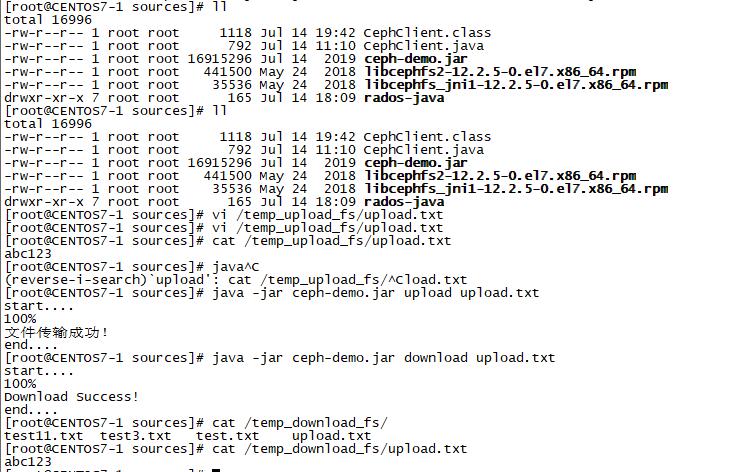
代码中的上传目录为/temp_upload_fs,创建名为upload.txt的文件,内容为abc123
[root@CENTOS7-1 sources]# cat /temp_upload_fs/upload.txt abc123 -
上传至cephfs服务
[root@CENTOS7-1 sources]# java -jar ceph-demo.jar upload upload.txt start.... 100% 文件传输成功! end.... -
下载cephfs文件
文件名称为上传时创建的upload.txt
[root@CENTOS7-1 sources]# java -jar ceph-demo.jar download upload.txt start.... 100% Download Success! end.... -
查看下载内容
[root@CENTOS7-1 sources]# cat /temp_download_fs/upload.txt
abc123
通过演示, 可以看到能够通过java client 在项目中成功操作ceph。
-
-
FAQ问题
-
如果运行过程当中出现jni找不到动态库, 需要安装相关依赖:
yum -y install libcephfs2 libcephfs_jni-devel并检查相应的软链接:
[root@CENTOS7-1 sources]# ll /usr/lib/libcephfs_jni.so.2 lrwxrwxrwx 1 root root 25 Jul 14 11:34 /usr/lib/libcephfs_jni.so.2 -> /usr/lib64/libcephfs.so.2 -
如果rados版本0.6.0依赖, 需要手工上传至MAVEN仓库,命令:
mvn deploy:deploy-file -DgroupId=com.ceph -DartifactId=rados -Dversion=2.0.1 -Dpackaging=jar -Dfile=d:/TestCode/rados-0.6.0-SNAPSHOT.jar -url=http://192.168.19.102:8082/repository/maven-releases/ -DrepositoryId=nexus-releases
-



