


## 前言
>今天有网友咨询了一个问题:如何在一个工程中使用多种缓存进行差异化缓存,即实现多个`cacheManager`灵活切换。原来没有遇见这种场景,今天下班抽空试了下,以下就把如何实现的简单记录下。
## 一点知识
>在`SpringBoot`中使用`Spring Cache`可以轻松实现缓存,是`Spring`框架提供的对缓存使用的抽象类,支持多种缓存,比如`Redis`、`EHCache`等,集成很方便。同时提供了多种注解来简化缓存的使用,可对方法进行缓存。具体如何集成,之前的文章已经有详细介绍了,感兴趣的同学可点击:[SpringBoot | 第十一章:Redis的集成和简单使用](https://blog.lqdev.cn/2018/07/23/springboot/chapter-eleven/ "SpringBoot | 第十一章:Redis的集成和简单使用")。这里就不再阐述了,一下简单较少下`cacheManager`。
### 关于CacheMananger
>针对不同的缓存技术,需要实现不同的cacheManager,Spring定义了如下的cacheManger实现。
| CacheManger | 描述 |
| --- | --- |
| SimpleCacheManager | 使用简单的Collection来存储缓存,主要用于测试 |
| ConcurrentMapCacheManager | 使用ConcurrentMap作为缓存技术(默认) |
| NoOpCacheManager | 测试用 |
| EhCacheCacheManager | 使用EhCache作为缓存技术,以前在hibernate的时候经常用 |
| GuavaCacheManager | 使用google guava的GuavaCache作为缓存技术 |
| HazelcastCacheManager | 使用Hazelcast作为缓存技术 |
| JCacheCacheManager | 使用JCache标准的实现作为缓存技术,如Apache Commons JCS |
| RedisCacheManager | 使用Redis作为缓存技术 |
常规的`SpringBoot`已经为我们自动配置了`EhCache`、`Collection`、`Guava`、`ConcurrentMap`等缓存,默认使用`ConcurrentMapCacheManager`。`SpringBoot`的`application.properties`配置文件,使用`spring.cache`前缀的属性进行配置。
**application配置**
```
spring.cache.type=#缓存的技术类型
spring.cache.cache-names=应用程序启动创建缓存的名称
spring.cache.ehcache.config=ehcache的配置文件位置
spring.cache.infinispan.config=infinispan的配置文件位置
spring.cache.jcache.config=jcache配置文件位置
spring.cache.jcache.provider=当多个jcache实现类时,指定选择jcache的实现类
```
**这里为了演示多`cacheManager`实现,这里使用`redis`和`ehcache`进行集成。**
## 集成Redis和ehcache
0.pom文件依赖
```xml
spring-boot-starter-data-redis
ehcache
```
1.创建配置类。
`CacheConfig.java`
```java
@Configuration
@EnableCaching
public class CacheConfig {
public interface CacheManagerName {
String REDIS_CACHE_MANAGER = "redisCacheManager";
String EHCACHE_CACHE_MAANGER = "ehCacheCacheManager";
}
@Bean
public RedisTemplate
StringRedisTemplate template = new StringRedisTemplate(factory);
Jackson2JsonRedisSerializer
Object.class);
ObjectMapper om = new ObjectMapper();
om.setVisibility(PropertyAccessor.ALL, JsonAutoDetect.Visibility.ANY);
om.enableDefaultTyping(ObjectMapper.DefaultTyping.NON_FINAL);
jackson2JsonRedisSerializer.setObjectMapper(om);
//序列化 值时使用此序列化方法
template.setValueSerializer(jackson2JsonRedisSerializer);
template.afterPropertiesSet();
return template;
}
@Bean(CacheConfig.CacheManagerName.REDIS_CACHE_MANAGER)
@Primary
public RedisCacheManager redisCacheManager(RedisTemplate
RedisCacheManager rcm = new RedisCacheManager(redisTemplate);
//使用前缀
rcm.setUsePrefix(true);
//缓存分割符 默认为 ":"
// rcm.setCachePrefix(new DefaultRedisCachePrefix(":"));
//设置缓存过期时间
//rcm.setDefaultExpiration(60);//秒
return rcm;
}
@Bean(CacheConfig.CacheManagerName.EHCACHE_CACHE_MAANGER)
public EhCacheCacheManager EhcacheManager() {
EhCacheCacheManager ehCacheManager = new EhCacheCacheManager();
return ehCacheManager;
}
}
```
注:其实就是配置多个`cacheManager`。但这里需要注意,要设置一个默认的`cacheManager`,即注解在未设置`cacheManager`时,自动使用此缓存管理类进行缓存,同时,因为注入了多个`cacheManaager`,需要在默认的管理器方法上加上`@Primary`注解。不然,会出现一下异常:
```
No CacheResolver specified, and no unique bean of type CacheManager found. Mark one as primary (or give it the name 'cacheManager') or declare a specific CacheManager to use, that serves as the default one.
```
至于原因。可以查看以下代码:
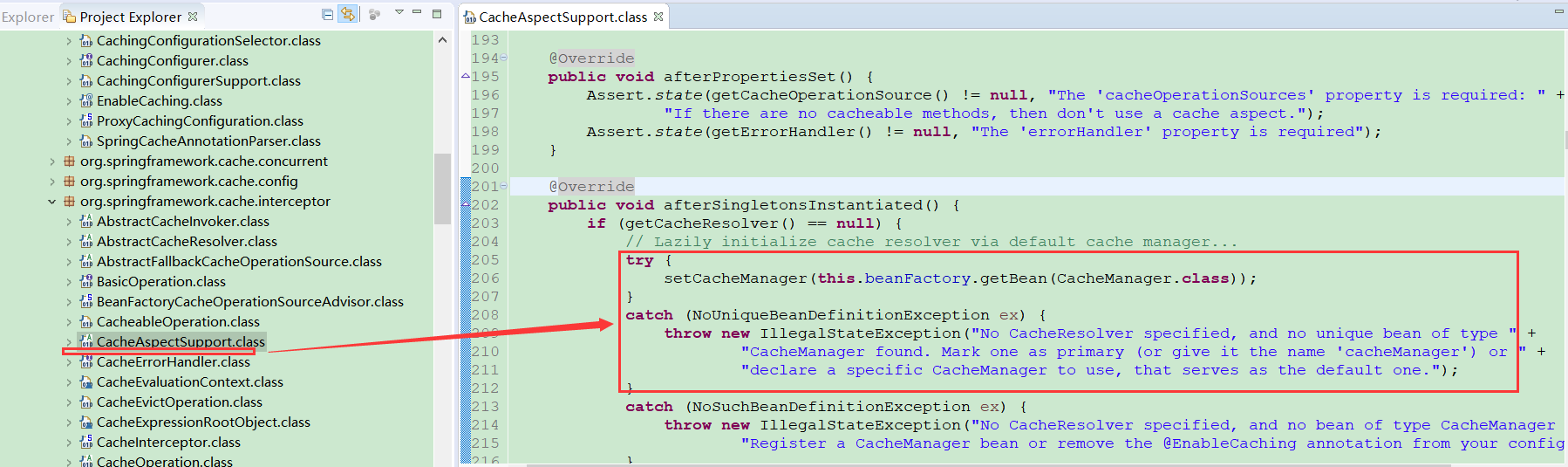
其实就是配置了多个bean,抛出了一个`NoUniqueBeanDefinitionException`异常。其实就是未指定一个默认的`cacheManager`,所以加上`@Primary`即可。
```
@Primary 优先考虑,优先考虑被注解的对象注入
```
2.编写测试类,默认是使用`redis缓存`,若想指定缓存,只需要设置`cacheManager`的值即可。
```java
@RestController
@Slf4j
public class DemoController {
@RequestMapping("/redis/{key}")
@Cacheable(value = "redis",key="#key",cacheManager=CacheConfig.CacheManagerName.REDIS_CACHE_MANAGER)
public String cacheRedisTest(@PathVariable("key") String key) {
log.info("redis,key={}", key);
return key;
}
@RequestMapping("/ehcache/{key}")
@Cacheable(value = "oKongCache",key="#key",cacheManager=CacheConfig.CacheManagerName.EHCACHE_CACHE_MAANGER)
public String cacheEhcacheTest(@PathVariable("key") String key) {
log.info("ehcache,key={}", key);
return key;
}
@RequestMapping("/default/{key}")
@Cacheable(value = "default",key="#key")
public String cacheDefaultTest(@PathVariable("key") String key) {
log.info("default,key={}", key);
return key;
}
}
```
3.配置application文件,加入相关配置。
```
# REDIS (RedisProperties)
# Redis数据库索引(默认为0)
spring.redis.database=0
# Redis服务器地址
spring.redis.host=127.0.0.1
# Redis服务器连接端口
spring.redis.port=6379
# Redis服务器连接密码(默认为空)
spring.redis.password=
# 连接池最大连接数(使用负值表示没有限制)
spring.redis.pool.max-active=8
# 连接池最大阻塞等待时间(使用负值表示没有限制)
spring.redis.pool.max-wait=-1
# 连接池中的最大空闲连接
spring.redis.pool.max-idle=8
# 连接池中的最小空闲连接
spring.redis.pool.min-idle=0
# 连接超时时间(毫秒)
spring.redis.timeout=0
# ehcache配置地址
spring.cache.ehcache.config=ehcache.xml
```
配置`ehcache.xml`文件,设置`cacheName`。
```xml
xsi:nonamespaceSchemaLocation="ehcache.xsd"> maxElementsInMemory="10000" eternal="false" timeToIdleSeconds="120" timeToLiveSeconds="120" maxElementsonDisk="10000000" diskExpiryThreadIntervalSeconds="120" memoryStoreEvictionPolicy="LRU"> eternal="false" timeToIdleSeconds="2400" timeToLiveSeconds="2400" maxEntriesLocalHeap="10000" maxEntriesLocalDisk="10000000" diskExpiryThreadIntervalSeconds="120" overflowToDisk="false" memoryStoreEvictionPolicy="LRU">
```
**关于其属性参数,大家可自行百度下,使用的不多呀,(┬_┬)**
4.启动应用。
依次访问:
1. http://127.0.0.1:8080/redis/okong
2. http://127.0.0.1:8080/ehcache/okong
3. http://127.0.0.1:8080/default/okong
可以看看redis中已经存在相关记录了
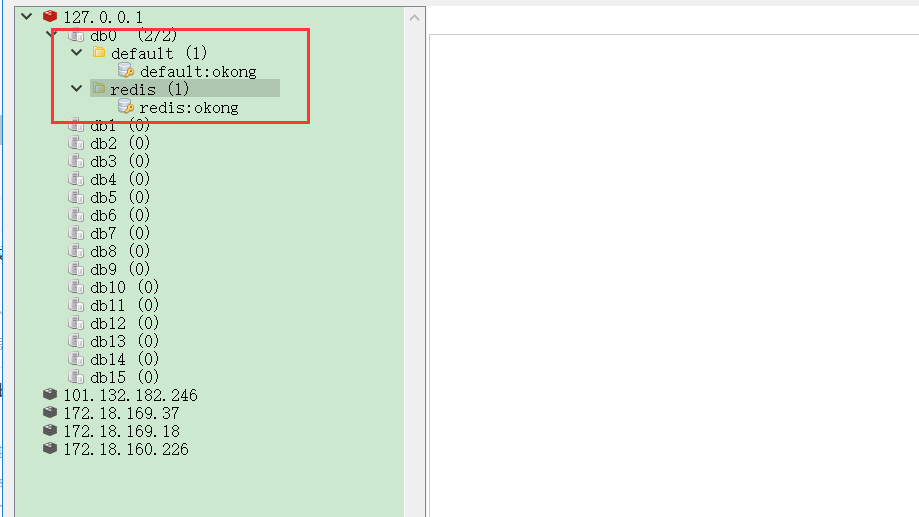
之后多访问几次,查看控制台,是没有输出的。

## 参考资料
1. [https://docs.spring.io/spring-boot/docs/1.5.15.RELEASE/reference/htmlsingle/#boot-features-caching-provider](https://docs.spring.io/spring-boot/docs/1.5.15.RELEASE/reference/htmlsingle/#boot-features-caching-provider "https://docs.spring.io/spring-boot/docs/1.5.15.RELEASE/reference/htmlsingle/#boot-features-caching-provider")
## 总结
>本章节主要介绍了多`cacheManager`的灵活切换,以便实现更加灵活的缓存使用,可以根据具体的业务需求,进行差异化操作。关于`ehcache`的使用,现在用的不多了,所以相关配置参数,可以自行搜索下了。
## 最后
>目前互联网上很多大佬都有`SpringBoot`系列教程,如有雷同,请多多包涵了。**原创不易,码字不易**,还希望大家多多支持。若文中有所错误之处,还望提出,谢谢。
完整示例:[https://github.com/xie19900123/spring-boot-learning/tree/master/chapter-36](https://github.com/xie19900123/spring-boot-learning/tree/master/chapter-36 "https://github.com/xie19900123/spring-boot-learning/tree/master/chapter-36")
原文地址:[https://blog.lqdev.cn/2019/03/08/springboot/chapter-thirty-six/](https://blog.lqdev.cn/2019/03/08/springboot/chapter-thirty-six/ "https://blog.lqdev.cn/2019/03/08/springboot/chapter-thirty-six/")



