


下面是两个纯CSS 面包屑导航栏实现代码,在网上找了一些方法但觉得都不合适唯独这两个纯css的就差不多了,下面一聚小编来给大家整理一下。
方法一,
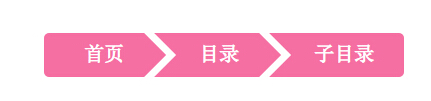
说明:本方法使用CSS3,无图片,兼容各种webkit系浏览器,同时兼容。先上图:
1.首先是HTML代码,比较简单,只需要一个简单的ul和li即可代码如下:
复制代码代码如下:
- 首页
- 目录
- 子目录
2.接下来是CSS代码,首先是设定常规的li浮动和a标签美化:
复制代码代码如下:#crumbs ul li {
float: left;
list-style: none;
}
#crumbs ul li a {
display: block;
float: left;
height: 34px;
background: #f66fa2;
text-align: center;
padding: 10px 20px 0 45px;
position: relative;
margin: 0 10px 0 0;
font-size: 20px;
text-decoration: none;
color: #fff;
}
接下来就是面包屑导航的关键地方,通过before和after来创建箭头效果:
复制代码代码如下:#crumbs ul li a:after {
content: "";
border-top: 22px solid transparent;
border-bottom: 22px solid transparent;
border-left: 22px solid #f66fa2;
position: absolute; right: -22px; top: 0;
z-index: 1;
}
#crumbs ul li a:before {
content: "";
border-top: 22px solid transparent;
border-bottom: 22px solid transparent;
border-left: 22px solid #fff;
position: absolute; left: 0; top: 0;
}
#crumbs ul li:first-child a {
border-top-left-radius: 5px;
border-bottom-left-radius: 5px;
padding-left: 40px;
}
#crumbs ul li:first-child a:before {
display: none;
}
#crumbs ul li:last-child a {
padding-right: 30px;
border-top-right-radius: 5px;
border-bottom-right-radius: 5px;
}
#crumbs ul li:last-child a:after {
display: none;
}
#crumbs ul li a:hover {
background: #e56592;
transition: all 0.2s ease;
}
#crumbs ul li a:hover:after {
border-left-color: #e56592;
transition: all 0.2s ease;
}
最后清除浮动:
复制代码代码如下:.fixed {
clear: both;
}
方法二:
XML/HTML Code复制内容到剪贴板- *{margin:0;padding:0;list-style-type:none;}
- a,img{border:0;}
- body{font:12px/180% Arial, Helvetica, sans-serif, "新宋体";}
- .demo{width:600px;margin:100px auto;background:#f0f0f0;position:relative;}
- .demo ul{height:32px;overflow:hidden;}
- .demo li{float:left;width:200px;text-align:center;position:relative;z-index:2;font-weight:bold;font-size:14px;line-height:32px;}
- .demo li em{position:absolute;right:-24px;top:-8px;width:0;height:0;line-height:0;border-width:24px 0 24px 24px;border-color:transparent transparent transparent #fff;border-style:dashed dashed dashed solid;}
- .demo li i{position:absolute;right:-16px;top:0;width:0;height:0;line-height:0;border-width:16px 0 16px 16px;border-color:transparent transparent transparent #f0f0f0;border-style:dashed dashed dashed solid;}
- .demo li.current{background:#f60;color:#fff;z-index:1;}
- .demo li.current i{border-color:transparent transparent transparent #f60;}
- 面包屑一
- 面包屑二