
栏目分类:
子分类:
返回
名师互学网用户登录
快速导航关闭
当前搜索
当前分类
子分类
实用工具
热门搜索
名师互学网 > IT > 软件开发 > Web开发 > Html/CSS > CSS教程

一款利用纯css3实现的360度翻转按钮的实例教程

CSS教程 更新时间: 发布时间: IT归档 最新发布 模块sitemap 名妆网 法律咨询 聚返吧 英语巴士网 伯小乐 网商动力

  今天要给大家分享的是由css3实现的翻转360动画按钮。之前已为大家分享了好几款css3按钮,大家可以点击链接进去找一找适合自己的。哈哈。下面先为大家上效果图:
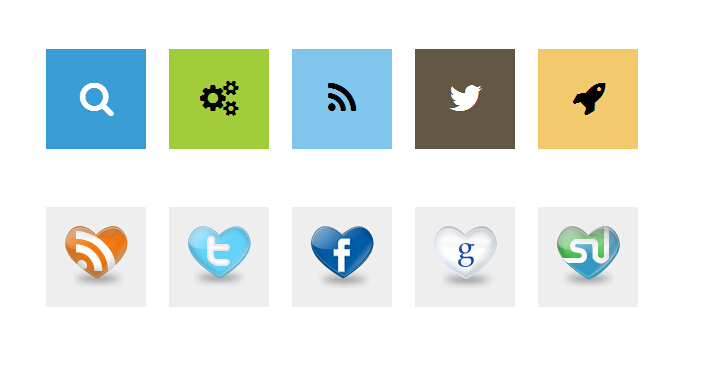
  下面是实现的代码。

  html代码:

XML/HTML Code复制内容到剪贴板
  1.   
  2.             
  3.   
  4.             Search
  5.   
  6.             
  7. Gears
  8.   
  9.             
  10. RSS
  11.   
  12.             
  13. Twitter
  14.   
  15.             
  16. Rocket
  17.   
  18.           
  19.           
  20.           
  21.           
  22.             
  23.   
  24.                 

  25.   
  26.             
  27.   
  28.                 

  29.   
  30.             
  31.   
  32.                 

  33.   
  34.             
  35.   
  36.                 

  37.   
  38.             
  39.   
  40.                 

  41.   
  42.           

  css代码:

CSS Code复制内容到剪贴板
  1. ul.flatflipbuttons   
  2.         {   
  3.             margin: 0;   
  4.             padding: 0;   
  5.             list-style: none;   
  6.             -webkit-perspective: 10000px;   
  7.             -moz-perspective: 10000px;   
  8.             perspective: 10000px;   
  9.         }   
  10.            
  11.         ul.flatflipbuttons li   
  12.         {   
  13.             margin: 0;   
  14.             display: inline-block;   
  15.             width: 100px;   
  16.             height: 100px;   
  17.             margin-right: 15px;   
  18.             background: white;   
  19.             text-transform: uppercase;   
  20.             text-align: center;   
  21.         }   
  22.            
  23.         ul.flatflipbuttons li a   
  24.         {   
  25.             display: table;   
  26.             font: bold 36px Arial;   
  27.             width: 100%;   
  28.             height: 100%;   
  29.             margin-bottom: 4px;   
  30.             color: black;   
  31.             background: #3B9DD5;   
  32.             text-decoration: none;   
  33.             outline: none;   
  34.             -webkit-transition: all 300ms ease-out;   
  35.             -moz-transition: all 300ms ease-out;   
  36.             transition: all 300ms ease-out;   
  37.         }   
  38.            
  39.         ul.flatflipbuttons li:nth-of-type(1) a   
  40.         {   
  41.             color: white;   
  42.             background: #3B9DD5;   
  43.         }   
  44.            
  45.         ul.flatflipbuttons li:nth-of-type(2) a   
  46.         {   
  47.             background: #A1CD3A;   
  48.         }   
  49.            
  50.         ul.flatflipbuttons li:nth-of-type(3) a   
  51.         {   
  52.             background: #80C5EC;   
  53.         }   
  54.            
  55.         ul.flatflipbuttons li:nth-of-type(4) a   
  56.         {   
  57.             color: white;   
  58.             background: #635746;   
  59.         }   
  60.            
  61.         ul.flatflipbuttons li:nth-of-type(5) a   
  62.         {   
  63.             background: #F2C96D;   
  64.         }   
  65.            
  66.         ul.flatflipbuttons li a span   
  67.         {   
  68.             -moz-box-sizing: border-box;   
  69.             -webkit-box-sizing: border-box;   
  70.             box-sizing: border-box;   
  71.             display: table-cell;   
  72.             vertical-align: middle;   
  73.             width: 100%;   
  74.             height: 100%;   
  75.             -webkit-transition: all 300ms ease-out;   
  76.             -moz-transition: all 300ms ease-out;   
  77.             transition: all 300ms ease-out;   
  78.         }   
  79.            
  80.         ul.flatflipbuttons li b   
  81.         {   
  82.               
  83.             display: block;   
  84.             position: relative;   
  85.             width: 100%;   
  86.             opacity: 0;   
  87.             -webkit-transition: all 300ms ease-out 0.2s;   
  88.             -moz-transition: all 300ms ease-out 0.2s;   
  89.             transition: all 300ms ease-out 0.2s;   
  90.         }   
  91.            
  92.            
  93.         ul.flatflipbuttons li a img   
  94.         {   
  95.               
  96.             border-width: 0;   
  97.             vertical-align: middle;   
  98.         }   
  99.            
  100.            
  101.         ul.flatflipbuttons li:hover a   
  102.         {   
  103.             -webkit-transform: rotateY(180deg);   
  104.             -moz-transform: rotateY(180deg);   
  105.             transform: rotateY(180deg);   
  106.             background: #c1e4ec;   
  107.             -webkit-transition-delay: 0.2s;   
  108.             -moz-transition-delay: 0.2s;   
  109.             transition-delay: 0.2s;   
  110.         }   
  111.            
  112.         ul.flatflipbuttons li:hover a span   
  113.         {   
  114.             color: black;   
  115.             -webkit-transform: rotateY(180deg);   
  116.             -moz-transform: rotateY(180deg);   
  117.             transform: rotateY(180deg);   
  118.             -webkit-transition-delay: 0.2s;   
  119.             -moz-transition-delay: 0.2s;   
  120.             transition-delay: 0.2s;   
  121.         }   
  122.            
  123.            
  124.         ul.flatflipbuttons li:hover b   
  125.         {   
  126.             opacity: 1;   
  127.         }   
  128.            
  129.           
  130.            
  131.         ul.second li a   
  132.         {   
  133.             background: #eee !important;   
  134.         }   
  135.            
  136.         ul.second li a:hover   
  137.         {   
  138.             background: #ddd !important;   
  139.         }  

以上就是利用css3实现的翻转360动画按钮的代码教程,谢谢阅读,希望能帮到大家,请继续关注考高分网,我们会努力分享更多优秀的文章。

转载请注明:文章转载自 www.mshxw.com
本文地址:https://www.mshxw.com/it/216541.html
我们一直用心在做
关于我们 文章归档 网站地图 联系我们

版权所有 (c)2021-2022 MSHXW.COM

ICP备案号:晋ICP备2021003244-6号
