


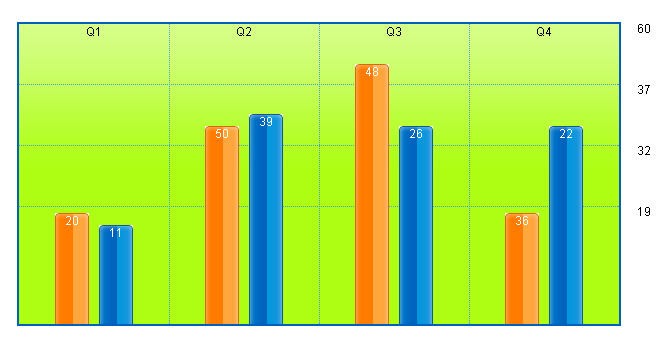
本文实例讲述了纯CSS实现美观大方的网页柱状图效果。分享给大家供大家参考。具体如下:
这是一款用纯CSS代码实现的网页柱状图,随着你给出的数据柱状图的调试会变化,实际应用中你可以将生成柱状图的数据从数据库中取得,这样就可以适时显示了,这款柱状图结构清淅,用背景图片平铺,给人很直观的感觉。
复制代码代码如下:
body {padding:0;margin:40px;font-size:9pt;font-family:Helvetica,Geneva,sans-serif;}
h3 {font-weight:normal;display:block;width:600px;text-align:center;}
ul#q-graph {
border:2px solid #0063be;
background:#adfe12 url(https://img.jbzj.com/file_images/article/201505/2015512160152351.png) repeat-x scroll 0 0 !important;
background:#adfe12 repeat-x scroll 0 0;
height:300px !important;
height:304px;
width:600px;
position:relative;
list-style:none;
margin:1.1em 1em 3.5em;
padding:0;
}
#q-graph li {
position:absolute;
text-align:center;
bottom:0;
padding:0
margin:0;
}
li.qtr {
width:150px;
height:300px;
border-right:1px dotted #41a3e2;
z-index:2;
}
li#q1 {left:0;}
li#q2 {left:150px;}
li#q3 {left:300px;}
li#q4 {left:450px;border-right:none;}
#q-graph ul {list-style:none;}
li.bar {
width:34px;
color:#fff;
}
li.north {
left:36px;
background:#ddd url(https://img.jbzj.com/file_images/article/201505/2015512155936873.gif) no-repeat 0 0;
}
li.south {
left:80px;
background:#ddd url(https://img.jbzj.com/file_images/article/201505/2015512155936873.gif) no-repeat -34px 0;
}
li#ticks {
left:0;
height:300px;
width:100%;
z-index:1;
}
div.ticks {
position:relative;
height:60px;
border-top:1px dotted #41a3e2;
}
div.ticks:first-child {border-top:none;}
div.ticks p {
position:absolute;
left:103%;
top:-11pt;
}
- Q1
- 20
- 11
- Q2
- 50
- 39
- Q3
- 48
- 26
- Q4
- 36
- 22
60
37
32
19
运行效果如下图所示:
希望本文所述对大家的div+css网页设计有所帮助。



