


本文实例讲述了CSS实现带阴影效果的黑色导航菜单效果。分享给大家供大家参考。具体如下:
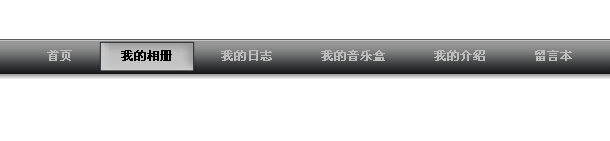
这是一款CSS实现带阴影效果黑色导航菜单,有立体感,鼠标放到菜单上会看到菜单的背景在变化,纯CSS的代码应用,没有使用任何的Javascript代码。如果你觉得菜单的背景颜色和文字颜色不是您想要的,你还可以自己修改CSS文件,只要你有创意,一个漂亮菜单就会诞生。
运行效果截图如下:
在线演示地址如下:
http://demo.jb51.net/js/2015/css-black-shadow-nav-style-codes/
具体代码如下:
复制代码代码如下:"http://www.w3.org/TR/xhtml2/DTD/xhtml1-strict.dtd">
.bg {background: url(images/button4.gif);}
.menu {padding:0 0 0 32px; margin:0; list-style:none; height:40px; background:#fff url(images/button1a.gif) repeat-x; position:relative; font-family:arial, verdana, sans-serif; margin-top:100px;}
.menu li.top {display:block; float:left; position:relative;}
.menu li a.top_link {display:block; float:left; height:40px; line-height:33px; color:#bbb; text-decoration:none; font-size:11px; font-weight:bold; padding:0 0 0 12px; cursor:pointer;}
.menu li a.top_link span {float:left; font-weight:bold; display:block; padding:0 24px 0 12px; height:40px;}
.menu li a.top_link span.down {float:left; display:block; padding:0 24px 0 12px; height:40px; background:url(images/down.gif) no-repeat right top;}
.menu li a.top_link:hover {color:#000; background: url(images/button4.gif) no-repeat;}
.menu li a.top_link:hover span {background:url(images/button4.gif) no-repeat right top;}
.menu li a.top_link:hover span.down {background:url(images/button4a.gif) no-repeat right top;}
.menu li:hover > a.top_link {color:#000; background: url(images/button4.gif) no-repeat;}
.menu li:hover > a.top_link span {background:url(images/button4.gif) no-repeat right top;}
.menu li:hover > a.top_link span.down {background:url(images/button4a.gif) no-repeat right top;}
.menu table {border-collapse:collapse; width:0; height:0; position:absolute; top:0; left:0;}
.menu a:hover {visibility:visible;}
.menu li:hover {position:relative; z-index:200;}
.menu ul,
.menu :hover ul ul,
.menu :hover ul :hover ul ul,
.menu :hover ul :hover ul :hover ul ul,
.menu :hover ul :hover ul :hover ul :hover ul ul {position:absolute; left:-9999px; top:-9999px; width:0; height:0; margin:0; padding:0; list-style:none;}
.menu :hover ul.sub {left:2px; top:40px; right:2px; background: #fff; padding:3px 0; border:1px solid #999999; white-space:nowrap; width:200px; height:auto;}
.menu :hover ul.sub li {display:block; height:20px; position:relative; float:left; width:250px;}
.menu :hover ul.sub li a {font-weight:normal;display:block; font-size:11px; height:20px; width:192px; line-height:20px; text-indent:5px; color:#000; text-decoration:none; border:3px solid #fff; border-width:0 0 0 3px;}
.menu :hover ul.sub li a.fly {background:#fff url(images/arrow.gif) 80px 7px no-repeat;}
.menu :hover ul.sub li a:hover {background:#999999; color:#fff;}
.menu :hover ul.sub li a.fly:hover {background:#999999 url(images/arrow_over.gif) 80px 7px no-repeat; color:#fff;}
.menu :hover ul li:hover > a.fly {background:#999999 url(images/arrow_over.gif) 80px 7px no-repeat; color:#fff;}
.menu :hover ul :hover ul,
.menu :hover ul :hover ul :hover ul,
.menu :hover ul :hover ul :hover ul :hover ul,
.menu :hover ul :hover ul :hover ul :hover ul :hover ul
{left:90px; top:-4px; background: #fff; padding:3px 0; border:1px solid 999999; white-space:nowrap; width:93px; z-index:200; height:auto;}
- 首页
- 我的相册
- 我的日志
- 我的音乐盒
- 我的介绍
- 留言本
希望本文所述对大家的div+css网页设计有所帮助。



