


1. 实现背景图片的动态变换
首先在HTML页面body板块中,添加图片div,代码如下:
再对图片进行css设计。你要对图片进行大小定位,那么以下代码肯定要首先编写:
`.bgk {
margin: auto;
position: absolute;
width: 1366px;
height: 672px;
overflow: hidden;
}`
位置设定ok以后,那么再对里面的图片进行设置。为了使图片能足够大覆盖页面,则代码必须有 background-size: cover;
要实现动态效果,那么你的css代码中必须有动画的设计:
-webkit-animation-name: kenburns;
animation-name: kenburns;
-webkit-animation-duration: 16s;
animation-duration: 16s;
-webkit-animation-timing-function: linear;
animation-timing-function: linear;
-webkit-animation-iteration-count: infinite;
animation-iteration-count: infinite;
-webkit-transform: scale(1.2);
transform: scale(1.2);
-webkit-filter: blur(10px);
filter: blur(10px);
在绑定每个子元素选择器,有几张图片就绑定几个选择器:
.bgk-image:nth-child(1) {
-webkit-animation-name: kenburns-1;
animation-name: kenburns-1;
z-index: 3;
}
.bgk-image:nth-child(2) {
-webkit-animation-name: kenburns-2;
animation-name: kenburns-2;
z-index: 2;
}
.bgk-image:nth-child(3) {
-webkit-animation-name: kenburns-3;
animation-name: kenburns-3;
z-index: 1;
}
.bgk-image:nth-child(4) {
-webkit-animation-name: kenburns-4;
animation-name: kenburns-4;
z-index: 0;
}
创建好选择器以后,你就可以预览你的动态背景图片变换了
2. 对登录表单的设计
在之前HTML页面中继续添加一个表单
添加完表单之后,就要进行表单的样式设计。首先你得对表单规定一个圈子,限制它的宽度和高度
.form_login{
    margin: auto;
    width:700px;
    height: 480px;
    top: 90px;
    left: 333px;
    position: absolute;
    border-radius: 15px;
    background: rgba(216,216,216,0.5);
    text-align: center;
    overflow: hidden;
}
然后对表单里面的各个label进行定位和样式设计,这里可以自由设计。
对输入框的设计,我只贴出主要样式代码
outline:none;
border:1px solid rgba(0,0,0,.49);
-webkit-background-clip: padding-box;
background-clip: padding-box;
background:rgba(216,216,216,0.4) ;
border-radius:6px;
padding:7px;
当聚焦输入框的时候,可以增加一点绚丽色彩
.form_login input[type="text"]:focus,input[type="password"]:focus{
    -webkit-transition:border linear .2s,-webkit-box-shadow linear .5s;
    border-color:rgba(255,128,0,.75);
}
最后进行提交按钮的设计
text-shadow:0px -1px 0px #5b6ddc;
outline:none;
border:1px solid rgba(0,0,0,0.49);
-webkit-background-clip: padding-box;
background-clip: padding-box;
border-radius:6px;
cursor:pointer;
background-color:#768ee4;
当鼠标放在提交按钮上面时,你可以适当进行一些动画效果设计
.form_login input[type="submit"]:hover{
    background-color:#5f73e9;
    background-image:-webkit-linear-gradient(bottom,#5f73e9 0%,#859bef 100%);
    background-image:-moz-linear-gradient(bottom,#5f73e9 0%,#859bef 100%);
    background-image:-ms-linear-gradient(bottom,#5f73e9 0%,#859bef 100%);
    background-image:-o-linear-gradient(bottom,#5f73e9 0%,#859bef 100%);
    -webkit-box-shadow: inset 0px 1px 0px #aab9f4;
    box-shadow: inset 0px 1px 0px #aab9f4;
    margin-top:22px;
}
最后整个设计完成,你可以看见你最终的效果了
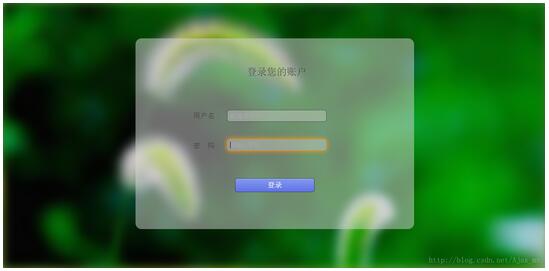
以上所述是小编给大家介绍的HTML+CSS实现动态背景登录页面,希望对大家有所帮助,如果大家有任何疑问请给我留言,小编会及时回复大家的。在此也非常感谢大家对考高分网网站的支持!



