


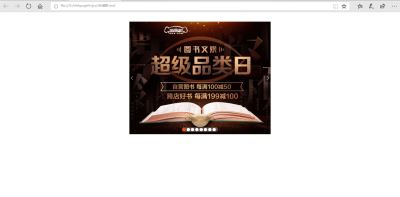
使用了纯HTML和CSS实现了JD的轮播图,没有加动态效果,主要是使用了定位的知识。


,如图为两个侧边箭头图片。
    LunBo

 *{
     padding: 0;
     margin: 0;
 }
 li{
     list-style: none;
 }
 .lunbo{
     margin: 40px auto;
     height: 470px;
     width: 590px;
     position: relative;
 }
 .left,.right{
     position: absolute;
     top: 50%;
     margin-top: -18px;
     width: 24px;
     height: 36px;
 }
 .left{
     left: 0;
 }
 .right{
     right: 0;
 }
 .lunbo ul{
     height: 18px;
     width: 151px;
     background: rgba(255,255,255,.3);
     position: absolute;
     bottom: 10px;
     left: 50%;
     margin-left: -76px;
     border-radius: 10px;
 }
 .lunbo li{
     height: 14px;
     width: 14px;
     border-radius: 50%;
     background-color: #fff;
     float: left;
     margin: 2px;
 }
 .lunbo .current{
     background-color: #f40;
 }


实现了如下效果
总结
以上所述是小编给大家介绍的纯HTML和CSS实现JD轮播图效果,希望对大家有所帮助,如果大家有任何疑问请给我留言,小编会及时回复大家的。在此也非常感谢大家对考高分网网站的支持!



