


有时候我们的页面会需要这样的一些提示框或者叫气泡框,运用css,我们可以实现这样的效果。
为了实现上面的效果,我们首先要理解如何制作三角形。
当我们给一个DIV不同颜色的边框的时候,我们可以得到下面的效果。
.triangle{
 border-top:20px solid red;
 width:50px;
 height:50px;
 border-right:20px solid blue;
 border-bottom:20px solid gray;
 border-left:20px solid green;
   }
可以看到,四条边框变成了 梯形 的形状,而不是我们以为的长方形形状。
当我们把盒子的 宽度和高度变为0 的时候,四条边框就会从中心点出发,变成4个三角形。
.triangle{
 border-top:20px solid red;
 width:0px;
 height:0px;
 border-right:20px solid blue;
 border-bottom:20px solid gray;
 border-left:20px solid green;
   }

这样,当我们只需要一个三角形的时候,只要把别的边框颜色设为透明色就好了。例如我们只保留朝上的三角形
.triangle{
    border-top:20px solid transparent;
    width:0px;
    height:0px;
    border-right:20px solid transparent;
    border-bottom:20px solid gray;
    border-left:20px solid transparent;
   }

知道了怎么制作三角形,我们就可以利用伪类,用绝对定位的方式,制作一个气泡框,例如
.container{
 position:relative;
 margin-top:50px;
 padding:6px 12px;
 color:#fff;
 font-size:16px;
 line-height:25px;
 width:200px;
 height:50px;
 background-color:orange;
 border-radius:4px;
   }
   p.container:after{
 position:absolute;
 top:-40px;
 right:20px;
 border-top:20px solid transparent;
 content:" "; // content 不要漏了,漏了会显示不出来
 width:0px;
 height:0px;
 border-right:20px solid transparent;
 border-bottom:20px solid orange;
 border-left:20px solid transparent;
   }


    hi,这篇文章要教大家怎么使用css制作气泡框。
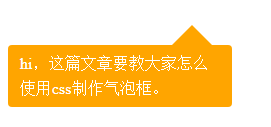
简单的气泡框就制作好了。三角形的形状,大家可以根据实际的需求去拼接。
以上就是本文的全部内容,希望对大家的学习有所帮助,也希望大家多多支持考高分网。



