


在很多项目中,需要实现分格展示的功能,中间有灰色分割线,两侧没有。
如图:
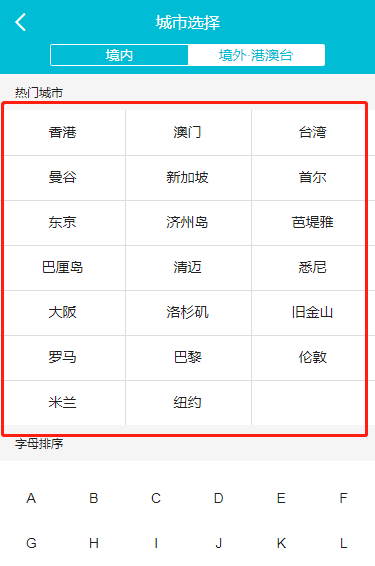
按照一般的思路,设置好li的宽度,通过nth-of-type(n){}的方式给li标签添加样式。
设置每个li 33.33%的宽度,但当我们添加1px边框时,最右边的内容就被挤了下来。
这时可以通过给父级 ul 添加:before :after 伪类元素来实现。而不占用li的width
当显示3列时,通过给ul 添加:before来实现
CSS
 ul li{ list-style: none;}
 .mp-list{
     position: relative;
     overflow: hidden;
     z-index: 0;
     background-color: #fff;
 }
 .mp-list:before {
     content: '';
     position: absolute;
     width: 33.33%;
     left: 33.33%;
     height: 100%;
     border-left: .02rem solid #ddd;
     border-right: .02rem solid #ddd;
 }
 .mp-list li {
     width: 33.33%;
     height: 2rem;
     line-height: 2rem;
     font-size: .28rem;
     text-align: center;
     border-bottom: .02rem solid #ddd;
     margin-bottom: -1px;
     float: left;
     position: relative;
     z-index: 10;
     color: #212121;
 }
 .mp-list li a {
     color: #212121;
     display: block;
     overflow: hidden;
     text-overflow: ellipsis;
     white-space: nowrap;
     font-size: .28rem;
 }
HTML
- 香港
- 澳门
- 台湾
- 曼谷
- 新加坡
- 首尔
- 东京
- 济州岛
- 芭堤雅
当显示4列时,给:after添加样式,注意需要更改li的width、.mp-list:before的位置。
.mp-list:after {
    content: '';
    position: absolute;
    width: 10%;
    left: 75%;
    height: 100%;
    border-left: .02rem solid #ddd;
    border-right: 0;
}
以上就是本文的全部内容,希望对大家的学习有所帮助,也希望大家多多支持考高分网。



