



前言:所有浏览器都有附带的默认样式,这些样式应用在每一个页面,叫做“用户代理样式表”。(如下需要梯子)
Chromium UA stylesheet -Google Chrome & Opera
Mozilla UA stylesheet - firefox
WebKit UA stylesheet - safari
虽然大部分相同,但也有很多样式是不一致的,如搜索输入框
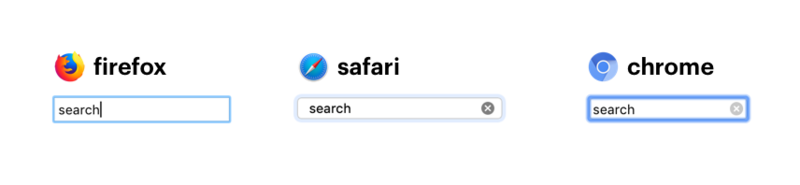
所以我们需要reset css处理,统一不同浏览器差异确认团队开发的起始标准,弥补浏览器的‘缺点’。
html{

  font-size:14px;

  box-sizing: border-box;

}

html,body{

  -webkit-tap-highlight-color: rgba(0, 0, 0, 0);

  -webkit-overflow-scrolling: touch;
  overflow-scrolling: touch;

  height: 100%;
}

body{

  background: #fff;

  font:14px,-apple-system,BlinkMacSystemFont,'Segoe UI','PingFang SC','Hiragino Sans GB','Microsoft YaHei',
  'Helvetica Neue',Helvetica,Arial,sans-serif,'Apple Color Emoji','Segoe UI Emoji','Segoe UI Symbol'

  -webkit-font-smoothing: antialiased;
  -moz-osx-font-smoothing: grayscale;
}
去除浏览器默认的margin和padding, 自行删减一些不必要的标签
body,
p,
h1,
h2,
h3,
h4,
h5,
h6,
dl,
dd,
ul,
ol,
th,
td,
button,
figure,
input,
textarea,
form,
pre,
blockquote,
figure{
margin: 0;
padding: 0;
}

a{

  cursor: pointer;

  text-decoration:none;

  transition: color 0.3s ease;
}

ol,
ul{

  list-style:none
}
这些节点部分属性没有继承父节点样式,所有继承一下,并取消outline,外轮廓的效果
a,
h1,
h2,
h3,
h4,
h5,
h6,
input,
select,
button,
textarea {
font-family: inherit;
font-size: inherit;
font-weight: inherit;
font-style: inherit;
line-height: inherit;
color: inherit;
outline: none;
}

button,
input[type='submit'],
input[type='button'] {

cursor: pointer;
}

input[type='number'] {
-moz-appearance: textfield;
}
input[type=number]::-webkit-inner-spin-button,
input[type=number]::-webkit-outer-spin-button {
margin: 0;
-webkit-appearance: none;
}

button::-moz-focus-inner,
[type="button"]::-moz-focus-inner,
[type="reset"]::-moz-focus-inner,
[type="submit"]::-moz-focus-inner {
  border-style: none;
  padding: 0;
}


[hidden] {
  display: none;
}
template {

display: none;
}
css Reset地址
后续还会继续添加,小伙伴们一起吧。
以上就是本文的全部内容,希望对大家的学习有所帮助,也希望大家多多支持考高分网。



