


效果如下:
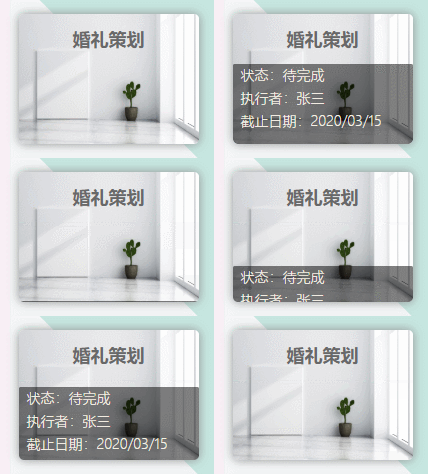
HTML:
   婚礼策划

状态:待完成

执行者:张三

截止日期:2020/03/15
CSS:
.itemInWorks{
    width: 180px;
    height: 130px;
    border-radius:5px;
    font-size: 18px;
    font-weight: 600;
    color: dimgrey;
    text-align: center;
    line-height: 50px;
    background: url('image/works_image/4.jpg');
    background-repeat: no-repeat;
    background-size: 180px 130px;
    box-shadow: #909090 0px 0px 10px;

    overflow: hidden;
    position: relative;
}

.itemInWorks .mask{
    height:80px;
    width:172px;
    color: #f5f1e5;
    line-height: 23px;
    text-align: left;
    padding-left: 8px;
    border-radius:2px 2px 5px 5px;
    font-size: 14px;
    font-weight: 300;

    position: absolute;
    top:130px;
    background-color:rgba(0,0,0,0.5);
    transition:top 0.5s ease-in-out;
}
.itemInWorks:hover .mask{
    top:50px ;
}
全部代码:
    Title


    .itemInWorks{
 width: 180px;
 height: 130px;
 border-radius:5px;
 font-size: 18px;
 font-weight: 600;
 color: dimgrey;
 text-align: center;
 line-height: 50px;
 background: url('image/works_image/4.jpg');
 background-repeat: no-repeat;
 background-size: 180px 130px;
 box-shadow: #909090 0px 0px 10px;
 overflow: hidden;
 position: relative;
    }

    .itemInWorks .mask{
 height:80px;
 width:172px;
 color: #f5f1e5;
 line-height: 23px;
 text-align: left;
 padding-left: 8px;
 border-radius:2px 2px 5px 5px;
 font-size: 14px;
 font-weight: 300;
 position: absolute;
 top:130px;
 background-color:rgba(0,0,0,0.5);
 transition:top 0.5s ease-in-out;
    }
    .itemInWorks:hover .mask{
 top:50px ;
    }


    婚礼策划

 状态:待完成

 执行者:张三

 截止日期:2020/03/15
总结
以上所述是小编给大家介绍的 纯CSS实现鼠标放上滑动出半透明效果的文字说明(新手小白 必看),希望对大家有所帮助!



