


前言
现在的设备很多,有PC、iPad、手机、智能手表、智能电视。如果没有响应式布局,那么电脑网页在手机或者ipad上显示,是体验非常差,操作不方便,视觉疲劳的,所以我们开发网页要做好响应式布局。
index
    响应式布局


 头部
 左侧
 中间
 右侧
 底部
CSS
*{
    margin: 0;
    padding: 0;
}


@media screen and (min-width: 1000px) {
    #content{
 width: 960px;
 margin:0 auto;
    }

    #header{
 width: 100%;
 line-height: 100px;
 float: left;
 background: #333;
 color: #fff;
 text-align: center;
 font-size: 30px;
 margin-bottom: 10px;
    }

    #left{
 width: 200px;
 line-height: 400px;
 text-align: center;
 background: #333;
 float: left;
 font-size: 30px;
 color: #fff;
 margin-right: 10px;
    }

    #center{
 width: 540px;
 line-height: 400px;
 text-align: center;
 background: #333;
 float: left;
 font-size: 30px;
 color: #fff;
    }

    #right{
 width: 200px;
 line-height: 400px;
 text-align: center;
 background: #333;
 float: right;
 font-size: 30px;
 color: #fff;
    }

    #footer{
 width: 960px;
 height: 200px;
 background: #333;
 color: #fff;
 line-height: 200px;
 font-size: 30px;
 text-align: center;
 float: left;
 margin-top: 10px;
    }
}


@media screen and (min-width: 640px) and (max-width: 1000px) {
    #content{
 width: 600px;
 margin:0 auto;
    }

    #header{
 width: 100%;
 line-height: 100px;
 float: left;
 background: #333;
 color: #fff;
 text-align: center;
 font-size: 30px;
 margin-bottom: 10px;
    }

    #left{
 width: 200px;
 line-height: 400px;
 text-align: center;
 background: #333;
 float: left;
 font-size: 30px;
 color: #fff;
 margin-right: 10px;
    }

    #center{
 width: 390px;
 line-height: 400px;
 text-align: center;
 background: #333;
 float: left;
 font-size: 30px;
 color: #fff;
    }

    #right{
 width: 600px;
 line-height: 300px;
 text-align: center;
 background: #333;
 float: left;
 font-size: 30px;
 color: #fff;
 margin-top: 10px;
    }

    #footer{
 width: 600px;
 height: 200px;
 background: #333;
 color: #fff;
 line-height: 200px;
 font-size: 30px;
 text-align: center;
 float: left;
 margin-top: 10px;
    }
}


@media screen and (max-width: 639px){
    #content{
 width: 400px;
 margin:0 auto;
    }

    #header{
 width: 100%;
 line-height: 100px;
 float: left;
 background: #333;
 color: #fff;
 text-align: center;
 font-size: 30px;
 margin-bottom: 10px;
    }

    #left{
 width: 100%;
 line-height: 150px;
 text-align: center;
 background: #333;
 float: left;
 font-size: 30px;
 color: #fff;
 margin-bottom: 10px;
    }

    #center{
 width: 100%;
 line-height: 300px;
 text-align: center;
 background: #333;
 float: left;
 font-size: 30px;
 color: #fff;
    }

    #right{
 width: 100%;
 line-height: 150px;
 text-align: center;
 background: #333;
 float: left;
 font-size: 30px;
 color: #fff;
 margin-top: 10px;
    }

    #footer{
 width: 100%;
 height: 200px;
 background: #333;
 color: #fff;
 line-height: 200px;
 font-size: 30px;
 text-align: center;
 float: left;
 margin-top: 10px;
    }
}
通过@media screen and (限制范围) 来控制网页的布局,例如
min-width代表最小的限制,max-width代表最大的限制。
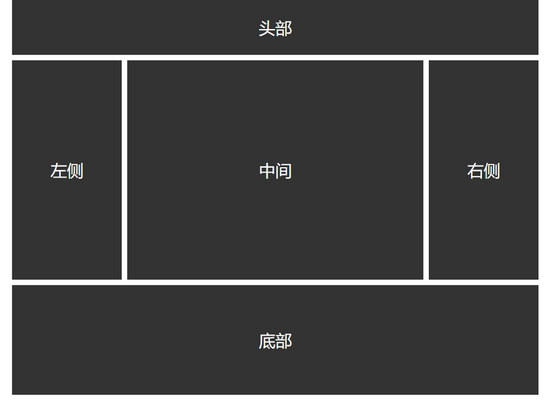
PC端
Pad端

Phone端

以上就是本文的全部内容,希望对大家的学习有所帮助,也希望大家多多支持考高分网。



