


什么是sticky footer布局?
我们常见的网页布局方式一般分为header(页头)部分,content(内容区)部分和footer(页脚)部分。当页头区和内容区的内容较少时,页脚区不是随着内容区排布而是始终显示在屏幕的最下方。当内容区的内容较多时,页脚能随着文档流撑开始终显示在页面的最下方。这就是传说中的Sticky footer布局。是不是很容易理解。不理解的小伙伴也没关系下面我就举个简单的例子。
一般指手机页面中,当内容高度撑不满一屏时,页脚紧贴屏幕底部;当内容高度超过一屏时,页脚紧随其后。
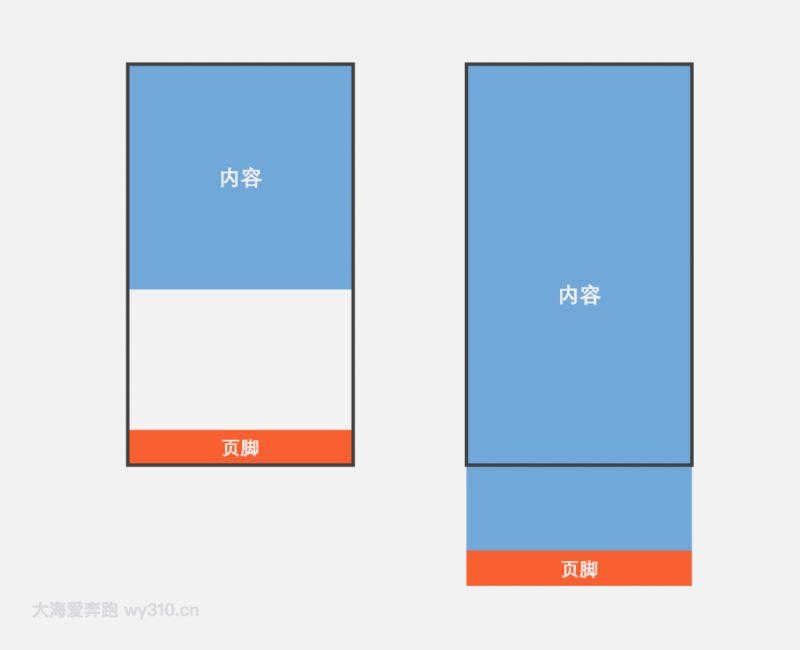
方法一:flex弹性盒子布局
- 父容器container的display为flex,并规定项目排列顺序是纵向的
- content元素的flex为1,即有多余空间就增大
- footer定义一个高度
查看演示请狠狠地点击:flex弹性盒子布局实现sticky footer
  内容
  页脚
body {
  margin: 0;
}
.container {
  display: flex;
  flex-direction: column;
  min-height: 100vh;
}
.content {
  flex: 1;

  width: 100%;
  height: 300px;
  line-height: 300px;
  text-align: center;
  color: #fff;
  font-size: 30px;
  font-weight: bold;
  background-color: #71a8da;

}
.footer {
  height: 60px;

  width: 100%;
  line-height: 60px;
  text-align: center;
  color: #fff;
  font-size: 30px;
  font-weight: bold;
  background-color: #f85f2f;

}
方法二:padding-bottom+负margin-top
- 容器wrapper需要指定min-height为100vh(vh:视窗高度)
- 内容写在content容器里,指定padding-bottom为footer容器的高度
- footer指定高度和margin-top,并且margin-top为高度的负值
查看演示请狠狠地点击:padding-bottom+负margin-top实现sticky footer
  内容

页脚
body {
  margin: 0;
}
.wrapper {
  width: 100%;
  min-height: 100vh;
}
.content {

  padding-bottom: 60px;

  width: 100%;
  height: 400px;
  line-height: 400px;
  text-align: center;
  color: #fff;
  font-size: 30px;
  font-weight: bold;
  background-color: #71a8da;

}
.footer {

  margin-top: -60px;
  height: 60px;

  width: 100%;
  line-height: 60px;
  text-align: center;
  color: #fff;
  font-size: 30px;
  font-weight: bold;
  background-color: #f85f2f;

}
提示:两个之间的部分不是实现sticky footer布局的必要代码,只是一些辅助样式,可以删除
到此这篇关于css sticky footer经典布局的实现的文章就介绍到这了,更多相关css sticky footer内容请搜索考高分网以前的文章或继续浏览下面的相关文章,希望大家以后多多支持考高分网!



