


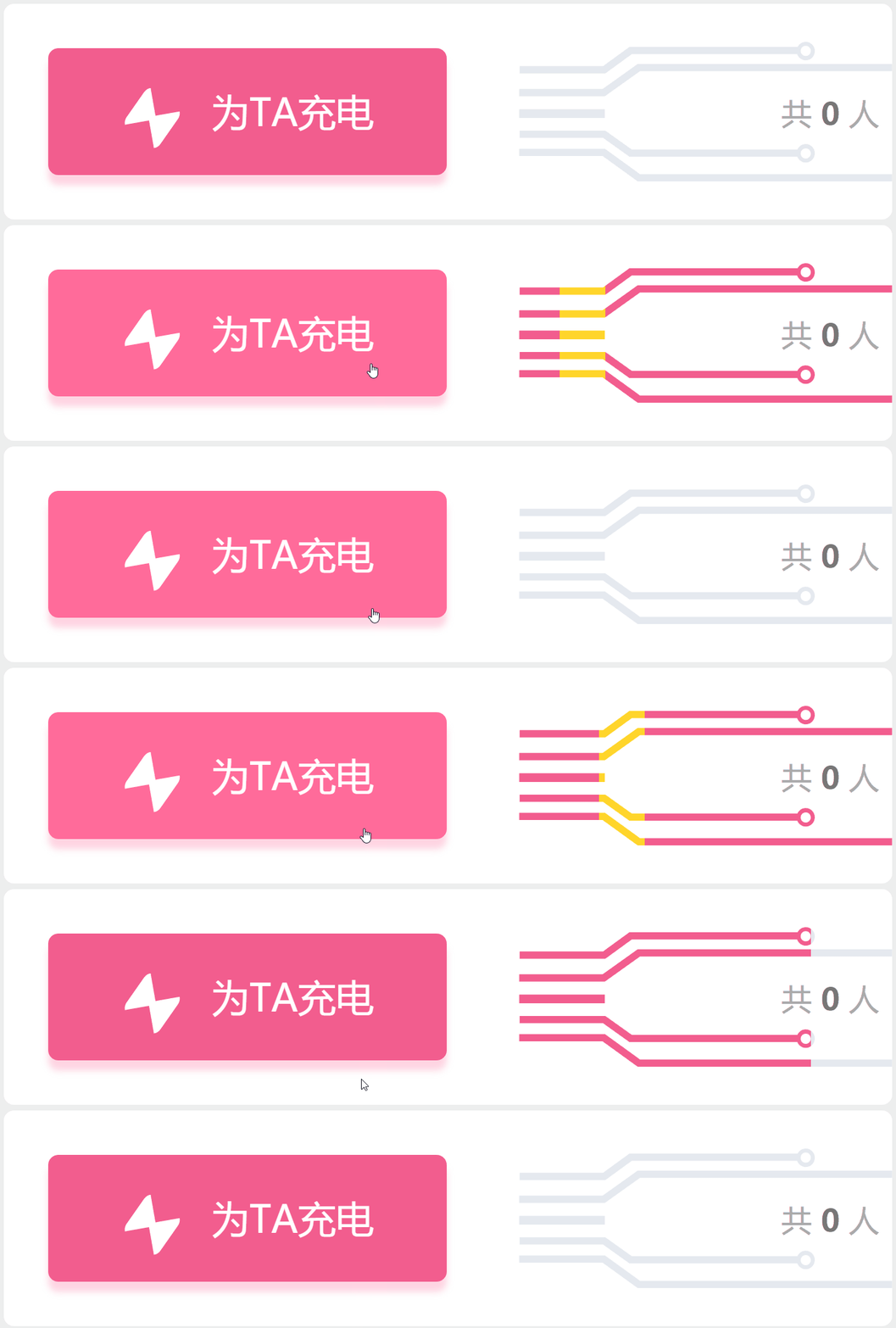
难点
svg图形的两块蒙版制作
先上代码
这是左边粉色框框的内容
这个没啥好说的
为TA充电
body {
      margin: 0;
      padding: 0;
      background-color: #eee;
    }

    #con {
      width: 350px;
      height: 85px;
      background-color: #fff;
      position: relative;
      border-radius: 4px;
      margin:50px auto;
    }
#TA-con {
      width: 157px;
      height: 50px;
      background-color: #f25d8e;
      box-shadow: 0 4px 4px rgba(255, 112, 159, .3);
      position: absolute;
      top: 50%;
      left: 5%;
      transform: translateY(-50%);
      border-radius: 4px;
      cursor: pointer;
    }

    #text-con {
      width: 100px;
      height: 100%;
      margin: 0 auto;
      position: relative;
    }

    #linght {
      width: 0;
      height: 0;
      position: absolute;
      top: 36%;
      left: 4px;
      border-color: transparent;
      border-style: solid;
      border-width: 10px;
      border-top: 10px solid #fff;
      border-radius: 4px;
      transform: rotate(-55deg);
    }
    #linght::after {
      position: absolute;
      top: -13px;
      left: -11px;
      content: "";
      width: 0;
      height: 0;
      border-color: transparent;
      border-style: solid;
      border-width: 10px;
      border-top: 10px solid #fff;
      transform: rotate(180deg);
      border-radius: 4px;
    }

    #TA {
      float: right;
      line-height: 50px;
      font-size: 15px;
      color: #fff;
    }
    #TA-con:hover {
      background-color: #ff6b9a;
    }
这里做的就是创建一个svg的图形,背景色是灰色,看着是不是很多很复杂,没事,这也不是我写的
用的是这玩意,网页版在线的,画好后就可以右击复制代码了,是不是很简单! www.figma.com/
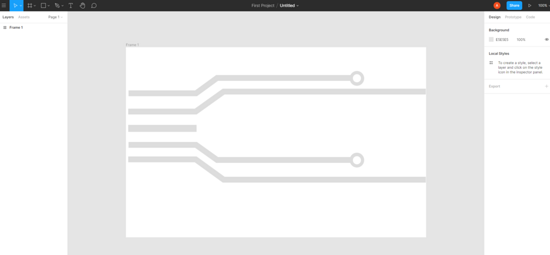
既然svg图画好了,就要想怎么完成了
需要的东西:
1:svg底色为灰色的图;
2:一个粉色的svg图,当我鼠标hover到左边粉色框时,粉色svg图完全展开,初始为0;
3:快速移动的黄色小方块;
底色灰色做好了,还差粉色和黄色的svg图
mask是用来做粉色svg的蒙版的
跟灰色svg没有任何的区别,就是改改颜色
orange-mask是用来做黄色svg的蒙版
跟灰色svg没有任何的区别,就是改改颜色
共 0 人
css的代码
    #tube-con {
      width: 157px;
      height: 55px;
      position: absolute;
      right: -5px;
      top: 15px;
    }

    svg {
      width: 100%;
      height: 100%;
    }

    #mask {
      width: 0px;
      height: 100%;
      overflow: hidden;
      position: absolute;
      top: 0;
      left: 0;
      transition:all 0.5s;
    }

    #mask svg {
      width: 157px;
      height: 55px;
    }

    #TA-con:hover+#tube-con>#mask{
      width:157px;
    }

    #TA-con:hover+#tube-con>#orange-mask{
      animation: move1 0.5s linear 0.2s infinite;
    }
    #TA-con:hover+#tube-con>#orange-mask svg{
      animation: movetwo 0.5s linear 0.2s infinite;
    }

    #orange-mask{
      width: 18px;
      height: 100%;
      overflow: hidden;
      position:absolute;
      left:-15px;
      top:0px;
    }

    #orange-mask svg {
      position: absolute;;
      top:0;
      left:15px;
      width: 157px;
      height: 55px;
    }
    @keyframes move1 {
      0%{
 left:-15px;
      }
      100%{
 left:140px;
      }
    }
    @keyframes movetwo {
      0%{
 left:15px;
      }
      100%{
 left:-140px;
      }
    }
    #people{
      position:absolute;
      right:10px;
      top:8px;
      font-size:12px;
      font-family:"雅黑";
      color:#aaa;
    }
    #people>b{
      color:#777;
    }
其中css处理最难的地方在于黄色svg和黄色svg蒙版的地方
因为既要保证黄色svg的蒙版从左向右移动,又要保证黄色svg位置保证不变;
蒙版为父元素,黄色svg为子元素,
父元素添加定位后,父元素移动,子元素一定会跟着移动,
如果子元素添加定位,父元素不添加定位 或者 父元素正常定位,子元素定位为fixed,
这有会导致父元素蒙版不能对子元素溢出的部分进行隐藏,在这我纠结了好久
!!!然后我就突然发现
父元素无论以多块的速度移动多远的距离,子元素只要以相同的速度移动相反的距离,
子元素就能保证一直以一个位置保持不变!!!子元素就相对body是静止的!!
move1是父元素蒙版的,movetwo是黄色svg图形的,请不要吐槽起名。。。。
move1移动多远,movetwo就移动相反的距离
 @keyframes move1 {
      0%{
 left:-15px;
      }
      100%{
 left:140px;
      }
    }
    @keyframes movetwo {
      0%{
 left:15px;
      }
      100%{
 left:-140px;
      }
    }
全部的代码
  document

    body {
      margin: 0;
      padding: 0;
      background-color: #eee;
    }

    #con {
      width: 350px;
      height: 85px;
      background-color: #fff;
      position: relative;
      border-radius: 4px;
      margin:50px auto;
    }

    #TA-con {
      width: 157px;
      height: 50px;
      background-color: #f25d8e;
      box-shadow: 0 4px 4px rgba(255, 112, 159, .3);
      position: absolute;
      top: 50%;
      left: 5%;
      transform: translateY(-50%);
      border-radius: 4px;
      cursor: pointer;
    }

    #text-con {
      width: 100px;
      height: 100%;
      margin: 0 auto;
      position: relative;
    }

    #linght {
      width: 0;
      height: 0;
      position: absolute;
      top: 36%;
      left: 4px;
      border-color: transparent;
      border-style: solid;
      border-width: 10px;
      border-top: 10px solid #fff;
      border-radius: 4px;
      transform: rotate(-55deg);
    }
    #linght::after {
      position: absolute;
      top: -13px;
      left: -11px;
      content: "";
      width: 0;
      height: 0;
      border-color: transparent;
      border-style: solid;
      border-width: 10px;
      border-top: 10px solid #fff;
      transform: rotate(180deg);
      border-radius: 4px;
    }

    #TA {
      float: right;
      line-height: 50px;
      font-size: 15px;
      color: #fff;
    }
    #TA-con:hover {
      background-color: #ff6b9a;
    }


    #tube-con {
      width: 157px;
      height: 55px;
      position: absolute;
      right: -5px;
      top: 15px;
    }

    svg {
      width: 100%;
      height: 100%;
    }

    #mask {
      width: 0px;
      height: 100%;
      overflow: hidden;
      position: absolute;
      top: 0;
      left: 0;
      transition:all 0.5s;
    }

    #mask svg {
      width: 157px;
      height: 55px;
    }

    #TA-con:hover+#tube-con>#mask{
      width:157px;
    }

    #TA-con:hover+#tube-con>#orange-mask{
      animation: move1 0.5s linear 0.2s infinite;
    }
    #TA-con:hover+#tube-con>#orange-mask svg{
      animation: movetwo 0.5s linear 0.2s infinite;
    }

    #orange-mask{
      width: 18px;
      height: 100%;
      overflow: hidden;
      position:absolute;
      left:-15px;
      top:0px;
    }

    #orange-mask svg {
      position: absolute;;
      top:0;
      left:15px;
      width: 157px;
      height: 55px;
    }
    @keyframes move1 {
      0%{
 left:-15px;
      }
      100%{
 left:140px;
      }
    }
    @keyframes movetwo {
      0%{
 left:15px;
      }
      100%{
 left:-140px;
      }
    }
    #people{
      position:absolute;
      right:10px;
      top:8px;
      font-size:12px;
      font-family:"雅黑";
      color:#aaa;
    }
    #people>b{
      color:#777;
    }


 为TA充电


      共 0 人
到此这篇关于css+svg实现b站充电效果的示例代码的文章就介绍到这了,更多相关css b站充电内容请搜索考高分网以前的文章或继续浏览下面的相关文章,希望大家以后多多支持考高分网!



