


第一种:
用css的position属性
 .div1 {
     width: 100px;
     height: 100px;
     border: 1px solid #000000;
     position: relative;
 }

 .div2 {
     width: 40px;
     height: 40px;
     background-color: red;
     position: absolute;
     margin: auto;
     top: 0;
     left: 0;
     right: 0;
     bottom: 0;
 }
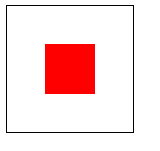
效果图:
第二种:
利用css3的新增属性table-cell, vertical-align:middle;
 .div1 {
     width: 100px;
     height: 100px;
     border: 1px solid #000000;
     display: table-cell;
     vertical-align: middle;
 }

 .div2 {
     width: 40px;
     height: 40px;
     background-color: red;
     margin: auto;
 }
效果:
第三种:
利用flexbox布局
    .div1 {
 width: 100px;
 height: 100px;
 border: 1px solid #000000;
 display: flex;

 justify-content: center;
 align-items: center;
    }

    .div2 {
 height: 40px;
 width: 40px;
 background-color: red;
    }
效果:
第四种:
利用transform的属性(缺点:需要支持Html5)
    .div1 {
 width: 100px;
 height: 100px;
 border: 1px solid #000000;
 position: relative;
    }

    .div2 {
 height: 40px;
 width: 40px;
 background-color: red;
 position: absolute;
 top: 50%;
 left: 50%;
 -ms-transform: translate(-50%, -50%);
 -moz-transform: translate(-50%, -50%);
 -o-transform: translate(-50%, -50%);
 transform: translate(-50%, -50%);
    }
效果图:
到此这篇关于CSS盒子居中的常用的几种方法(小结)的文章就介绍到这了,更多相关CSS盒子居中内容请搜索考高分网以前的文章或继续浏览下面的相关文章,希望大家以后多多支持考高分网!



