


1 效果
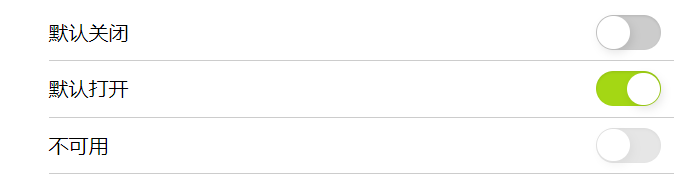
演示地址: https://www.albertyy.com/2020/7/check2.html
另一篇文章:https://www.jb51.net/css/735639.html
2 知识点
2.1
在html中,
关联控件的id一般指的是input元素的id;在html5中还新增了一个属性form,form属性是用来规定所属的一个或多个表单的 id 列表,以空格隔开;当
2.2 CSS float 属性
float属性指定一个盒子(元素)是否应该浮动。
属性值:
| 值 | 描述 |
|---|---|
| left | 元素向左浮动。 |
| right | 元素向右浮动。 |
| none | 默认值。元素不浮动,并会显示在其在文本中出现的位置。 |
| inherit | 规定应该从父元素继承 float 属性的值。 |
元素怎样浮动:
元素在水平方向浮动,即元素只能左右移动而不能上下移动。一个浮动元素会尽量向左或向右移动,直到它的外边缘碰到包含框或另一个浮动框的边框为止。浮动元素之后的元素将围绕它。浮动元素之前的元素将不会受到影响。
清除浮动 - 使用 clear:
元素浮动之后,周围的元素会重新排列,为了避免这种情况,使用 clear 属性。clear 属性指定元素两侧不能出现浮动元素。
注意: 绝对定位的元素忽略float属性!
2.3 CSS3 :checked 选择器
:checked 选择器匹配每个选中的输入元素(仅适用于单选按钮或复选框)。
2.4 CSS element+element 选择器
element+element 选择器用于选择(不是内部)指定的第一个元素之后紧跟的元素。
例如:选择所有紧接着 元素之后的第一个
元素:
div+p{ background-color:yellow; }
3 代码实现
.Switch { padding: 0; width: 500px; margin: auto; } .Switch li { clear: both; line-height: 44px; border-bottom: 1px solid #CCC; list-style: none; } .Switch input { display: none } .Switch label { width: 52px; background: #CCC; height: 28px; border-radius: 14px; float: right; margin: 8px 10px 0 0; box-shadow: 0 1px 2px rgba(0, 0, 0, .1) inset; cursor: pointer; } .Switch label em { width: 26px; height: 26px; float: left; margin: 1px; border-radius: 13px; box-shadow: 2px 3px 8px rgba(0, 0, 0, .1); background: #FFF; } .Switch input:checked+label { background: #a4d714; } .Switch input:checked+label em { float: right; } .Switch input:disabled+label { opacity: 0.5 }
- 默认关闭
- 默认打开
- 不可用
到此这篇关于纯CSS实现iOS风格打开关闭选择框的文章就介绍到这了,更多相关css ios 打开关闭选择框内容请搜索考高分网以前的文章或继续浏览下面的相关文章,希望大家以后多多支持考高分网!



