


废话不多说,直接上代码:
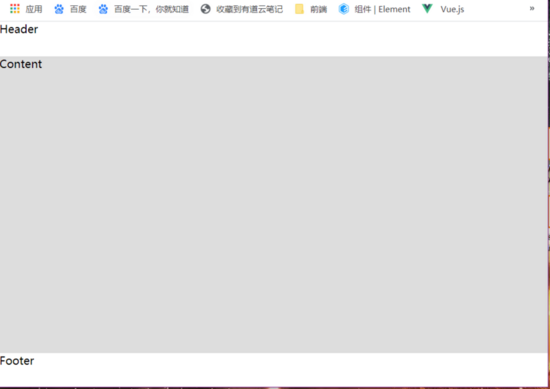
1、上中下布局:
     document

     body {
     position: absolute;
     left: 0; right: 0; top: 0; bottom: 0;
     padding: 0; margin: 0;
     display: flex;
     flex-direction: column;
     }
     .header, .footer {
     height: 50px;
     }
     .body {
     flex-grow: 1;
     background-color: #DDD;
     }


     Header
     Content
     Footer
显示效果如下:
2、左右布局:
     document

     body {
     position: absolute;
     left: 0; right: 0; top: 0; bottom: 0;
     padding: 0; margin: 0;
     display: flex;
     }
     .left, .right {
     height: 100%;
     }
     .left {
     width: 250px;
     background-color: rgba(255,0,0,0.3);
     }
     .right {
     display: flex;
     flex-direction: column;
     }
     .header, .footer {
     height: 50px;
     }
     .right, .content {
     flex-grow: 1;
     }
     .content {
     background-color: #DDD;
     }


     LeftNav

     Header
     Content
     Footer
页面的效果如下:

下面对几个关键的样式加以说明,这样就可以设计出任何想要的布局了:
flex-grow: 1; // 表示容器在主轴的宽度有多余时该子项占据剩余空间
position:absolute; left: 0;right: 0; top: 0; bottom: 0; // 这一组样式让该元素占满定位的父级元素
到此这篇关于使用flex布局轻松实现页面布局的示例代码的文章就介绍到这了,更多相关flex页面布局内容请搜索考高分网以前的文章或继续浏览下面的相关文章,希望大家以后多多支持考高分网!



