


兼容css3新属性
在css3中,我们可以使用prefixfree.min.js这个插件来自动为css3的相关属性加上兼容浏览器属性,使我们不用为每个css3新属性再加上属性(需要用到大量css3的项目时再引入)
content布局
当h5内嵌在app里面的时候,在iso手机下,底部(头部)固定按钮会跟着一起滚动,需要使用content布局,然后使用padding-bottom或者padding-top,把相应的位置空出来!!!
当需要在content里面滚动的时候,需要将body和html设置height:100%;然后content也需要设置height:100%,这样才可以实现在content里面里面滚动,当需要在body里面滚动的时候,需要将html、body中的height:100%;设置去掉!!不然body会被限制住,内容只显示一半不能滚动!!!
还有一种解决弹窗遮罩层底部出现滚动的方法就是,当出现弹窗的时候,通过js控制底下的内容为body{height:100%;overflow:hidden;},然后关闭弹窗的时候移除掉这个样式!!!
.content {
    padding-top: .88rem;
    -webkit-box-sizing: border-box;
    -moz-box-sizing: border-box;
    box-sizing: border-box;
    max-width: 750px;
    width: 100%;
    margin: 0 auto;
    overflow-x: hidden;
    height: 100%;
    overflow-y: auto;
    -webkit-overflow-scrolling: touch;
使用这种布局方式可以解决,单页面滚动的时候,点击弹窗,弹窗会被遮住滚动问题!!!
注意:当需要计算body的高度的时候,不能使用,还有当页面中,有表单,需要使用position:relative时,来使安卓键盘不被挡住!!!!但是为解决弹窗不滚动问题,可以通过,弹窗的时候,增加content布局,关闭弹窗的是移除content布局!!!
 //点击领取
 $(".reward-btn").click(function(){
     $(".reward-page").wrap("");
     $(".insurance-box").show();
     $(".dialog2").show();

 });
 //点击关闭大弹窗按钮
 $(".closeDia").click(function(){
     $(this).parent().parent().hide();
     $(".dialog2").hide();
     $(".reward-page").unwrap("");
 });
场景二:在content布局下,需要给页面设置背景图,可以在content下面在包裹一层大的div,然后对这个div进行全页面背景图设置,这样背景图才会随着内容超出一屏幕而滚动,而不是直接在content这个容器上设置背景图,如果直接在这个容器上设置背景图,那背景图不会滚动!!!
常见头部布局
两边有时候有文字或者图标,但是中间的标题固定居中,大概位置如下,就是内容会变化!!

布局如下
 设置个人中心更多

css:
.head{
    position:relative;
    width:100%;
    height:88px;
    line-height:88px;
    text-align:center;
}
.head-left, .head-right{
    position:absolute;
    height:88px;
    line-height:88px;
}
.head-left {
    left:30px;
}
.head-right {
    right:30px;
}
模拟上拉加载
  $(window).scroll(function() {
  var winH = $(window).height();
  var scrH = $(window).scrollTop();
  var htmH = $(document).height();
  //解决滚动到下面,遮罩层一半
  $(".fixed").height(htmH);

  if(winH + scrH >= htmH) {
      console.info(tabActive);
      if(tabActive==0){
   console.info(1111);
   if(next_page){
if(ajax_lock == true)
{
    ajax_lock = false;
    page++;
    getRecord(page,0);

}
   }
      }
});
1.美化复选框
效果
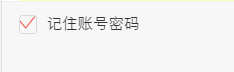
html代码
css代码
.hidden {
     display: none;
}
.checkbox:checked ~.icon-checkbox {
    background: url(../images/yes_15.png) no-repeat;
    background-size: 0.3rem 0.25rem;
}
.icon-checkbox {
    width: 0.3rem;
    height: 0.3rem;
    margin-right: 0.1rem;
    border: 0.02rem solid #d7d7d7;
    border-radius: 0.06rem;
}
.icon {
    display: inline-block;
    vertical-align: middle;
}
js
if(!$('#agreeTerm').is(":checked")){
$.alert('请勾选同意《保险条款》和《重要告知与申明》');
return;
};
.allCheck {
padding:0 .1rem 0 .3rem;
}
.check-icon {
display: inline-block;
width:1.5rem;
padding-left:.5rem;
background:url("../../assets/select-no.png")no-repeat left center;
background-size:.42rem .42rem ;
}
.check:checked ~ .check-icon {
background:url("../../assets/selected.png")no-repeat left center;
background-size:.42rem .42rem ;
}
2.模拟单选按钮
类似效果
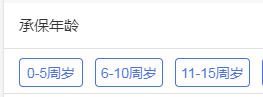
html代码
- 选择补偿金额补偿金说明
css代码
.selection-rd:checked ~ .selection-lb {
    color: #e44;
    border:1px solid #e44;
}
.selection-lb {
    display: inline-block;
    margin:33px 30px 30px 0;
    width:150px;
    height: 64px;
    line-height: 64px;
    white-space: nowrap;
    background-color: #fff;
    border:1px solid #bbc;
    border-radius: 5px;
    text-align: center;
    font-size: 32px;
}
jq代码
var payLevel=$("input[name='money_type']:checked").val();
3.中间文字,两边横线居中
效果

代码
学生信息

.title-center {
position:relative;
width:100%;
text-align: center;
height: 100px;
line-height: 100px;
font-size: 28px;
color: #4d72e2;
}
.title-center div{
display: inline-block;
padding:0 20px;
}
.title-center:before ,.title-center:after{
display: inline-block;
position: relative;
content:"";
height:2px;
width:48px;
top:-6px;
background-color:#4d72e2;
}

当设置rem为单位时,1px,会显示偏大,将.title-center:before ,.title-center:after修改为如下:

.title-center:before, .title-center:after {
display: inline-block;
position: relative;
content: "";
height: 1px;
width: 1.88rem;
top: -.1rem;
background-color: #fd734f;
-webkit-transform: scaleY(0.5);
transform: scaleY(0.5);
-webkit-transform-origin: 0 0;
transform-origin: 0 0;
}

终极版,rem单位,横线自适应长度!!!!


    我要居中,两边横线对齐


.border-center{

height: 1px;
background-color: #fd734f;
-webkit-transform: scaleY(0.5);
transform: scaleY(0.5);
-webkit-transform-origin: 0 0;
transform-origin: 0 0;
}
中间文字,两边横线居中方法2
效果图
不辜负你比较快糖果盒如果好
css
.card-title {
padding-top: .4rem;
font-size: .34rem;
color: #3c3c3c;
text-align: center;
font-weight: bold;
}

.card-title .text {
position: relative;
}
.card-title .text:before ,.card-title .text:after {
content: "";
display: inline-block;
position: absolute;
width: .4rem;
height: .32rem;
background: url('../images/card-title.png')no-repeat;
background-size: 100% 100%;
top: 50%;
margin-top: -.16rem;

}
.card-title .text:before{
left: -.51rem;
}
.card-title .text:after{
transform: rotateY(180deg);
-webkit-transform: rotateY(180deg);
right: -.51rem;
}
4.怎么实现图标水平垂直居中(rem单位)
利用background-size来设置背景图的本身大小尺寸,然后利用background-position:center center;来设置背景图相对元素的水平垂直居中,其中元素的宽是背景图的宽,高就是原来的高
sass的写法

@mixin headerIcon($width,$height,$url,$position) {
position: absolute;
$position: .3rem;
top: 0;
width: $width; //图标的宽度
height: .88rem; //头部的高度
background: url($url) no-repeat;
background-position:left center;
background-size:$width $height;
font-size: .3rem;
text-align: left;
}
方法二,

html:


     首页


css:

a{display:inline-block;}
.foot-nav1{
   width: .66rem;
    height: .66rem;
    display: block;
    margin: 0 auto;
    background:url();
}
span {
   display: block;
    line-height: .24rem;
    text-align: center;
    font-size: .24rem;
    height: .24rem;
    margin-bottom: .8rem;
    color: #666;
}
5.头部常用样式设置
我是标题
.header{
      width: 100%;
      height: .88rem;
      position: absolute;
      left: 0;
      top: 0;
      z-index: 998;
      border-bottom: 1px solid #f1f1f1;
      text-align: center;
      h1{
   font-size: .36rem;
   font-family: PingFangSC-Medium, sans-serif;
      }
      .left-icon{
 position: absolute;
 width: .88rem;
 height: .88rem;
 left: .3rem;
 top: 0;
 background: url('../../assets/back-icon.png') no-repeat;
 background-size:.17rem .35rem;
 background-position: left center;
 }
 .right-icon{
 position: absolute;
 width: .88rem;
 height: .88rem;
 right: .3rem;
 top: 0;
 background: url('../../assets/back-icon.png') no-repeat;
 background-size:.17rem .35rem;
 background-position: left center;
 }
6.常用表单布局
效果:
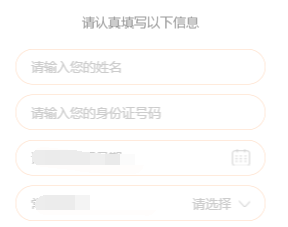
代码:
请认真填写以下信息
- 收货地址:
css:
.section2 li {
    list-style: none;
    position: relative;
    width: 500px;
    margin: 0 auto;
    border: 1px solid #ffd6b9;
    box-sizing: border-box;
    padding: 17px 30px;
    background-color: #fff;
    margin-top: 20px;
    border-radius: 40px;
}

.section2 li input {
    background-color: transparent;
    border: 0 none;
    color: #333;
    outline: none;
    position: relative;
    font-size: 26px;
    width: 435px;
    z-index: 102;
}
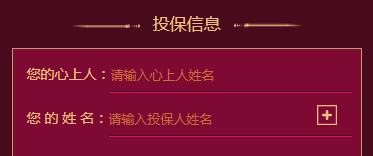
html:
css:
.sec3 li {
    position: relative;
    height: .88rem;
    -webkit-box-align: end;
    -moz-box-align: end;
    -ms-flex-align: end;
    -webkit-align-items: flex-end;
    align-items: flex-end;
    box-sizing: border-box;
}
.sec3 li label {
    padding-bottom: .2rem;
}
.sec3 li input {
    position: relative;
    width: 4.86rem;
    background: transparent;
    border: 0 none;
    border-bottom: 1px solid #dc115b;
    padding-bottom: .2rem;
    color: #efc283;
    font-size: .28rem;
    border-radius: 0;
}
7、上方图片下方文文字,水平居中布局
效果


css样式
.mall .details-foot .details-kefu {
    width: 1.56rem;
    height: .99rem;
    border-right: 1px solid #f1f1f1;
}

.mall .details-foot .details-kefu i {
    display: block;
    width: .42rem;
    height: .42rem;
    margin: .12rem auto .06rem;
    background: url(data:image/png;base64,iVBORw0KGgoAAAANSUhEUgAAACoAAAAqCAYAAADFw8lbAAAAGXRFW…7oxfKRixjo4VSJhW/sUYi1M9kR4RNoUZHpQEuX+Z/pXwEGAHRzn0c9HGr7AAAAAElFTkSuQmCC) no-repeat;
    background-size: 100% 100%;
}

.mall .details-foot .details-kefu-name {
    text-align: center;
}
8、答题进度条
就是用来展示答题进度的进度条,效果如下

其中img是形状底色(小圆圈是透明的)。而recommend-jd-bg是进度条背景色,recommend-jd-ks是控制进度的颜色!!,其中img的z-index>recommend-jd-bg>recommend-jd-ks

html:

css:
.recommend-jd {
    width: 6.43rem;
    position: absolute;
    top: 1.59rem;
    left: .54rem;
}
.recommend-jd-bg {
    width: 100%;
    height: .31rem;
    background: #fff;
    position: absolute;
    top: 0;
    z-index: 97;
}
.recommend-jd-ks {
    width: 12.5%;  //这个是js控制,根据题数的进度来控制!
    height: .31rem;
    background: #4a90ff;
    position: absolute;
    top: 0;
    z-index: 98;
}
.recommend-jd img {
    width: 100%;
    display: block;
    position: absolute;
    top: 0;
    z-index: 99;
    height: .31rem;
}
进度条2

    ¥0.01


.progressBar {
    margin: .3rem auto .1rem;
    width: 6.3rem;
    height: .1rem;
    background-color: rgb(72, 11, 29);
}

.progressPer {
    position: relative;
    top: 0;
    left: 0;
    display: inline-block;
    width: 0;
    height: .1rem;
    background-color: #efc283;
}
.moneyBox {
    position: absolute;
    right: -.53rem;
    top: .3rem;
    display: inline-block;
    width: 1.06rem;
    height: .4rem;
    background: url(../images/moneyBox.png)no-repeat;
    background-size: 100% 100%;
}
.moneyBox .moneyText {
    position: absolute;
    bottom: 0;
    left: 0;
    width: 1.04rem;
    height: .34rem;
    line-height: .34rem;
    text-align: center;
    color: #efc283;
    font-size: .26rem;
}
9.答题测试1-10题都在同一个页面
10、去掉selected自带的下拉框标识,增加如下属性
select {
    background: transparent;
 border: 0 none;
 outline:none;
appearance:none;
    -moz-appearance:none;
    -webkit-appearance:none;

}
11、修改input的placeholder样式
.detail-page input::-webkit-input-placeholder {
    font-size: .26rem;
    color:#b2b2b2;
    opacity:  1;
}
.detail-page input:-moz-placeholder {
   font-size: .26rem;
   color:#b2b2b2;
   opacity:  1;
}
.detail-page input::-moz-placeholder {
   font-size: .26rem;
   color:#b2b2b2;
   opacity:  1;
}
.detail-page input:-ms-input-placeholder {
   font-size: .26rem;
   color:#b2b2b2;
   opacity:  1;
}
12.input中增加disabled会自带灰色,修改颜色如下
input:disabled{
      border:1px solid #DDD;
      background-color:#F5F5F5;
      color:#ACA899;
}
13、多行文字左右对齐:
p {

   text-align: justify;
  text-justify: inter-ideograph;

}
效果

14、实现单行文字两端对齐,例如要实现下列单行文字对齐
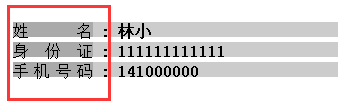
方法一,使用伪类:
html:
    姓名
    :
    林小


    身份证
    :
    111111111111


    手机号码
    :
    141000000
css:
.line{
 width:100%;
 height:15px;
 margin:5px;
}
.public{
 width:80px;
 height:100%;
 display:inline-block;
 text-align: justify;
 vertical-align:top;
}
.public::after{
 content:"";
 display: inline-block;
 width:100%;
 overflow:hidden;
 height:0;
}
方法二使用letter-spacing来解决:
html:
- 热门搜索
- 电视机
- 性感漂亮
- 高跟鞋
- 手机
- 对齐
- 牛仔裤
- 小家碧玉
- 家居
css:
.hotsearch dd{
float: left;
line-height: 24px;
margin-right: 30px;
overflow: hidden;
text-align: center;
width: 4em;
}
.hotsearch dd a{
display:block;
}
.w2{
letter-spacing:2em;
margin-right:-2em;
}
.w3{
letter-spacing:0.5em;
margin-right:-0.5em;
}
效果
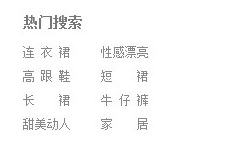
15、实现图片加载过程高度自适应
应用情景:在页面布局过程中,遇到轮播图或者大张图片,当图片下面还有其它块内容,在图片加载过程中,由于高度是0,下面的元素会往上跑,图片加载完。元素会往下跑,给用户感觉抖动。
解决方法:在图片最外层设置一个div,给这个div设置如下样式
.img-box {
 overflow: hidden;
 width: 100%;
 height: 0;
 padding-bottom: 52%;

 width:100%;

 height: 52%vw;
 background:#eee;
}
16、实现文字超出省略...(需要设置宽度,当父级元素使用flex布局时,需要在display:flex;这边设置min-width:0;不然ellipsis会失效!!)
.ellipsis {
    overflow: hidden;
    text-overflow: ellipsis;
    white-space: nowrap;
}
.ellipsis-2l {
    display: -webkit-box;
    overflow: hidden;
    text-overflow: ellipsis;
    -webkit-box-orient: vertical;
    -webkit-line-clamp: 2; //第几行
}
17、竖向滚动条
效果,每次点都要与时间对齐,可以把小圆点放在跟日期同一个div上,然后横线做成整个记录的背景图
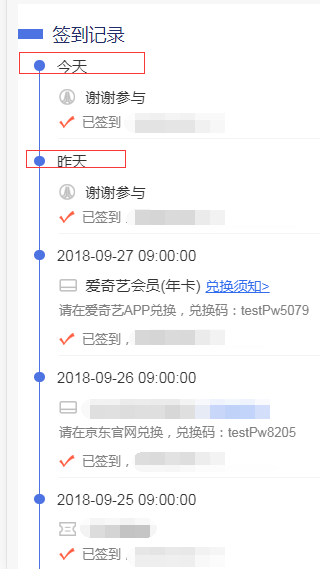
html:
 今天
 2元优惠券,无门槛可用去使用>
 已签到,获得1个白鸽币


 今天
 2元优惠券,无门槛可用去使用>
 请在爱奇艺APP兑换,兑换码:testPw5079
 已签到,获得1个白鸽币


 2018-09-28
 已签到,获得1个白鸽币


 今天
 2元优惠券,无门槛可用去使用>
 请在爱奇艺APP兑换,兑换码:testPw5079
 已签到,获得1个白鸽币
css:
.list {
    padding-top: .1rem;
    padding-bottom: .1rem;
    font-size: .3rem;
    color: #333;
    background-color: #fff;
}
.list-item {
    width: 100%;
    margin-left: .32rem;
    margin-top: -.15rem;
    padding-bottom: .4rem;
    background: url("../images/border.png") no-repeat .1rem .21rem;
    background-size: 1px 100%;
}
  .progres2-item {
      display: inline-block;
      margin-right: .25rem;
      width: .21rem;
      height: .21rem;
      background-color: #4d72e2;
      border-radius: 50%;
  }


.list-item:last-of-type{
    background:transparent;
}
.list-item-award,.list-item-text {
    margin-left: .5rem;
}
.list-item-award{
    padding-left: .53rem;
    margin-bottom: .12rem;
    margin-top: .22rem;

}
.list-item-text {
    width: 100%;
    padding-left: .46rem;
    padding-bottom: .16rem;
    background: url("../images/sign-icon.png") no-repeat left .05rem;
    background-size: .32rem .25rem;
    font-size: .26rem;
    color: #808080;
    box-sizing: border-box;
    border-bottom: 1px solid #f4f4f4;
}
.list-item:last-of-type .list-item-text {
    border-bottom: 0 none;
}
.list-item .list-btn {
    padding-left: .1rem;
    text-decoration: underline;
    font-size: .28rem;
    color: #316cec;
}
18、文字底部横线背景
让小白鸽知道您不是机器人哦!

.login-title {
    position: relative;
    height: .39rem;
    margin-top: .4rem;
    font-size: .34rem;
    color: #fff;
    text-align: center;
}
.login-title:after {
    content: "";
    position: absolute;
    width: 5.05rem;
    height: .21rem;
    background-color: #fe923f;
    z-index: -1;
    left: 0;
    right: 0;
    margin: 0 auto;
    bottom: 0;
}
附录: CSS常用样式汇编
1. 背景图自适应屏幕
.background{
  position: fixed;
  top: 0;
  left: 0;
  width: 100%;
  height: 100%;
  min-width: 1000px;
  z-index: -10;
  zoom: 1;
  background-color: #fff;
  background: url(../../assets/signin@2x.png) no-repeat;
  background-size: cover;
  -webkit-background-size: cover;
  -o-background-size: cover;
  background-position: center 0;
}
2. 高度自适应屏幕
.height{
  width: 200px;
  min-height: 400px;
  overflow: auto;
  height: 100vh;
  display: -webkit-flex;
}
到此这篇关于详解常用css样式(布局)的文章就介绍到这了,更多相关CSS样式布局内容请搜索考高分网以前的文章或继续浏览下面的相关文章,希望大家以后多多支持考高分网!



