


一、大概思路
1.1、
(备注:安装Zend framework,其附带apache2和php5)
1.2、
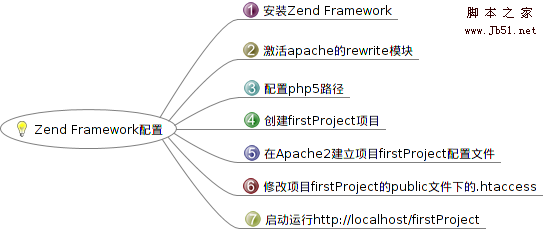
二、Zend framework配置
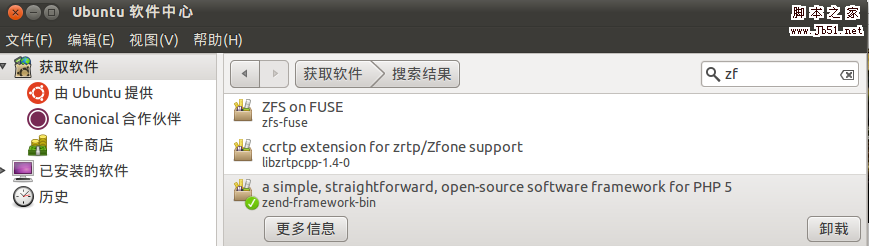
2.1、安装Zend framework
在ubuntu10.10的软件中心安装zf.
2.2、激活apache的rewrite模块
命令行输入:sudo a2enmod rewrite
2.3、配置PHP5路径
配置include_path路径信息,修改/etc/php5/con.d目录下的zend-framework.ini
终端输入:sudo gedit /etc/php5/conf.d/zend-framework.ini

2.4、创建firstProject项目
终端输入:zf create project firstProject
(其路径默认为 Ubuntu主文件目录下)

2.5、在Apache2建立firstProject项目配置文件
因为apache默认的web目录是在/var/www下,为了能够让 apache自动定位到指定目录下的web应用,这里我们在/etc/apache2/conf.d中创建一个关于firstProject的配置文件,称为 firstProject.conf。
终端输入:sudo gedit /etc/apache2/conf.d/firstProject.conf
文件的内容是:
复制代码代码如下:
Alias /firstProject "/home/administrator/firstProject/public/"
Allow from all
RewriteEngine on
Rewritebase /firstProject
RewriteCond %{REQUEST_FILENAME} !-f
RewriteRule !.(css|js|jpg|gif|png|swf|flv)$ index.php
Options FollowSymlinks MultiViews
AllowOverride All
2.6、修改项目firstProject的public文件下的.htaccess
增加一行Rewritebase /firstProject
(.htaccess默认是隐藏的,可按快捷键Ctrl+H显示出来)
RewriteEngine On
Rewritebase /firstProject
RewriteCond %{REQUEST_FILENAME} -s [OR]
RewriteCond %{REQUEST_FILENAME} -l [OR]
RewriteCond %{REQUEST_FILENAME} -d
RewriteRule ^.*$ - [NC,L]
RewriteRule ^.*$ index.php [NC,L]
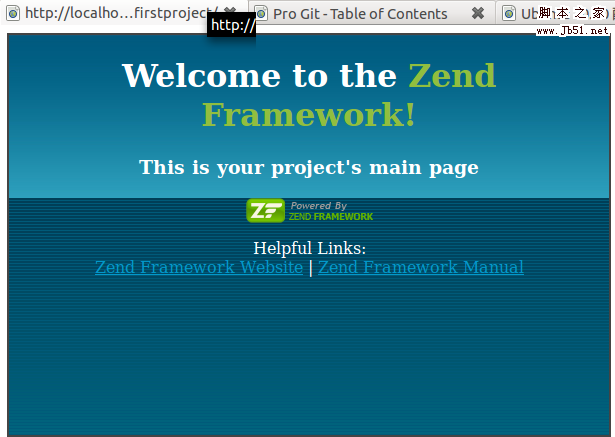
2.7、启动运行http://localhost/firstProject
三、Zend framework显示hello
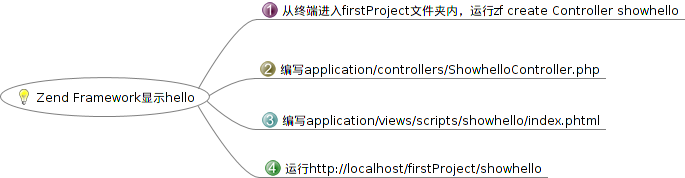
3.1、从终端进入firstProject文件夹内,运行zf create Controller showhello
3.2、编写application/controllers/ShowhelloController.php
复制代码代码如下:
class ShowhelloController extends Zend_Controller_Action {
public function init() {
}
public function indexAction() {
// action body
$this->view->content = "Hello World";
$this->render ();
}
}
3.3、编写application/views/scripts/showhello/index.phtml
复制代码代码如下:
name index
content;?>
3.4、运行http://localhost/firstProject/showhello
四、总结
配置环境虽然是件很麻烦的事,但是只要花一些时间,总可以找到相应的解决方法。



