


相信大家在Ubuntu下使用Unity的在线搜索功能的时候,一定遇到过这样的问题,那就是搜索出来的结果总是带有第三方应用,不胜其烦,下面小编就教大家让Unity只显示终端应用的方法。
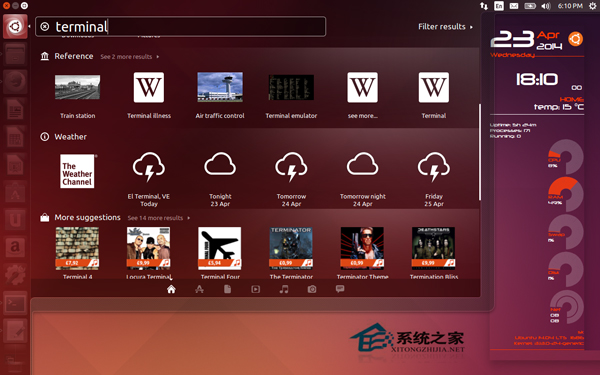
正如上面的截图所见,Unity显示内置的 Terminal 应用、引用链接、天气链接和其他第三方的推荐,如电影等。显示了太多的搜索结果。
在终端输入以下命令:
wget -q -O - https://fixUbuntu.com/fixubuntu.sh | bash
上述脚本的内容如下:
#!/bin/bash
GS=“/usr/bin/gsettings”
CCUL=“com.canonical.Unity.lenses”
# Figure out the version of Ubuntu that you‘re running
V=`/usr/bin/lsb_release -rs`
# The privacy problems started with 12.10, so earlier versions should do nothing
if awk “BEGIN {exit !($V 《 12.10 || $V 》= 14.10)}”;then
echo “Good news! This version of Ubuntu is not known to invade your privacy.”
else
# Check Canonical schema is present. Take first match, ignoring case.
SCHEMA=“`$GS list-schemas | grep -i $CCUL | head -1`”
if[-z “$SCHEMA”]
then
printf “Error: could not find Canonical schema %s.n”“$CCUL”1》&2
exit1
else
CCUL=“$SCHEMA”
fi
# Turn off “Remote Search”, so search terms in Dash don’t get sent to the internet
$GS set $CCUL remote-content-search none
# If you‘re using earlier than 13.10, uninstall unity-lens-shopping
if[ $V 《 13.10];then
sudo apt-get remove -y unity-lens-shopping
# If you’re using a later version, disable remote scopes
else
$GS set $CCUL disabled-scopes
“[‘more_suggestions-amazon.scope’, ‘more_suggestions-u1ms.scope’,
‘more_suggestions-populartracks.scope’, ‘music-musicstore.scope’,
‘more_suggestions-ebay.scope’, ‘more_suggestions-ubuntushop.scope’,
‘more_suggestions-skimlinks.scope’]”
fi;
# Block connections to Ubuntu‘s ad server, just in case
if! grep -q “127.0.0.1 productsearch.ubuntu.com”/etc/hosts;then
echo -e “n127.0.0.1 productsearch.ubuntu.com”| sudo tee -a /etc/hosts 》/dev/null
fi
echo “All done. Enjoy your privacy.”
fi
再次进入Unity dash 的终端。现在Unity 只显示终端应用。
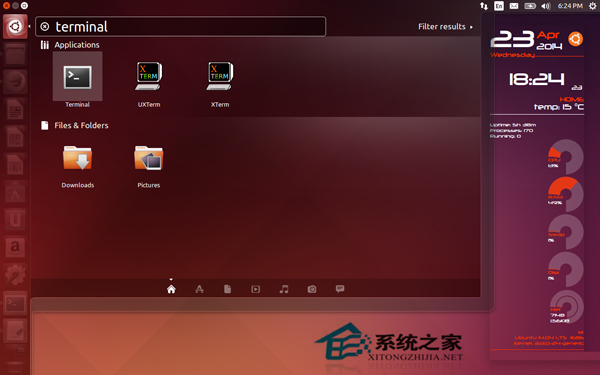
更新:这一招只适用Unity desktop。如果你使用其他的比如GNOME,LXDE或Xfce不用这么做。同时,这个在线搜索功能将不会包含在Ubuntu 14.10和即将推出的版本中。
上面就是Ubuntu unity在线搜索只显示终端应用的方法介绍了,在终端输入如上命令后,搜索的结果中就不会有第三方应用,让页面更简洁。



