


其实我们可以用Shift来控制窗口动画的速度,但首先得先修改一下注册表以打开控制功能。
1.WIN+R运行regedit
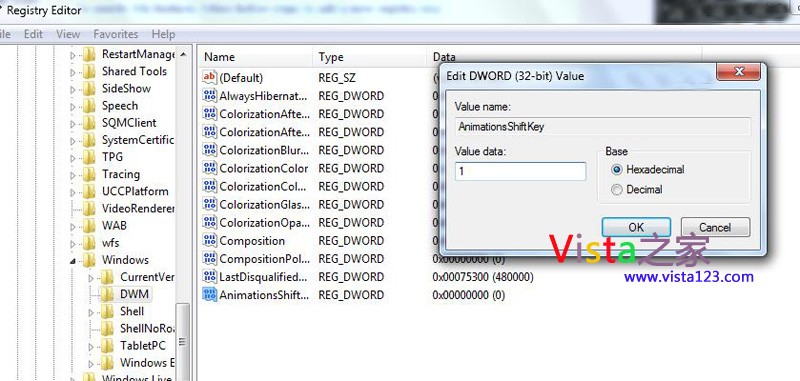
2.定位到:HKEY_CURRENT_USERSoftwareMicrosoftWindowsDWM.
3.右键DWM值,新建DWORD值(32位)
4.命名为AnimationsShiftKey.
5.双击AnimationsShiftKey,将其值改为1,确定
6.退出注册表编辑器并注销或重启系统
现在按住Shift键最大化/最小化窗口试试。
附部分原文:
When you minimize, maximize or close any windows/applications, the animation speed to perform these tasks is a default setting and you can’t really control it.
However, you can actually change the window animation speed by just holding down the SHIFT key to make the transition slower after doing some simple registry hack.
...



