


在Windwos 10系统中,我们可以通过【Windwos设置】—【应用和功能】中卸载软件。有用户反应,在卸载的时候发现有的软件无法卸载的情况,该怎么办?下面考高分网的小编给大家分享下解决方法。
原因分析:
由于一些windwos自带的应用是无法使用正常方法卸载,需要通过特殊手段才可以卸载
解决方法:
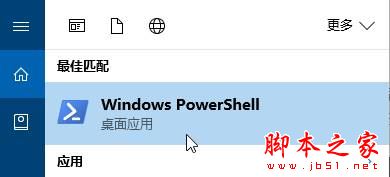
1、打开小娜,搜索“Windows PowerShell”,在最佳匹配下的“Windows PowerShell”上单击右键,选择“以管理员身份运行”;
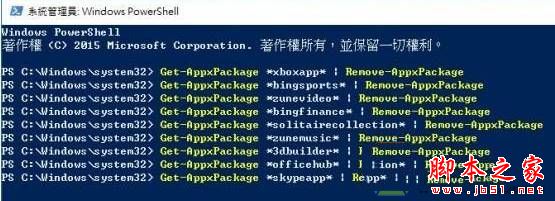
2、从下面找到你所需要卸载的程序,复制代码,在“Windows PowerShell”中粘贴进去,按下回车键即可卸载。代码如下:
Groove 音乐
Get-AppxPackage *zunemusic* | Remove-AppxPackage
oneNote
Get-AppxPackage *onenote* | Remove-AppxPackage
地图
Get-AppxPackage *windowsmaps* | Remove-AppxPackage
3D Builder
Get-AppxPackage *3dbuilder* | Remove-AppxPackage
闹钟与时钟
Get-AppxPackage *windowsalarms* | Remove-AppxPackage
天气
Get-AppxPackage *bingweather* | Remove-AppxPackage
Xbox
Get-AppxPackage *xboxapp* | Remove-AppxPackage
行事历
Get-AppxPackage *windowscalculator* | Remove-AppxPackage
行事历与邮件
Get-AppxPackage *windowscommunicationsapps* | Remove-AppxPackage
相机
Get-AppxPackage *windowscamera* | Remove-AppxPackage
取得Office
Get-AppxPackage *officehub* | Remove-AppxPackage
取得Skype
Get-AppxPackage *skypeapp* | Remove-AppxPackage
取得开始
Get-AppxPackage *getstarted* | Remove-AppxPackage
Microsoft Solitaire Collection 扑克牌游戏
Get-AppxPackage *solitairecollection* | Remove-AppxPackage
财经
Get-AppxPackage *bingfinance* | Remove-AppxPackage
Movies & TV
Get-AppxPackage *zunevideo* | Remove-AppxPackage
新闻
Get-AppxPackage *bingnews* | Remove-AppxPackage
联络人
Get-AppxPackage *people* | Remove-AppxPackage
手机小帮手
Get-AppxPackage *windowsphone* | Remove-AppxPackage
相片
Get-AppxPackage *photos* | Remove-AppxPackage
市集
Get-AppxPackage *windowsstore* | Remove-AppxPackage
运动
Get-AppxPackage *bingsports* | Remove-AppxPackage
语音录音机
Get-AppxPackage *soundrecorder* | Remove-AppxPackage
拓展阅读:
win10系统无法卸载程序提示请等待当前程序完成卸载或更改的两种解决方法
win10系统电脑无法卸载office提示此产品安装文件已损坏的有效解决方法
以上就是Win10系统应用和功能卸载按钮灰色无法卸载应用的原因及解决方法图文教程,方法很简单,有该需要的朋友可以按照上述的方法进行设置解决!



