


apache shiro框架简介
Apache Shiro是一个强大而灵活的开源安全框架,它能够干净利落地处理身份认证,授权,企业会话管理和加密。现在,使用Apache Shiro的人越来越多,因为它相当简单,相比比Spring Security,Shiro可能没有Spring Security那么多强大的功能,但是在实际工作时可能并不需要那么复杂的东西,所以使用简单的Shiro就足够了。
以下是你可以用 Apache Shiro所做的事情:

Shiro的4大核心部分——身份验证,授权,会话管理和加密
Authentication:身份验证,简称“登录”。
Authorization:授权,给用户分配角色或者权限资源
Session Management:用户session管理器,可以让CS程序也使用session来控制权限
Cryptography:把JDK中复杂的密码加密方式进行封装。
除了以上功能,shiro还提供很多扩展
Web Support:主要针对web应用提供一些常用功能。
Caching:缓存可以使应用程序运行更有效率。
Concurrency:多线程相关功能。
Testing:帮助我们进行测试相关功能
Run As:一个允许用户假设为另一个用户身份(如果允许)的功能,有时候在管理脚本很有用。
Remember Me:记住用户身份,提供类似购物车功能。
shiro框架认证流程

Application Code:应用程序代码,由开发人员负责开发的
Subject:框架提供的接口,是与程序进行交互的对象,可以是人也可以是服务或者其他,通常就理解为用户。所有Subject 实例都必须绑定到一个SecurityManager上。我们与一个 Subject 交互,运行时shiro会自动转化为与 SecurityManager交互的特定 subject的交互。
SecurityManager:框架提供的接口,是 Shiro的核心,代表安全管理器对象。初始化时协调各个模块运行。然而,一旦 SecurityManager协调完毕,SecurityManager 会被单独留下,且我们只需要去操作Subject即可,无需操作SecurityManager 。 但是我们得知道,当我们正与一个 Subject 进行交互时,实质上是 SecurityManager在处理 Subject 安全操作。
Realm:可以开发人员编写,框架也提供一些。Realms在 Shiro中作为应用程序和安全数据之间的“桥梁”或“连接器”。他获取安全数据来判断subject是否能够登录,subject拥有什么权限。他有点类似DAO。在配置realms时,需要至少一个realm。而且Shiro提供了一些常用的 Realms来连接数据源,如LDAP数据源的JndiLdapRealm,JDBC数据源的JdbcRealm,ini文件数据源的IniRealm,properties文件数据源的PropertiesRealm,等等。我们也可以插入自己的 Realm实现来代表自定义的数据源。 像其他组件一样,Realms也是由SecurityManager控制。
更详细的图

下面就开始shiro与SSM工程的整合使用
下载地址:http://shiro.apache.org/download.html
下载下来这两个个文件,一个jar包,一个源码文件

首先,第一步,将jar包导入到工程中
然后,第二步,在web.xml中配置spring框架提供的用于整合shiro框架的过滤器(一定要放到springmvc或struts框架过滤器的前面,为了保险起见,放到最上面就好了)
  shiroFilter
  org.springframework.web.filter.DelegatingFilterProxy


  shiroFilter

@RequestMapping("/login")
public String login(User user, HttpServletRequest request, Model model){
  HttpSession session = request.getSession();
  User newUser = userService.login(user);
  if(newUser != null){
    session.setAttribute("loginUser",newUser);
    return "home/home";
  }
  model.addAttribute("errorMessage","用户名或者密码不正确!");
  return "forward:/index.jsp";
}
修改后的login方法
@RequestMapping("/login")
public String login(User user, HttpServletRequest request, Model model){
  HttpSession session = request.getSession();
  //使用Shiro框架提供的方式进行认证
  Subject subject = SecurityUtils.getSubject(); //获得当前登录用户对象,现在状态为 “未认证”
  //用户名密码令牌
  AuthenticationToken token = new UsernamePasswordToken(user.getLoginName(), MD5Utils.md5(user.getPassword()));
  try{
    subject.login(token); //执行你自定义的Realm
    User user1 = (User) subject.getPrincipal();
    session.setAttribute("loginUser",user1);
    return "home/home";
  }catch(UnknownAccountException e){
    e.printStackTrace();
    model.addAttribute("errorMessage","此用户名不存在!");
  }catch(IncorrectCredentialsException e){
    e.printStackTrace();
    model.addAttribute("errorMessage","密码不正确!");
  }catch(Exception e){
    e.printStackTrace();
  }
  return "forward:/index.jsp";
}
第六步:自定义realm,并注入给安全管理器
创建一个UserRealm类,继承AuthorizingRealm这个类
public class UserRealm extends AuthorizingRealm{
  @Autowired
  private UserDao userDao;
   //认证方法
  @Override
  protected AuthenticationInfo doGetAuthenticationInfo(AuthenticationToken token) throws AuthenticationException {
    System.out.println("realm中的认证方法执行了。。。。");
    UsernamePasswordToken myToken = (UsernamePasswordToken) token;
    String loginName = myToken.getUsername();
    //根据用户名查询数据库中的用户,这个方法是自己写的
    User user = userDao.findUserByLoginName(loginName);
    if(user == null){
      //用户名不存在
      return null;
    }
    //如果能查询到,再由框架比对数据库中查询到的密码和页面提交的密码是否一致
    AuthenticationInfo info = new SimpleAuthenticationInfo(user, user.getPassword(), this.getName());
    return info;
  }
   //授权方法
  @Override
  protected AuthorizationInfo doGetAuthorizationInfo(PrincipalCollection principals) {
    return null;
  }
}
将自定义realm注入给安全管理器
到这里程序就可以正常运行了,登录后进入首页

但是点击角色管理,会进入没有权限的页面

这是因为我在spring配置文件中配置了 /role/findAllRoleList = perms["角色管理"],而我还没有给当前用户授权,所以当前用户没有权限访问此路径
所以要给该用户授权,在UserRealm类中,编写授权方法
//授权方法
  @Override
  protected AuthorizationInfo doGetAuthorizationInfo(PrincipalCollection principals){
    SimpleAuthorizationInfo info = new SimpleAuthorizationInfo();
    User user = (User) principals.getPrimaryPrincipal();
    for (Role role : user.getRoles()){
      for (Privilege privilege : role.getPrivileges()){
 info.addStringPermission(privilege.getName());
      }
    }
    return info;
  }
这样,就可以正常访问了,这个授权方法是在访问/role/findAllRoleList这个路径时,shiro框架自动调用的
我们之前进行权限控制是在spring配置文件中配置了 /role/findAllRoleList = perms["角色管理"] ,现在介绍另一种方式,也是我比较喜欢的方式, 使用注解方式进行权限控制
使用shiro的方法注解方式权限控制
第一步:在springmvc配置文件中开启shiro注解支持(注意:springmvc框架,放到springmvc配置文件中,struts放到spring配置文件中)
第二步:在Controller的方法上使用shiro注解------ @RequiresPermissions("") 执行这个方法必须有相应的权限
  @RequiresPermissions("角色列表") //执行这个方法必须有角色列表这个权限
  @RequestMapping("/findAllRoleList")
  public String findAllRoleList(Model model){
    List roleList = roleService.findAllRoleList();
    model.addAttribute("roleList",roleList);
    return "role/list";
  }
@RequiresAuthentication
验证用户是否登录,等同于方法subject.isAuthenticated() 结果为true时。
@ RequiresUser
验证用户是否被记忆,user有两种含义:
一种是成功登录的(subject.isAuthenticated() 结果为true);
另外一种是被记忆的( subject.isRemembered()结果为true)。
@ RequiresGuest
验证是否是一个guest的请求,与@ RequiresUser完全相反。
换言之,RequiresUser == ! RequiresGuest 。
此时subject.getPrincipal() 结果为null.
@ RequiresRoles
例如:
@RequiresRoles("aRoleName");
     void someMethod();
如果subject中有aRoleName角色才可以访问方法someMethod。如果没有这个权限则会抛出异常AuthorizationException。
@RequiresPermissions
例如:
@RequiresPermissions( {"file:read", "write:aFile.txt"} )
     void someMethod();
要求subject中必须同时含有file:read和write:aFile.txt的权限才能执行方法someMethod()。否则抛出异常AuthorizationException。
注解方式的权限控制就完成了,但这种方式没有权限时不会自动跳转到没有权限的页面,而是直接把异常抛到页面了,所以我们要配置一个全局的异常处理
第三步:在springmvc配置文件中,进行如下配置,配置全局异常捕获,当shiro框架抛出权限不足异常时,跳转到权限不足提示页面
redirect:/noPrivilegeUI.jsp
使用shiro提供的页面标签方式权限控制
最后,说一说shiro提供的页面标签
第一步:在jsp页面中引入shiro的标签库
<%@ taglib uri="http://shiro.apache.org/tags" prefix="shiro"%>
第二步:使用shiro的标签控制页面元素展示
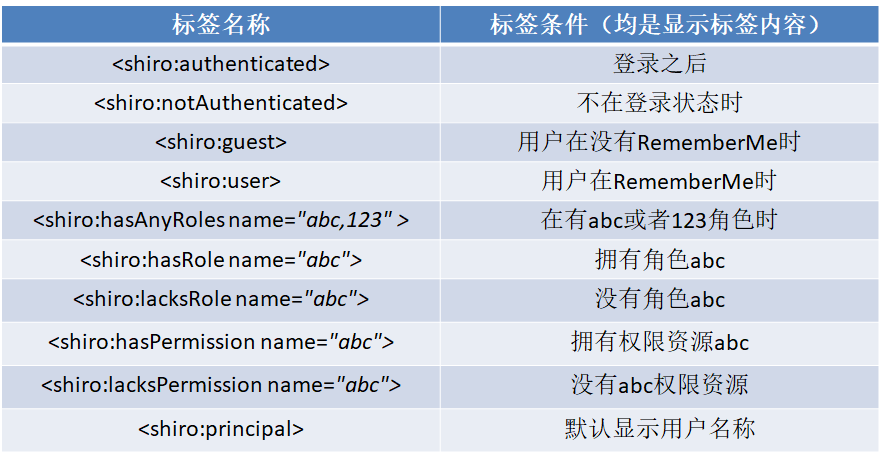
这样,一个shiro入门程序就完成了。
总结
以上所述是小编给大家介绍的Apache shiro的简单介绍与使用教程(与spring整合使用),希望对大家有所帮助,如果大家有任何疑问请给我留言,小编会及时回复大家的。在此也非常感谢大家对考高分网网站的支持!



