


本文介绍了Visual Studio Code(vscode) git的使用,分享给大家,具体如下:
1.创建一个github账号

2.在vscode中执行命令
echo "# C-Tests" >> README.md
git init
git add README.md
git commit -m "first commit"
git remote add origin https://github.com/harryluo163/C-Tests.git
git push -u origin master
执行时候会让你属于账户密码,vscode
先按照提示去下载git
1.安装
Git:
sudo apt-get install git
全局配置
git config --global user.name "YourName"
git config --global user.email YourName@gmail.com
查看配置
git config user.name
git config user.email
或
git config --list
或查看一下文件
~/.gitconfig
3.回到vs code打开git工作区就会看到所有代码显示在这里


4.然后按提示随便在消息框里输入一个消息,再按ctrl+enter提交

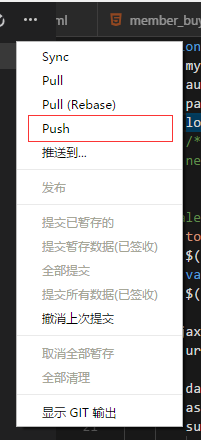
5.然后把所有暂存的代码push云端
6.打开github,发生改变了哦

以上就是本文的全部内容,希望对大家的学习有所帮助,也希望大家多多支持考高分网。



