


Linux下安装nginx和安装多个tomcat的方法这里不过多介绍,不清楚的可参考:
Linux安装nginx:
https://www.jb51.net/article/159519.htm
Linux安装多个tomcat:
https://www.jb51.net/article/159521.htm
当我们服务器安装好了nginx,并且安装了多台tomcat,那么我们现在可以试着玩玩nginx的负载均衡。
先简单介绍我的运行环境
一台阿里云服务器,
Linux系统,jdk1.8, 已安装好nginx,
安装了4个tomcat,并且配置好了各端口号,分别对应8080,8081,8082,8083

一:进入nginx目录下的conf目录
这是我的nginx安装目录:
[root@aliServer ~]# cd /usr/local/nginx/conf
二:编辑nginx.conf

[root@aliServer conf]# vi nginx.conf
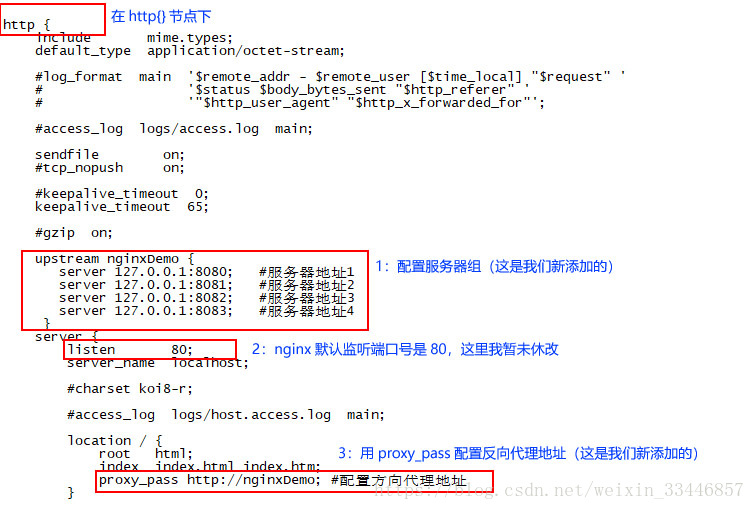
三:配置服务器组
1:在http{}节点之间添加upstream配置。(注意不要写localhost,不然访问速度会很慢)
upstream nginxDemo {
  server 127.0.0.1:8081;  #服务器地址1
  server 127.0.0.1:8082;  #服务器地址2
  server 127.0.0.1:8082;  #服务器地址3
  server 127.0.0.1:8083;  #服务器地址4
}
2:修改nginx监听的端口号80
nginx默认端口是80,这里我暂未更改,保持不变
server {
  listen    80;   #默认是80,也可更改为其他的,当然已被占用的端口号不能写。
  ......
}
3:用proxy_pass配置反向代理地址
在location{}中,利;此处“http://”不能少,后面的地址要和第一步upstream定义的名称保持一致(也就是nginxDemo这个名称是自定义的,两个地方需要一致)
location / {
      root  html;
      index index.html index.htm;
      proxy_pass http://nginxDemo; #配置方向代理地址
    }
配置完成后,如图:
四:启动nginx
我的安装nginx路径是 /usr/local/nginx
所以我的启动命令是:
[root@aliServer ~]# /usr/local/nginx/sbin/nginx
因为nginx之前安装时就已经启动了,现在再启动就报错端口号被占用

这时我们使用命令查看各端口号占用情况
[root@aliServer ~]# netstat -ntpl

我们看到,nginx被9097这个PID占用着,使用kill -9杀掉
[root@aliServer ~]# kill -9 9097
再次启动nginx
[root@aliServer ~]# /usr/local/nginx/sbin/nginx
没有任何反应,这就对了,这时在浏览器中输入你服务器地址

说明nginx启动成功,至于配置是否正确,是否能负载匀衡,现在开始验证。。。
五:验证
我们都知道,nginx负载均衡时客户端所有请求都经过nginx,那么nginx就可以决定将这些请求转发给谁,如果服务器A的资源更充分(CPU更多、内存更大等等),服务器B没有服务器A处理能力强,那么nginx就会把更多的请求转发到A,转发较少的请求到服务器B,这样就做到了负载均衡,而且就算其中一台服务器宕机了,对于用户而言也能正常访问网站。
在验证前,需要先做点准备。
1:准备一个简单点的jsp,如:

我一台服务器上安装了4个tomcat,所以我准备了4个index.jsp文件
分别是
Tomcat8080<title> Hellow Tomcat_8080
<title>Tomcat8081<title> Hellow Tomcat_8081
<title>Tomcat8082<title> Hellow Tomcat_8082
<title>Tomcat8083<title> Hellow Tomcat_8083</pre>

<p>这里需要注意的是:jsp文件的名字一定要是index.jsp,因为tomcat启动成功的画面,如图:</p>
<p style="text-align: center"><br/><a alt="" href="http://img.jbzj.com/file_images/article/201904/2019041111153356.png" data-fancybox="images"><img alt="" src="http://img.jbzj.com/file_images/article/201904/2019041111153356.png" /  alt="Linux下Nginx负载均衡多个tomcat配置的方法步骤" title="Linux下Nginx负载均衡多个tomcat配置的方法步骤"></a><br/><br />
</p>
<p>读取就是tomcat安装目录下的webapps/ROOT/index.jsp</p>
<p>我的地址是:/usr/java/tomcat/tomcat_8080/webapps/ROOT<br />
</p>
<p style="text-align: center"><br/><a alt="" href="http://img.jbzj.com/file_images/article/201904/2019041111153357.png" data-fancybox="images"><img alt="" src="http://img.jbzj.com/file_images/article/201904/2019041111153357.png" /  alt="Linux下Nginx负载均衡多个tomcat配置的方法步骤" title="Linux下Nginx负载均衡多个tomcat配置的方法步骤"></a><br/><br />
</p>
<p>将先前准备的4个index.jsp文件,覆盖每个tomcat默认的index.jsp文件。</p>
<p>启个各个tomcat</p>

<pre class="brush:php;toolbar:false">
[root@aliServer bin]# ./startup.sh</pre>

<p>这时我们再在浏览器输入 xxx.xxx.xx.xx:8080  你会发现,不在出现那只小猫了,而是。。。。。。</p>
<p style="text-align: center"><br/><a alt="" href="http://img.jbzj.com/file_images/article/201904/2019041111153358.png" data-fancybox="images"><img alt="" src="http://img.jbzj.com/file_images/article/201904/2019041111153358.png" /  alt="Linux下Nginx负载均衡多个tomcat配置的方法步骤" title="Linux下Nginx负载均衡多个tomcat配置的方法步骤"></a><br/><br />
</p>
<p style="text-align: center"><br/><a alt="" href="http://img.jbzj.com/file_images/article/201904/2019041111153359.png" data-fancybox="images"><img alt="" src="http://img.jbzj.com/file_images/article/201904/2019041111153359.png" /  alt="Linux下Nginx负载均衡多个tomcat配置的方法步骤" title="Linux下Nginx负载均衡多个tomcat配置的方法步骤"></a><br/><br />
</p>
<p style="text-align: center"><br/><a alt="" href="http://img.jbzj.com/file_images/article/201904/2019041111153360.png" data-fancybox="images"><img alt="" src="http://img.jbzj.com/file_images/article/201904/2019041111153360.png" /  alt="Linux下Nginx负载均衡多个tomcat配置的方法步骤" title="Linux下Nginx负载均衡多个tomcat配置的方法步骤"></a><br/><br />
</p>
<p style="text-align: center"><br/><a alt="" href="http://img.jbzj.com/file_images/article/201904/2019041111153361.png" data-fancybox="images"><img alt="" src="http://img.jbzj.com/file_images/article/201904/2019041111153361.png" /  alt="Linux下Nginx负载均衡多个tomcat配置的方法步骤" title="Linux下Nginx负载均衡多个tomcat配置的方法步骤"></a><br/></p>
<p>4个tomcat都启动成功了,nginx也已启动成功了。</p>
<p>这时输入在浏览器输入你的服务器ip,不停的刷新页面,你会发现页面一会显示8080,一会显示8081,一会显示8082,一会显示8083,当然这个是nginx根据哪个服务器资源更充分而决定请求去什么地方的,我们在浏览器的请求的地址不变,却访问的是不同的tomcat服务器,说明,nginx配置成功。</p>
<p>以上就是本文的全部内容,希望对大家的学习有所帮助,也希望大家多多支持考高分网。</p></div>
</div>
<div style="clear: both;"></div>
<div class="author-info fl">
<div><span class="gray">转载请注明:</span>文章转载自 <a href="https://www.mshxw.com/" class="blue">www.mshxw.com</a></div>
<div><span class="gray">本文地址:</span><a href="https://www.mshxw.com/it/178694.html" class="blue">https://www.mshxw.com/it/178694.html</a></div>
</div>
<div class="prev fl">
<p>   <a style='text-align:left;' class='center-block text-center glyphicon glyphicon-collapse-down' href="https://www.mshxw.com/it/178735.html">上一篇  ubuntu下编译安装opencv的方法</a>
 </p>
<p>   <a style='text-align:left;' class='center-block text-center glyphicon glyphicon-collapse-down' href="https://www.mshxw.com/it/178664.html">下一篇  Linux下sshd服务及服务管理命令详解</a>
  </p>
</div>
<div class="new_tag fl">
</div>
</div>
<div class="new_r fr" style="border-radius:10px;">
<div class="tui fl">
<h3>服务器相关栏目本月热门文章</h3>
<ul>
  <li><span>1</span><a href="https://www.mshxw.com/it/1041277.html" title="【Linux驱动开发】设备树详解(二)设备树语法详解">【Linux驱动开发】设备树详解(二)设备树语法详解</a></li>
  <li><span>2</span><a href="https://www.mshxw.com/it/1041273.html" title="别跟客户扯细节">别跟客户扯细节</a></li>
  <li><span>3</span><a href="https://www.mshxw.com/it/1041266.html" title="Springboot+RabbitMQ+ACK机制(生产方确认(全局、局部)、消费方确认)、知识盲区">Springboot+RabbitMQ+ACK机制(生产方确认(全局、局部)、消费方确认)、知识盲区</a></li>
  <li><span>4</span><a href="https://www.mshxw.com/it/1041261.html" title="【Java】对象处理流(ObjectOutputStream和ObjectInputStream)">【Java】对象处理流(ObjectOutputStream和ObjectInputStream)</a></li>
  <li><span>5</span><a href="https://www.mshxw.com/it/1041256.html" title="【分页】常见两种SpringBoot项目中分页技巧">【分页】常见两种SpringBoot项目中分页技巧</a></li>
  <li><span>6</span><a href="https://www.mshxw.com/it/1041299.html" title="一文带你搞懂OAuth2.0">一文带你搞懂OAuth2.0</a></li>
  <li><span>7</span><a href="https://www.mshxw.com/it/1041297.html" title="我要写整个中文互联网界最牛逼的JVM系列教程 | 「JVM与Java体系架构」章节:虚拟机与Java虚拟机介绍">我要写整个中文互联网界最牛逼的JVM系列教程 | 「JVM与Java体系架构」章节:虚拟机与Java虚拟机介绍</a></li>
  <li><span>8</span><a href="https://www.mshxw.com/it/1041296.html" title="【Spring Cloud】新闻头条微服务项目:FreeMarker模板引擎实现文章静态页面生成">【Spring Cloud】新闻头条微服务项目:FreeMarker模板引擎实现文章静态页面生成</a></li>
  <li><span>9</span><a href="https://www.mshxw.com/it/1041294.html" title="JavaSE - 封装、static成员和内部类">JavaSE - 封装、static成员和内部类</a></li>
  <li><span>10</span><a href="https://www.mshxw.com/it/1041291.html" title="树莓派mjpg-streamer实现监控及拍照功能调试">树莓派mjpg-streamer实现监控及拍照功能调试</a></li>
  <li><span>11</span><a href="https://www.mshxw.com/it/1041289.html" title="用c++写一个蓝屏代码">用c++写一个蓝屏代码</a></li>
  <li><span>12</span><a href="https://www.mshxw.com/it/1041285.html" title="从JDK8源码中看ArrayList和LinkedList的区别">从JDK8源码中看ArrayList和LinkedList的区别</a></li>
  <li><span>13</span><a href="https://www.mshxw.com/it/1041281.html" title="idea 1、报错java: 找不到符号 符号: 变量 log 2、转换成Maven项目">idea 1、报错java: 找不到符号 符号: 变量 log 2、转换成Maven项目</a></li>
  <li><span>14</span><a href="https://www.mshxw.com/it/1041282.html" title="在openwrt使用C语言增加ubus接口(包含C uci操作)">在openwrt使用C语言增加ubus接口(包含C uci操作)</a></li>
  <li><span>15</span><a href="https://www.mshxw.com/it/1041278.html" title="Spring 解决循环依赖">Spring 解决循环依赖</a></li>
  <li><span>16</span><a href="https://www.mshxw.com/it/1041275.html" title="SpringMVC——基于MVC架构的Spring框架">SpringMVC——基于MVC架构的Spring框架</a></li>
  <li><span>17</span><a href="https://www.mshxw.com/it/1041272.html" title="Andy‘s First Dictionary C++ STL set应用">Andy‘s First Dictionary C++ STL set应用</a></li>
  <li><span>18</span><a href="https://www.mshxw.com/it/1041271.html" title="动态内存管理">动态内存管理</a></li>
  <li><span>19</span><a href="https://www.mshxw.com/it/1041270.html" title="我的创作纪念日">我的创作纪念日</a></li>
  <li><span>20</span><a href="https://www.mshxw.com/it/1041269.html" title="Docker自定义镜像-Dockerfile">Docker自定义镜像-Dockerfile</a></li>
</ul>
</div>
</div>
</div>
<!-- 公共尾部 -->
<div class="link main">
<div class="link_tit">
<span class="on">热门相关搜索</span>
</div>
<div class="link_tab">
<div class="link_con">
<a href="http://www.mshxw.com/TAG_1/luyouqishezhi.html">路由器设置</a>
<a href="http://www.mshxw.com/TAG_1/mutuopan.html">木托盘</a>
<a href="http://www.mshxw.com/TAG_1/baotamianban.html">宝塔面板</a>
<a href="http://www.mshxw.com/TAG_1/shaoerpython.html">儿童python教程</a>
<a href="http://www.mshxw.com/TAG_1/xinqingdiluo.html">心情低落</a>
<a href="http://www.mshxw.com/TAG_1/pengyouquan.html">朋友圈</a>
<a href="http://www.mshxw.com/TAG_1/vim.html">vim</a>
<a href="http://www.mshxw.com/TAG_1/shuangyiliuxueke.html">双一流学科</a>
<a href="http://www.mshxw.com/TAG_1/zhuanshengben.html">专升本</a>
<a href="http://www.mshxw.com/TAG_1/wodexuexiao.html">我的学校</a>
<a href="http://www.mshxw.com/TAG_1/rijixuexiao.html">日记学校</a>
<a href="http://www.mshxw.com/TAG_1/xidianpeixunxuexiao.html">西点培训学校</a>
<a href="http://www.mshxw.com/TAG_1/qixiuxuexiao.html">汽修学校</a>
<a href="http://www.mshxw.com/TAG_1/qingshu.html">情书</a>
<a href="http://www.mshxw.com/TAG_1/huazhuangxuexiao.html">化妆学校</a>
<a href="http://www.mshxw.com/TAG_1/tagouwuxiao.html">塔沟武校</a>
<a href="http://www.mshxw.com/TAG_1/yixingmuban.html">异形模板</a>
<a href="http://www.mshxw.com/TAG_1/xinandaxuepaiming.html">西南大学排名</a>
<a href="http://www.mshxw.com/TAG_1/zuijingpirenshengduanju.html">最精辟人生短句</a>
<a href="http://www.mshxw.com/TAG_1/6bujiaonizhuihuibeipian.html">6步教你追回被骗的钱</a>
<a href="http://www.mshxw.com/TAG_1/nanchangdaxue985.html">南昌大学排名</a>
<a href="http://www.mshxw.com/TAG_1/qingchaoshierdi.html">清朝十二帝</a>
<a href="http://www.mshxw.com/TAG_1/beijingyinshuaxueyuanpaiming.html">北京印刷学院排名</a>
<a href="http://www.mshxw.com/TAG_1/beifanggongyedaxuepaiming.html">北方工业大学排名</a>
<a href="http://www.mshxw.com/TAG_1/beijinghangkonghangtiandaxuepaiming.html">北京航空航天大学排名</a>
<a href="http://www.mshxw.com/TAG_1/shoudoujingjimaoyidaxuepaiming.html">首都经济贸易大学排名</a>
<a href="http://www.mshxw.com/TAG_1/zhongguochuanmeidaxuepaiming.html">中国传媒大学排名</a>
<a href="http://www.mshxw.com/TAG_1/shoudoushifandaxuepaiming.html">首都师范大学排名</a>
<a href="http://www.mshxw.com/TAG_1/zhongguodezhidaxue(beijing)paiming.html">中国地质大学(北京)排名</a>
<a href="http://www.mshxw.com/TAG_1/beijingxinxikejidaxuepaiming.html">北京信息科技大学排名</a>
<a href="http://www.mshxw.com/TAG_1/zhongyangminzudaxuepaiming.html">中央民族大学排名</a>
<a href="http://www.mshxw.com/TAG_1/beijingwudaoxueyuanpaiming.html">北京舞蹈学院排名</a>
<a href="http://www.mshxw.com/TAG_1/beijingdianyingxueyuanpaiming.html">北京电影学院排名</a>
<a href="http://www.mshxw.com/TAG_1/zhongguohuquxueyuanpaiming.html">中国戏曲学院排名</a>
<a href="http://www.mshxw.com/TAG_1/hebeizhengfazhiyexueyuanpaiming.html">河北政法职业学院排名</a>
<a href="http://www.mshxw.com/TAG_1/hebeijingmaodaxuepaiming.html">河北经贸大学排名</a>
<a href="http://www.mshxw.com/TAG_1/tianjinzhongdeyingyongjishudaxuepaiming.html">天津中德应用技术大学排名</a>
<a href="http://www.mshxw.com/TAG_1/tianjinyixuegaodengzhuankexuejiaopaiming.html">天津医学高等专科学校排名</a>
<a href="http://www.mshxw.com/TAG_1/tianjinmeishuxueyuanpaiming.html">天津美术学院排名</a>
<a href="http://www.mshxw.com/TAG_1/tianjinyinlexueyuanpaiming.html">天津音乐学院排名</a>
<a href="http://www.mshxw.com/TAG_1/tianjingongyedaxuepaiming.html">天津工业大学排名</a>
<a href="http://www.mshxw.com/TAG_1/beijinggongyedaxuegengdanxueyuanpaiming.html">北京工业大学耿丹学院排名</a>
<a href="http://www.mshxw.com/TAG_1/beijingjingchaxueyuanpaiming.html">北京警察学院排名</a>
<a href="http://www.mshxw.com/TAG_1/tianjinkejidaxuepaiming.html">天津科技大学排名</a>
<a href="http://www.mshxw.com/TAG_1/beijingyoudiandaxue(hongfujiaoou)paiming.html">北京邮电大学(宏福校区)排名</a>
<a href="http://www.mshxw.com/TAG_1/beijingwanglaozhiyexueyuanpaiming.html">北京网络职业学院排名</a>
<a href="http://www.mshxw.com/TAG_1/beijingdaxueyixuebupaiming.html">北京大学医学部排名</a>
<a href="http://www.mshxw.com/TAG_1/hebeikejidaxuepaiming.html">河北科技大学排名</a>
<a href="http://www.mshxw.com/TAG_1/hebeidezhidaxuepaiming.html">河北地质大学排名</a>
<a href="http://www.mshxw.com/TAG_1/hebeitiyoxueyuanpaiming.html">河北体育学院排名</a>
</div>
</div>
</div>
<div class="footer">
<div class="dl_con">
<div class="width1200">
<dl>
<dt>学习工具</dt>
<dd><a href="https://www.mshxw.com/tools/algebra/" title="代数计算器">代数计算器</a></dd>
<dd><a href="https://www.mshxw.com/tools/trigonometry/" title="三角函数计算器">三角函数</a></dd>
<dd><a href="https://www.mshxw.com/tools/analytical/" title="解析几何">解析几何</a></dd>
<dd><a href="https://www.mshxw.com/tools/solidgeometry/" title="立体几何">立体几何</a></dd>
</dl>
<dl>
<dt>知识解答</dt>
<dd><a href="https://www.mshxw.com/ask/1033/"  title="教育知识">教育知识</a></dd>
<dd><a href="https://www.mshxw.com/ask/1180/"  title="百科知识">百科知识</a></dd>
<dd><a href="https://www.mshxw.com/ask/1155/"  title="生活知识">生活知识</a></dd>
<dd><a class="https://www.mshxw.com/ask/1199/"  title="常识知识">常识知识</a></dd>
</dl>
<dl>
<dt>写作必备</dt>
<dd><a href="https://www.mshxw.com/zuowen/1128/" title="作文大全">作文大全</a></dd>
<dd><a href="https://www.mshxw.com/zuowen/1130/" title="作文素材">作文素材</a></dd>
<dd><a href="https://www.mshxw.com/zuowen/1132/" title="句子大全">句子大全</a></dd>

<dd><a href="https://www.mshxw.com/zuowen/1154/" title="实用范文">实用范文</a></dd>
</dl>
<dl class="mr0">
<dt>关于我们</dt>
<dd><a href="https://www.mshxw.com/about/index.html" title="关于我们" rel="nofollow">关于我们</a></dd>
<dd><a href="https://www.mshxw.com/about/contact.html" title="联系我们" rel="nofollow">联系我们</a></dd>
<dd><a href="https://www.mshxw.com/sitemap/" title="网站地图">网站地图</a></dd>
</dl>
<div class="dl_ewm">
<div class="wx"> <img src="https://www.mshxw.com/skin/sinaskin//kaotop/picture/gzh.jpg" alt="交流群">
<p>名师互学网交流群</p>
</div>
<div class="wx"><img src="https://www.mshxw.com/skin/sinaskin//kaotop/picture/weixin.jpg" alt="名师互学网客服">
<p>名师互学网客服</p>
</div>
</div>
</div>
</div>
<div class="copyright">
<p>名师互学网 版权所有 (c)2021-2022      ICP备案号:<a href="https://beian.miit.gov.cn" rel="nofollow">晋ICP备2021003244-6号</a>
 </p>
</div>
</div>
<!-- 手机端 -->
<div class="m_foot_top">
<img src="https://www.mshxw.com/foot.gif" width="192" height="27" alt="我们一直用心在做"><br/>
<a href="https://www.mshxw.com/about/index.html">关于我们</a>
<a href="https://www.mshxw.com/archiver/">文章归档</a>
<a href="https://www.mshxw.com/sitemap">网站地图</a>
<a href="https://www.mshxw.com/about/contact.html">联系我们</a>
<p>版权所有 (c)2021-2022 MSHXW.COM</p>
<p>ICP备案号:<a href="https://beian.miit.gov.cn/" rel="nofollow">晋ICP备2021003244-6号</a></p>
</div>
<div class="to_top" style="display:none;"><img src="https://www.mshxw.com/skin/sinaskin//kaotop/picture/to_top.png"></div>
<!--广告!-->
<script type="text/javascript" src="https://www.mshxw.com/skin/sinaskin//kaotop/js/top.js"></script>
<script src="https://www.mshxw.com/skin/sinaskin//kaotop/js/fixed.js" type="text/javascript"></script>
<!--头条搜索!-->
<script>
(function(){
var el = document.createElement("script");
el.src = "https://lf1-cdn-tos.bytegoofy.com/goofy/ttzz/push.js?018f42187355ee18d1bfcee0487fc91a76ac6319beb05b7dc943033ed22c446d3d72cd14f8a76432df3935ab77ec54f830517b3cb210f7fd334f50ccb772134a";
el.id = "ttzz";
var s = document.getElementsByTagName("script")[0];
s.parentNode.insertBefore(el, s);
})(window)
</script>
<!--头条搜索结束!-->
<script>
var _hmt = _hmt || [];
(function() {
  var hm = document.createElement("script");
  hm.src = "https://hm.baidu.com/hm.js?e05fec1c87ee5ca07f1ce57d093866c4";
  var s = document.getElementsByTagName("script")[0];
  s.parentNode.insertBefore(hm, s);
})();
</script>
</div>
</div>
<script type="text/javascript">
$(".alert_kf").click(function() {
      mantis.requestChat();
 });
</script>
<script type="text/javascript">
var mySwiper_weixin = new Swiper('.pc_swiper_weixin', {
autoplay: 3000, //可选选项,自动滑动
loop: true,
speed: 1000,
pagination: '.swiper-pagination',
paginationClickable: true,
})
</script>
<script type="text/javascript">
$(function() {
$(window).scroll(function() {
if ($(window).scrollTop() > 100) {
$(".to_top").fadeIn(1000);
} else {
$(".to_top").fadeOut(1000);
}
});
$(".to_top").click(function() {
if ($('html').scrollTop()) {
$('html').animate({
scrollTop: 0
}, 300);
return false;
}
$('body').animate({
scrollTop: 0
}, 300);
return false;
});
});
</script>
</body>
</html>