


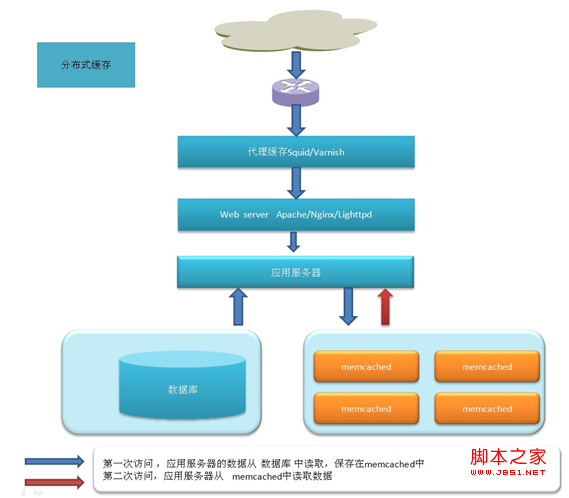
在内网的vps上安装Varnish的最新版3.0来用做测试
Varnish有centos下的rpm和ubuntu下的deb二进制包下载,但我选择的是源码编译安装
先下载 varnish-3.0.0_jb51.rar
yum install gcc
yum install gcc-c++ libstdc++-devel
yum install -y httpd-devel pcre perl pcre-devel zlib zlib-devel GeoIP GeoIP-devel
Varnish需要pcre支持,如果服务器没有安装pcre-devel会提示需要指定prce目录。
Centos服务器上使用yum install pcre-devel安装
解压varnish进行编译安装
cd varnish-3.0.0
./autogen.sh
./configure --prefix=/usr/local/varnish PKG_CONFIG_PATH=/usr/lib/pkgconfig
make
make install
安装成功后,安装的目录是
cd /usr/local/varnish/sbin
./varnishd -V
查看版本,看是否安装成功
测试varnish
先编辑配置文件
vi /usr/local/varnish/etc/varnish/default.vcl
复制代码代码如下:
# This is a basic VCL configuration file for varnish. See the vcl(7)
# man page for details on VCL syntax and semantics.
#
# Default backend definition. Set this to point to your content
# server.
#
backend default {
.host = "192.168.88.156";
.port = "80";
###下面三行为新加配
.connect_timeout = 1s;
.first_byte_timeout = 5s;
.between_bytes_timeout = 2s;
}
#
# Below is a commented-out copy of the default VCL logic. If you
# redefine any of these subroutines, the built-in logic will be
# appended to your code.
sub vcl_recv {
if (req.restarts == 0) {
if (req.http.x-forwarded-for) {
set req.http.X-Forwarded-For =
req.http.X-Forwarded-For + ", " + client.ip;
} else {
set req.http.X-Forwarded-For = client.ip;
}
}
if (req.request != "GET" &&
req.request != "HEAD" &&
req.request != "PUT" &&
req.request != "POST" &&
req.request != "TRACE" &&
req.request != "OPTIONS" &&
req.request != "DELETE") {
return (pipe);
}
if (req.request != "GET" && req.request != "HEAD") {
return (pass);
}
if (req.http.Authorization || req.http.cookie) {
return (pass);
}
return (lookup);
}
#
sub vcl_pipe {
# # Note that only the first request to the backend will have
# # X-Forwarded-For set. If you use X-Forwarded-For and want to
# # have it set for all requests, make sure to have:
# # set bereq.http.connection = "close";
# # here. It is not set by default as it might break some broken web
# # applications, like IIS with NTLM authentication.
return (pipe);
}
#
sub vcl_pass {
return (pass);
}
#
sub vcl_hash {
hash_data(req.url);
if (req.http.host) {
hash_data(req.http.host);
} else {
hash_data(server.ip);
}
return (hash);
}
#
sub vcl_hit {
return (deliver);
}
#
sub vcl_miss {
return (fetch);
}
#
sub vcl_fetch {
if (beresp.ttl <= 0s ||
beresp.http.Set-cookie ||
beresp.http.Vary == "*") {
set beresp.ttl = 120 s;
return (hit_for_pass);
}
return (deliver);
}
#
sub vcl_deliver {
return (deliver);
}
#
# sub vcl_error {
# set obj.http.Content-Type = "text/html; charset=utf-8";
# set obj.http.Retry-After = "5";
# synthetic {"
#
# # "http://www.w3.org/TR/xhtml1/DTD/xhtml1-strict.dtd">
#
#
#
#
#
# Error "} + obj.status + " " + obj.response + {"
#
"} + obj.response + {"
# Guru Meditation:
#
XID: "} + req.xid + {"
#
#
Varnish cache server
#
#
# "};
# return (deliver);
# }
#
sub vcl_init {
return (ok);
}
#
sub vcl_fini {
return (ok);
}
/usr/local/varnish/sbin/varnishd -f /usr/local/varnish/etc/varnish/default.vcl -s malloc,1024m -T 127.0.0.1:200 -a 0.0.0.0:80
现在可以打开varnish了
http://192.168.88.1/ (开启varnish的端口号)
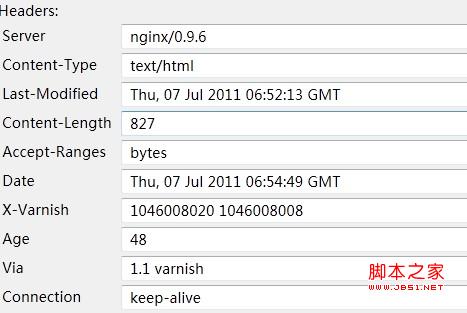
戴图显示,nginx 为177上运行的web服务器,出现了varnish字样,表示缓存架设成功,已正常工作了。
启动varnishncsa用来将Varnish访问日志写入日志文件:
复制代码代码如下:
/usr/local/varnish/bin/varnishncsa -n /var/vcache -w /var/logs/varnish.log &
配置开机自动启动Varnish
复制代码代码如下:
vi /etc/rc.local
在末尾增加以下内容:
引用
ulimit -SHn 51200
/usr/local/varnish/sbin/varnishd -n /var/vcache -f /usr/local/varnish/vcl.conf -a 0.0.0.0:80 -s file,/var/vcache/varnish_cache.data,1G -g www -u www -w 30000,51200,10 -T 127.0.0.1:3500 -p client_http11=on
/usr/local/varnish/bin/varnishncsa -n /var/vcache -w /var/logs/youvideo.log &
优化Linux内核参数
复制代码代码如下:
vi /etc/sysctl.conf
在末尾增加以下内容:
引用
net.ipv4.tcp_fin_timeout = 30
net.ipv4.tcp_keepalive_time = 300
net.ipv4.tcp_syncookies = 1
net.ipv4.tcp_tw_reuse = 1
net.ipv4.tcp_tw_recycle = 1
net.ipv4.ip_local_port_range = 5000 65000
查看Varnish服务器连接数与命中率
/usr/local/varnish/bin/varnishstat
配置启动脚本:
mkdir /cache/varnish/V -p
vi /usr/local/varnish/sbin/start.sh
#!/bin/sh
#file:start.sh
date -u
/usr/local/varnish/sbin/varnishd -a 0.0.0.0:80 -s file,/cache/varnish/V,1024m -f /usr/local/varnish/etc/varnish/default.vcl -p thread_pool_max=1500 -p thread_pools=5 -p listen_depth=512
chmod 777 start.sh
运行:
/usr/local/varnish/sbin/start.sh



