
栏目分类:
子分类:
返回
名师互学网用户登录
快速导航关闭
当前搜索
当前分类
子分类
实用工具
热门搜索
名师互学网 > IT > 软件开发 > 后端开发 > Java

java用iText渲染PDF并上传至oss

Java 更新时间: 发布时间: IT归档 最新发布 模块sitemap 名妆网 法律咨询 聚返吧 英语巴士网 伯小乐 网商动力

java用iText渲染PDF并上传至oss

在企业的信息系统中,报表处理一直占比较重要的作用,iText是一种生成PDF报表的Java组件。通过在服务器端使用Jsp或JavaBean生成PDF报表,客户端采用超链接显示或下载得到生成的报表,这样就很好的解决了B/S系统的报表处理问题,iText用于具有下列条件之一的项目:
内容不固定,它是基于用户输入或实时数据库信息计算。
由于页数多或者文件较大而造成的内容过多而使得PDF文件不能手动生成,。
文件需要在无人值守模式下创建的,使用批处理过程。
内容需要自定义或个性化;例如,最终用户的名字需要被印在某一页中。


1、引入jar包

  com.itextpdf
  itextpdf
  5.5.11


  com.itextpdf
  itext-asian
  5.2.0


  org.apache.pdfbox
  pdfbox
  2.0.12


  org.springframework
  spring-test
  RELEASE

2、创建一个工具类PDFTempletTicket
package com.text.util;

import cn.hutool.core.util.IdUtil;
import com.itextpdf.text.DocumentException;
import com.itextpdf.text.pdf.AcroFields;
import com.itextpdf.text.pdf.BaseFont;
import com.itextpdf.text.pdf.PdfReader;
import com.itextpdf.text.pdf.PdfStamper;
import com.text.BizException;
import com.text.OssHandler;
import com.text.User;
import org.apache.http.entity.ContentType;
import org.springframework.mock.web.MockMultipartFile;
import org.springframework.web.multipart.MultipartFile;

import java.io.*;
import java.util.ArrayList;
import java.util.Map;

public class PDFTempletTicket {
    
    private String templatePdfPath;
    private String ttcPath;
    private String targetPdfpath;
    private User user;
    
    public PDFTempletTicket() {
        super();
    }
    
    public PDFTempletTicket(String templatePdfPath, String ttcPath,
                            String targetPdfpath, Map map) {
        this.templatePdfPath= templatePdfPath;
        this.ttcPath= ttcPath;
        this.targetPdfpath= targetPdfpath;
        this.user= user;
    }
    
   
    public String admissionNotice(File file,User user) throws Exception {
        
        PdfReader reader = new PdfReader(templatePdfPath);
        ByteArrayOutputStream bos = new ByteArrayOutputStream();
        PdfStamper ps = new PdfStamper(reader, bos);
        
        
        BaseFont bf = BaseFont.createFont("STSong-Light", "UniGB-UCS2-H", BaseFont.NOT_EMBEDDED);
        
        
        ArrayList fontList = new ArrayList();
        fontList.add(bf);
        
        //初始化AcroFields并填入数据
        AcroFields s = ps.getAcroFields();
        s.setSubstitutionFonts(fontList);
        
        s.setField("01",user.getName());
        s.setField("02",user.getIdCard());
        //是否只读
        ps.setFormFlattening(true);
        ps.close();
        
        FileInputStream fileInputStream = new FileInputStream(file);
        FileOutputStream fos = new FileOutputStream(file);
        
        fos.write(bos.toByteArray());
        fos.close();
        bos.close();
        //把File转成MultipartFile格式
        MultipartFile  multipartFile = new MockMultipartFile(file.getName(),file.getName(),ContentType.APPLICATION_OCTET_STREAM.toString(),fileInputStream);
        //上传到oss并获取返货的oss存储链接
        String ossUrl = this.uploadOss(multipartFile);
        return ossUrl;
    }
    
    
    public String getTemplatePdfPath() {
        return templatePdfPath;
    }
    
    
    public void setTemplatePdfPath(String templatePdfPath) {
        this.templatePdfPath= templatePdfPath;
    }
    
    
    public String getTtcPath() {
        return ttcPath;
    }
    
    
    public void setTtcPath(String ttcPath) {
        this.ttcPath= ttcPath;
    }
    
    
    public String getTargetPdfpath() {
        return targetPdfpath;
    }
    
    
    public void setTargetPdfpath(String targetPdfpath) {
        this.targetPdfpath= targetPdfpath;
    }
    
    
    public User getTicket() {
        return user;
    }
    
    
    public void setTicket(User user) {
        this.user= user;
    }
    
    
    public String uploadOss(MultipartFile file) throws Exception {
        Long size = file.getSize();
        if (size > 5*1024*1024){
            throw new BizException("文件大小应小于5M");
        }
        String uploadFileName = file.getOriginalFilename();
        assert uploadFileName != null;
        String extendName = uploadFileName.substring(uploadFileName.lastIndexOf(".") + 1);
        // 把文件加上随机数,防止文件重复
        String uuid = IdUtil.randomUUID().replace("-", "").toLowerCase();
        String fileName = uuid + "." + extendName;
        // 把文件加上随机数,防止文件重复
        file.getOriginalFilename();
        OssHandler ossHandler = new OssHandler(OssHandler._OSS_ENDPOINT_OUT, OssHandler._OSS_USER_UPLOAD_BUCKET);
        String url = ossHandler.putObject(file.getInputStream(), fileName, false);
        return url;
    }
    
}

3、创建一个测试类TestTempletTicket
package com.text.util;

import com.text.User;

import java.io.File;

public class TestTempletTicket {
    
    //引用文件的临时存储空间
    private static final String FILE_PATH_TEMPLATE = System.getProperty("java.io.tmpdir") + "/tempdf/%s";

  	public static void main(String[] args) throws Exception {
	    User user = new User();
	    user.setName("张三");
	    user.setIdCard("1234567876543234567");
	
	    PDFTempletTicket pdfTT = new PDFTempletTicket();
	
	    //本地PDF文件路径,如果用网络路径直接填入oss地址
	    pdfTT.setTemplatePdfPath("/Users/ysxs/Desktop/录取告知书.pdf");
	    pdfTT.setTargetPdfpath(FILE_PATH_TEMPLATE);
	    pdfTT.setTicket(notice);
	
	    //渲染的pdf文件临时存放路径
	    File file = new File("/Users/ysxs/Desktop/q12121w231231e232r.pdf");
	    file.createNewFile();
	    
	    pdfTT.admissionNotice(file,user);
	}
}

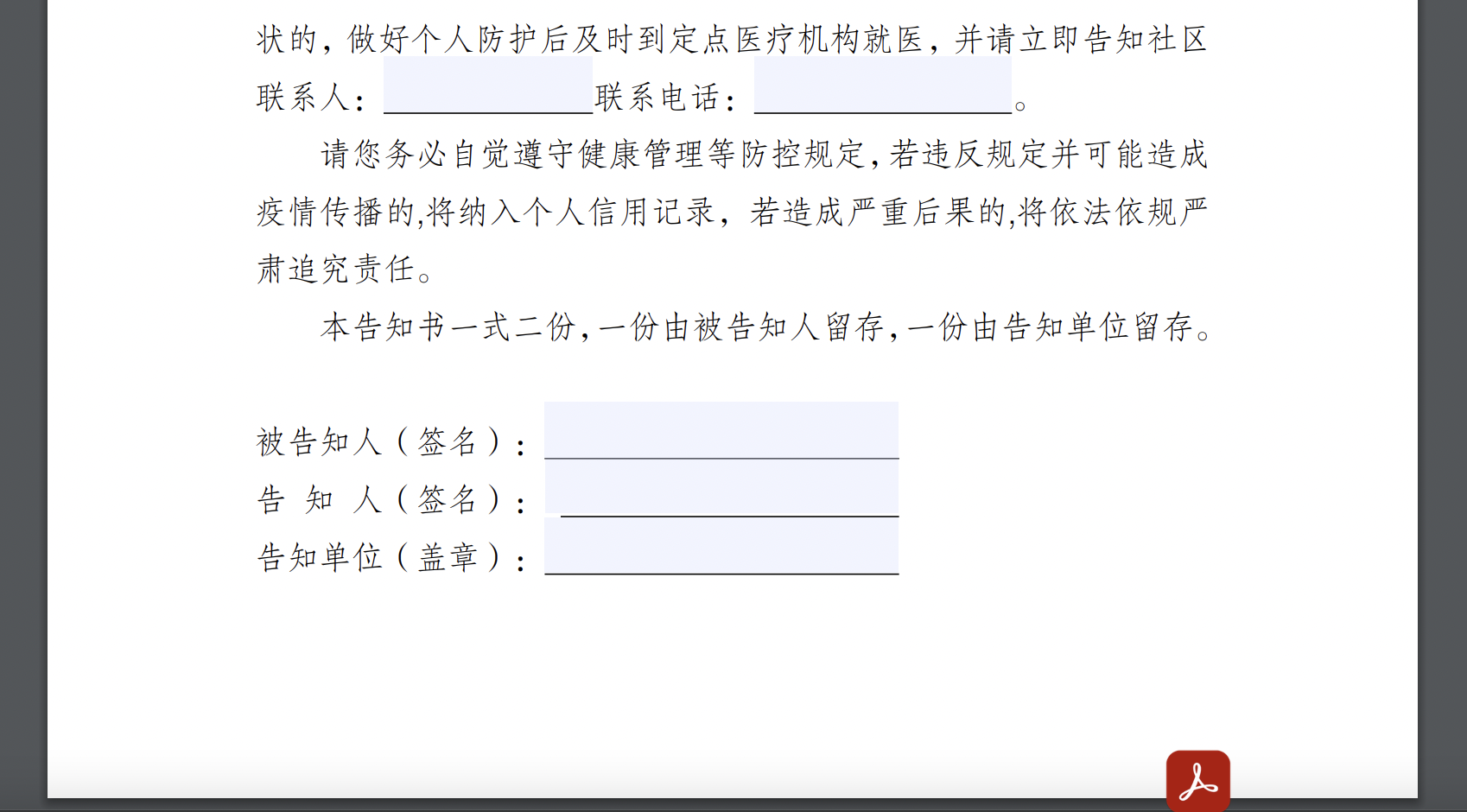
#### 4、下载Adobe Acrobat工具对pdf文件惊喜网格选中便于我们渲染,搞成这个吊样子就行了
![image.png](https://img-blog.csdnimg.cn/img_convert/99a7adafeb5d319f30e38f6b963422f3.png#clientId=u7b862aaa-da35-4&crop=0&crop=0&crop=1&crop=1&from=paste&height=470&id=u0354164c&margin=[object Object]&name=image.png&originHeight=940&originWidth=1698&originalType=binary&ratio=1&rotation=0&showTitle=false&size=592722&status=done&style=none&taskId=ucf45f60a-1f49-4650-98e0-22543916915&title=&width=849)


转载请注明:文章转载自 www.mshxw.com
本文地址:https://www.mshxw.com/it/1028694.html
我们一直用心在做
关于我们 文章归档 网站地图 联系我们

版权所有 (c)2021-2022 MSHXW.COM

ICP备案号:晋ICP备2021003244-6号
